


2026-08-24 08:00:00
Been a minute since I wrote one of these! Since the last one, I've moved to California. But I can write more about that later :)
This weekend I went on an incredible motorcycle adventure with Braelyn. We left San Francisco on Friday, after work, and rode up the 101 to Willits - a small town with the slogan "Gateway to the Redwoods". It sits in the centre of Mendocino county, right at the beginning of the redwood forests, so the slogan is apt!
We both have Kove 450s, and this was our first long freeway trip with them - they were actually pretty good!


That night, we went for a walk into town, and stopped at a pub named "Shanachie Pub". Inside, they had live music, and I had the best cider since leaving the UK. (I'm from Devon, and the south west is super known for our cider).
We met some guys there who worked for the power company, cutting down trees that could interfere with the cables. They were super fun to hang out with!
The next morning, we woke up a bit late (I blame the pub). We were planning on riding from Willits over to Fort Bragg. Highway 20 was the obvious route, but we were on dirt bikes! We took "Sherwood Road", which is about 40 miles long. The first quarter or so is paved, but once you leave the paving it's dirt almost the entire way to Fort Bragg.


We had to check the route SO many times. Sherwood Road is mostly logging trails, so there were many branches heading off in random directions. I had a rally tower sat at home that still needed installing - having a nav screen on this would have made life a million times easier.
About halfway through, Braelyn took a tumble :(


Luckily, she wasn't too injured, beyond some bruising. Her bike was scratched up, but almost entirely unharmed. It was a reminder that we really should carry a proper first aid kit, and some other emergency bits.
Once we got to Fort Bragg, we stopped for lunch. I hadn't been there since 2023, but wanted to stop at the cafe I visited with Michelle! Luckily it was still open, and still served good food.

I also bought a mug! Like most Brits, I had collected a number of mugs over the years. But I didn't bring any with me when I moved to the US :(
From Fort Bragg, we were heading north to Usal Road. The story here is interesting! Highway 1 hugs the ocean, but eventually the coast becomes too rough to have a major road there. So, it turns inland, and joins the 101 for a while.
But at this turn, there's a small dirt trail. You can continue to ride north along the ocean this way, and it's stunningly pretty. That's why it's called the Lost Coast - the road gave up, but you don't have to if you have a dirt bike!


Halfway up Usal Road, you will find Usal Beach. The first portion of the road is actually pretty busy, and we ran into a variety of vehicles - from off roading 4x4s, to regular cars. Visiting the beach is popular! (though not as busy as places you can reach in a normal car)


I'd been taking photos with my Ricoh up to this point, and switched to my Fuji now that I was walking about. I'd stupidly wedged my Ricoh in a pocket, and it fell out on the beach while walking around. I struggled to find it again, but Braelyn found it with ease. Thank you <3
After the beach, we tackled the northern part of Usal Road! This was much more fun. There was very minimal traffic - I think only one truck - and the road was very twisty, with fun elevation changes, and the surface had just the right amount of challenge. Despite being a bit dusty, it was probably the most fun I have had off road yet. I don't really have any photos of this part!
From here, we were heading towards Shelter Cove, to spend the night near the ocean. The road was paved for the majority of the way. In places it was gravel, and it was very narrow and steep throughout.
We arrived tired, but astonished by how beautiful the cove is! I thought I'd booked a hotel for the night, but somehow had the wrong dates. Luckily, the hotel ("Inn of the Lost Coast") had a room available, and were nice enough to shift the dates of my booking.
At this point, it was golden hour. The entire town was bathed in golden light, so we went for a walk. The centre of town has an airstrip - possibly the only way to get in and out of the area reasonably quickly - but otherwise is sparsely populated. I suspect the deer population outweighs the human one.


Our walk ended with dinner. This was a spot named "Gyppo Ale Mill", which apparently means something different in American English. (here it's a small-scale logger, not what it means back home!)


The next day, we were heading home. Braelyn was sore after her crash, and we were both fairly weary from a long day. First stop was Garberville, and despite being paved, the road there was gorgeous. Twisty, through the forest, with lots of high bridges and stunning views.
We refueled along the way - though with 8 gallon tanks, the Koves rarely need it - and joined the 101. This far north, the 101 isn't so dull! It's much twistier and more interesting. Despite this, we were planning on rejoining the 1 as soon as possible.
It turns out, I'd totally forgotten that there's a drive-thru tree at the junction of the 1 and 101! I was there in 2023 as well!


From here, we rode all the way to Fort Bragg. Stopped at the same cafe, then took 128 all the way to the 101, and then home. Midway through 128, it got SUPER HOT! We were both overdressed for this and found it a bit toasty.
There's something surreal about this post. I was revisiting memories and a ride from almost three years ago now, and my life has changed massively since then. Back in 2023, I made one trip to visit the US (from London) to ride motorcycles. The ride through Mendocino and Humboldt was very alien to me, and very far from home! But this time around, it was a weekend trip with my partner. I'm probably going to dedicate a future post to my thoughts and feelings around moving to a new country, but I'm really happy with how things have been going so far.
2026-08-19 08:00:00
Since running agents in a bunch of workspaces, I've been running out of storage on my mac FAR more often.
Granted, this is largely due to cargo being such a hog, and I need to run cargo clean more than I do.
But it's also due to years of accumulated cruft, all over my machine
mole is a pretty neat CLI that can find and clear leftover data
🐹 Clean, uninstall, analyze, optimize, and monitor your Mac.
Just
brew install moleand then
moleIt saved me 30gb
2026-05-13 08:00:00
A bunch of people read my post about using jj yesterday!
In that note I pointed out that I found jj not automatically moving bookmarks when a new commit is created to be really frustrating.
Well... turns out there is a really simple command that will do that! It's not automatic, but it's better than manually moving the bookmark
jj bookmark advance

# or for short

jj b a
So you can make a new commit, run jj b a, and then push.
2026-05-12 08:00:00
Over the past few weeks, I have been using jj! This is not the first time I have tried it, but it is the first time it has stuck.
For years, my git workflow has used "make a change, then git commit --amend --no-edit && git push --force-with-lease", while on a branch. This meant that my
changes would be up to date on the remote with very little latency. PRs would
rarely be more than a small number of commits, usually 1, and I would try to
keep them as small as possible.
Since working with agents, I have found myself switching branch much more
frequently. Because of this, I either have to git stash, or make some silly
little wip commit to stop my changes from stepping on each other.
Enter our new hero, jj! The model here is a bit different. I will not write a
huge manual because there are plenty of those, and they are better than anything
I would whack into my notes with little thought.
Suffice to say, the main thing that appeals to me is that my changes are always committed. Every edit automatically amends the most recent commit, and a push will overwrite the remote (or, in jj speak, move it "sideways").
Editing a change is easy, no checkout/rebase dance. It's as if someone took my preferred git workflow and built a tool around it. I am unsure why it took me so long to figure this out.
Just a braindump really. I will probably publish more notes as I learn more things.
When making a change, my workflow is
jj new main

<do some coding>

jj describe -m 'feat: something really cool'
jj git push -c @
Done. Merge PR, repeat.
In jj, we talk about changes more than commits. A change is a constantly evolving commit. And "@" refers to the current change
Before doing some work, you should start a change. All of the edits you are about to make will live here
jj new mainThis makes your commit (change vs commit is real and confusing when you're new)
on top of main (the commit with the bookmark main). If you want to make a new
change that is the child of your current, just run jj new.
You're probably used to adding some changes to your staging area, then committing them with a message. Well with jj, your changes are already added. But your change probably does not have a description! (like a commit message)
jj describe -m 'hello i am a message'You can also describe a change when you make it, with
jj new -m "hello i am a message"If you're on a change, you're happy with it, and you want it on github so some agent can roast your (claude's) code?
Easy.
jj git push -c @Aka "use git to push the current commit". It will automatically create a branch, push that to the remote. You can actually do this over and over again while making changes, and it will automatically translate the jj magic into a git amend and force push.
I am excited for jj to get its own protocol and host though.
If you want to jump back and edit an existing change? Easy
jj edit <change-id>This is where things start to feel powerful me, and also where the existing mental model I try to tack this onto starts to break. There's no checkout, rebase, etc to fuck about with.
jj has changes AND commits. If we recall that it constantly evolves a commit, rather than having a staging area, then we can think of the change as the stable id, and the commit id as the one that changes with each edit
Pretty much anything you do in jj is stored in the op log. If you do a thing,
and it messes up? jj undo to the rescue.
jj is still piggybacking on top of git, mostly. They have made it easy to convert an existing repo, and also integrate with github
# Create a jj repo inside of a git repo
jj git init

# Fetch from the remote (github etc)
jj git fetch

# Push
jj git push

# Clone
jj git cloneThere aren't any! Not in the way you are used to. jj uses "bookmarks", or, a
string that you can attach to a commit. When you push a change, it automatically
creates a bookmark for you - eg, push-refrefref
# bookmark the current change with a name
jj bookmark create <name>

# move a bookmark to a new commit
jj bookmark set <name> -r <commit>

# other things exist just use --help
The main frustration I have is that bookmarks do not move when I create a new change.
From the glossary
Unlike in Git, there is no concept of a "current bookmark"; bookmarks do not move when you create a new commit. Bookmarks do automatically follow the commit if it gets rewritten.
I'll write up something else about rebasing and editing and all the fun stuff later
Note: writing this in Vim has been super annoying, because I have jj bound to
<esc>.
2026-02-16 08:00:00
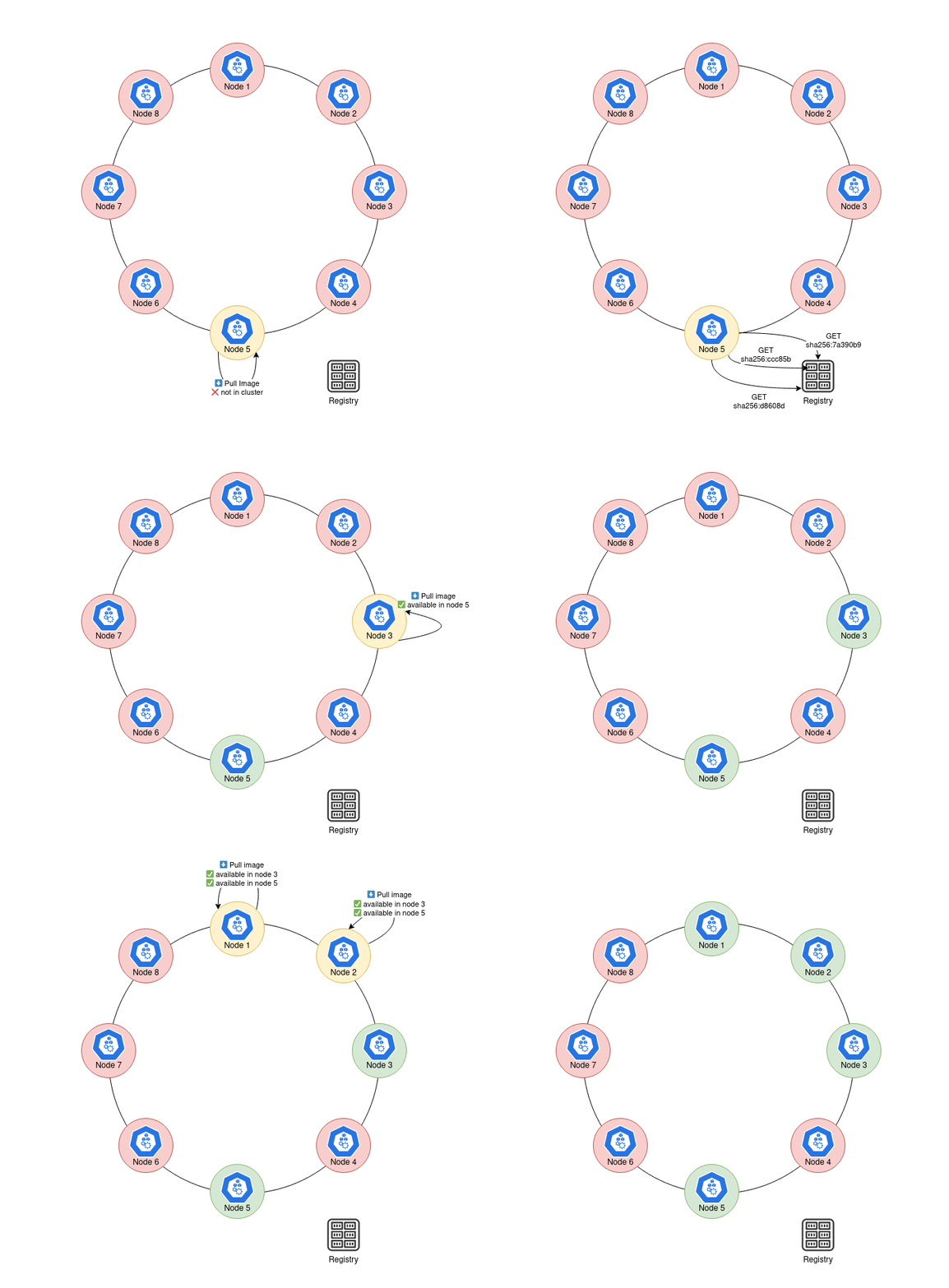
I was recently setting up a new k3s cluster for running Atuin. Since I wrote my last note on the subject, a few things have changed!
I definitely need to do a v2 of my post, but in the meantime I learned a bit about Spegel, an optional integrated registry included with k3s.
If server nodes are started with --embedded-registry, then they will setup +
run a Spegel registry. This means they host a local OCI registry on port 6443,
while connecting to a p2p network over port 5001.
In order for upstream registry mirroring to work, you must edit
/etc/rancher/k3s/registries.yaml
For example
mirrors:
  docker.io:
  registry.k8s.io:
enables mirroring of those two registries. This file is read at startup. You
can enable wildcard mirroring with "*":, quoted required.
The p2p routing works in a very similar way to BitTorrent - Spegel also uses a Kademlia DHT for resolving digests.
gif sourced from the spegel readme
2025-11-06 08:00:00
I moved to the US and bought a superduke yay
Here I am making some notes. I will likely also track torque specs, services, etc.
A collection of useful specs
| Spec | Value |
|---|---|
| Factory recommended rear pressure | 42 |
| Factory recommended front pressure | 36 |
| Ellie's preferred rear pressure | 36 |
| Ellie's preferred front pressure | 32 |
I'll note them down as I look them up
| Part | Torque (nm) |
|---|---|
| Rear wheel nut | 250 |

