


2026-11-05 21:06:20

A store does not go straight into the cache. Waiting for that write would stall the processor. It sits in a store buffer, and a later load can take its bytes from that buffer. That is store forwarding.
Forwarding works when the load is the same size as the store, or smaller and completely inside it. It fails when the load is wider than the store, or when the two ranges only partly overlap. The load then waits until the store has reached the cache.
Here is an example in C. We have a buffer, that might have received data previously. Yet one byte is overwritten, and we try to load 8 bytes. It will typically cause a store forwarding failure.
uint64_t reload_byte(char *p, unsigned char v) {
    // Copy one byte from v into the buffer.
    memcpy(p, &v, 1);
    uint64_t w;
    // Copy eight bytes from the buffer into w.
    memcpy(&w, p, 8);
    return w;
}
A 4-byte store followed by an 8-byte load would cause the same issue. So would an 8-byte store followed by an 8-byte load that starts four bytes later: the ranges overlap.
You can sidestep the issue by working in a register, like the following example.
uint64_t update_byte(char *p, unsigned char v) {
    uint64_t x;
    // load from p to x
    memcpy(&x, p, 8);
    x = (x & ~0xffull) | v;
    // store the modified result to p
    memcpy(p, &x, 8);
    return x;
}
Further, if you store eight bytes and read those same eight back, a compiler might delete the reload.
I ran some experiments to see how many cycles various store/load operations take.
| What the iteration does | Xeon Gold 6548N | Xeon 6975P-C | EPYC 9R45 | Graviton 5 | Apple M4 Max |
|---|---|---|---|---|---|
| store 8, load 8, same address | 1 | 1 | 1 | 5 | 5 |
| store 8, load 4 at +4 | 5 | 5 | 7 | 6 | 5 |
| store 4, load 8 | 19 | 19 | 14 | 5 | 5 |
| store 4, then store 4, load 8 | 20 | 20 | 15 | 5 | 8 |
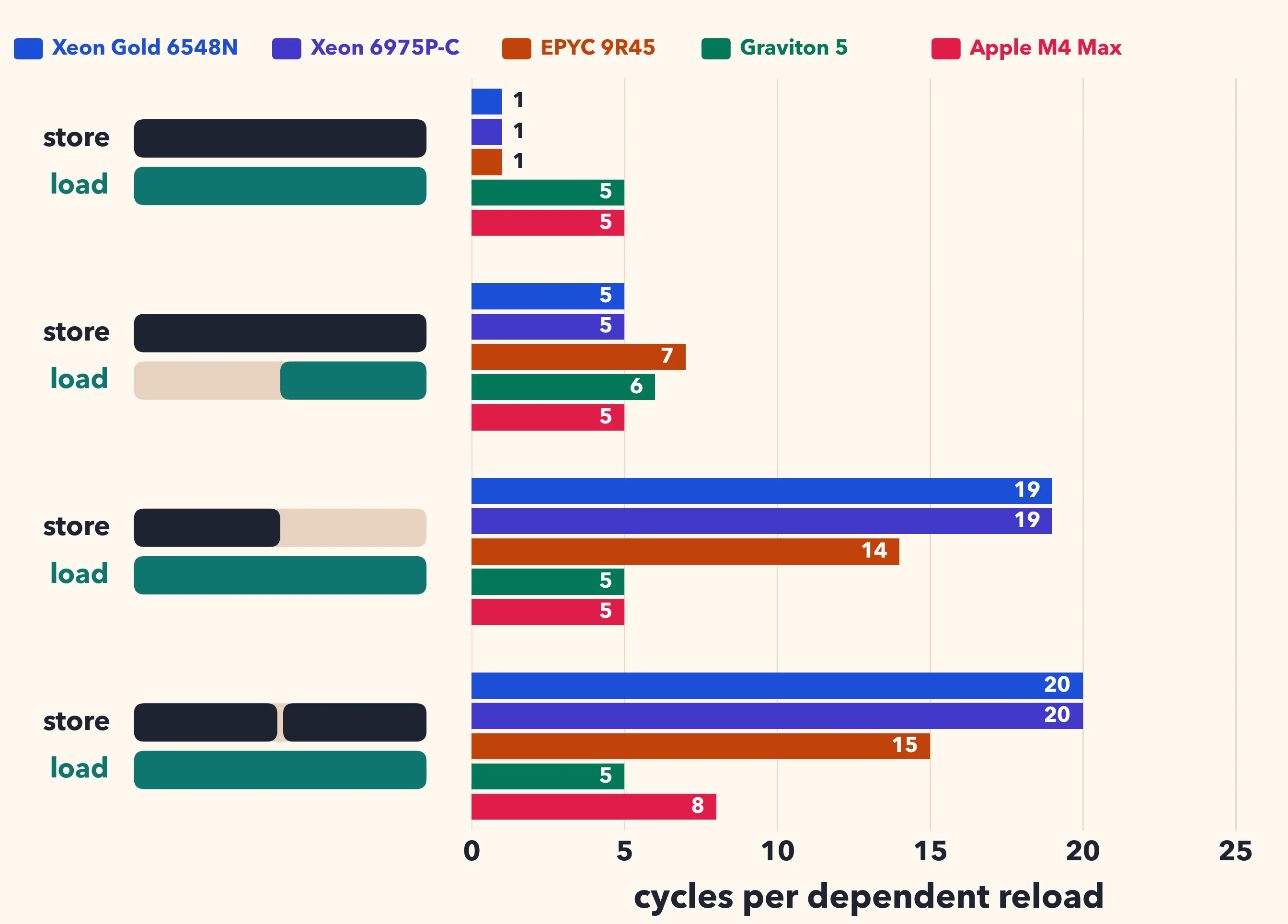
On the Xeons and the EPYC, a load that matches the store takes one cycle. A wider load takes 19 cycles on the Xeons and 14 on the EPYC.
On the M4 and Graviton 5, a wider load takes 5 cycles. Two stores bring the M4 to 8.
2026-11-04 20:48:24

Many people still picture innovation as a line. The professor thinks and publishes. The engineer reads the paper and designs a product. The customer consumes it.
It rarely works that way. The industrial revolution was not set off by professors writing papers. It was driven by demand for cheap and better clothing for the masses. Demand came first.
Michael Stonebraker made a related point in “Where We Have Failed” (2018). He argued that the database research community has lost its customer: “there are no ‘real world’ clients to keep us focused.” Without a customer, research drifts.
In 2019, JSON was everywhere, and parsing it was slow, at a few hundred megabytes per second. So we built simdjson. Today it parses JSON at gigabytes per second; I measured about 4.8 GB/s on twitter.json on a recent Intel Xeon.
We did not write the paper first. We wrote the code, then a blog post. We put it on GitHub and posted about it on social networks. Industry adopted it. Our first paper was published by the VLDB Journal, but it was more of an advertisement for our ideas and designs than the endpoint of the research.
Fred Brooks wrote that “the scientist builds in order to study; the engineer studies in order to build.” In my work, building is how I study.
Once simdjson parsed JSON quickly, a new bottleneck appeared: floating-point numbers. If everything else is fast, converting strings like 3.1416 into binary floats dominates the running time. That led to what is now called the Eisel-Lemire algorithm, which is exact and fast (Number Parsing at a Gigabyte per Second). It now sits inside the standard libraries of Rust, Go, .NET and C++ (through fast_float).
Then came the next bottleneck. Parsing JSON also means validating UTF-8, and security depends on getting that right. We got validation down to less than one instruction per byte. That code broke off into its own library, simdutf, which is now used by Node.js, Bun, Deno and web browsers for Unicode validation and transcoding.
I did not plan any of this from a mountaintop. Stonebraker said it well: “my ideas come from two sources: talking to real users with real problems and then trying to solve them.” Open source gives me those users. They show up with bug reports, adversarial inputs, exotic hardware and workloads I would never have imagined. Pull requests and code reviews are often a tougher form of peer review than most program committees. Reviewers who depend on your code read it more carefully than referees who skim your paper.
David Patterson, in “How to Build a Bad Research Center” (2014), wrote that for his successful projects, “the early indicators were not papers or awards, but non-researchers trying to use our ideas.” I agree.
Is open source still as important now that we have AI? If a model can write the code for you, why bother publishing yours?
What I see points the other way. More people than ever contribute to my projects, and more people than ever use my code and my ideas. AI tools seem to make it easier, not harder, for people to read an unfamiliar codebase, find a problem and send a fix.
Last week (October 29, 2026), I was one of four invited speakers at the launch of SERIQ, the new Centre interuniversitaire de recherche en génie logiciel pour la société numérique. SERIQ continues the SEMTL (Software Engineering at Montreal) meetings that have brought together Montreal software engineering researchers for more than a decade. The new centre is backed by the Université de Montréal, Polytechnique Montréal, McGill University and the École de technologie supérieure, and it aims to cover all of Quebec. About a hundred people came to the Pavillon Jean-Coutu at the Université de Montréal for the event.
The other three guests were:
Each of us had fifteen minutes. Afterwards, the four of us sat down for a panel on software research for society, moderated by Martin Robillard (McGill).

2026-11-02 20:48:59

You can write an empty default constructor as span() = default or as span() {}. It can have remarkable effects on performance.
struct span {
  const char *p;
  int len;
  const char *end;
  span() = default; // or span() {}
  span(const char *s, int n) : p(s), len(n), end(s + n) {}
};
The constructor span() = default on its first declaration makes span trivial. The constructor span() {} is user-provided, so span is not trivial.
| Constructor | Declaration | What happens | Members |
|---|---|---|---|
span() = default |
span s; |
nothing | uninitialized |
span() = default |
span s{} |
the whole object is zeroed, padding included; the constructor does not run | zero |
span() {} |
span s; |
the empty constructor is called; the compiler can delete the call | uninitialized |
span() {} |
span s{} |
the empty constructor is called; the object is not zeroed | uninitialized |
This span is a start pointer, a length, and an end pointer. A box holds one span. The expression box() value-initializes that span. The loop assigns a value-initialized box when i reaches n, and otherwise a span of length i + 1:
struct box {
  span s;
  box() : s() {}
  box(span in) : s(in) {}
};
void consume(box &);
void walk(const char *s, int n) {
  for (int i = 0;; i++) {
    box b;
    b = i == n ? box() : box(span(s, i + 1));
    if (i == n) { return; }
    consume(b);
  }
}
The box() path runs once, as the loop exits, and that span is not passed to consume.
With span() {}, GCC 16 (-O2 -march=x86-64) writes the three fields directly where consume expects them:
.L4:
    mov eax, ebx
    mov QWORD PTR [rsp+16], rbx
    mov rdi, rsp
    add rbx, 1
    sub eax, ebp
    mov QWORD PTR [rsp], rbp
    mov DWORD PTR [rsp+8], eax
    call    consume(box&)
    cmp rbx, r12
    jne .L4
With span() = default, GCC 16 stores the end pointer, rbx, straight into the box. The start pointer and the length go through a temporary, and the first 16 bytes of that temporary are copied back.
.L3:
    mov eax, ebx
    mov QWORD PTR [rsp+32], rbp
    mov rdi, rsp
    sub eax, ebp
    mov QWORD PTR [rsp+16], rbx
    add rbx, 1
    mov DWORD PTR [rsp+40], eax
    movdqa  xmm0, XMMWORD PTR [rsp+32]
    movaps  XMMWORD PTR [rsp], xmm0
    call    consume(box&)
    cmp rbx, r12
    jne .L3
I time the best of five runs of 100 million spans, on one core of an Intel Xeon Gold 6548N (Emerald Rapids), with -O2 -march=x86-64. My code is available.
| compiler | span() = default |
span() {} |
|---|---|---|
| GCC 14.3 | 1.73 ns/span | 1.74 ns/span |
| GCC 15.2 | 7.75 ns/span | 1.73 ns/span |
| GCC 16.2 | 8.04 ns/span | 1.73 ns/span |
| clang 21 | 1.75 ns/span | 1.74 ns/span |

With GCC 15 and GCC 16, the = default version is over four times slower.
2026-10-31 21:05:35

Dividing integers is slow on our processors. A 32-bit division costs:
| processor | latency | throughput |
|---|---|---|
| Emerald Rapids | about 12 cycles | one every 6 cycles |
| Zen 4 | 9 to 12 cycles | one every 6 cycles |
| Zen 5 | 10 to 13 cycles | one every 6 cycles |
| Arrow Lake performance core | 12 cycles | one every 6 cycles |
| Apple M4 performance core | 7 cycles | one every 2 cycles |
On Zen 4 and Zen 5, the latency depends on the inputs. The x86 rows are idiv (uops.info). The Apple row is sdiv (measurements).
A multiplication has a latency of 3 cycles. Emerald Rapids can do one every cycle. Zen 5 and Arrow Lake do three 64-bit multiplications per cycle (uops.info).
Thankfully, when the divisor is a constant, compilers replace the division by a multiplication and a shift (Granlund and Montgomery, 1994). Dividing by 7 is like multiplying by 1/7. In integer arithmetic, we multiply by an integer close to and we divide by with a shift.
Can we do better than the compiler? With signed 32-bit integers on a 64-bit system, often yes.
Let us divide a signed 32-bit integer by 7:
int32_t div7(int32_t x) { return x / 7; }
GCC 14 produces the following code on an x64 processor:
    movsx   rax, edi
    imul    rax, rax, -1840700269
    shr rax, 32
    add eax, edi
    sar edi, 31
    sar eax, 2
    sub eax, edi
    ret
It multiplies by a 32-bit constant, keeps the most significant 32 bits, and adds back (add eax, edi). Then it shifts. The instructions sar edi, 31 and sub eax, edi add one when is negative, so that the result is rounded toward zero, as C requires.
Why add back? The ideal multiplier for 7 is 2454267027 which needs 33 bits. It does not fit in a signed 32-bit integer. So the compiler stores and it corrects the result by adding . This is not rare: among the divisors between 3 and 1000 (excluding powers of two), 38% require this correction (376 out of 990). Over that range, GCC and LLVM pick the same multipliers, following Hacker’s Delight, Henry S. Warren, Jr.’s book of small algorithms for integers and bits.
But we are on a 64-bit processor! Multiplying a 32-bit integer by a 33-bit integer gives at most a 65-bit integer… but not with signed integers. The absolute value of a signed 32-bit integer is at most . Our multiplier needs 33 bits as a signed integer, but it is less than : it fits in 32 bits as an unsigned integer. So the absolute value of the product is less than , and it fits in a signed 64-bit integer.
We need to pick the multiplier. In a paper with Colin Bartlett and Owen Kaser (Integer division by constants: optimal bounds), we show (Theorem 1) that for all integers in if and only if
We pick , the smallest power of two such that , and we round up: . Then and both inequalities hold for . We get for all signed 32-bit integers . For negative values of , we compute and add one, as the compiler does. It works because is never an integer when is not zero: if it were an integer , the bounds would force , and thus , which is impossible since is not a power of two.
The code is short:
template <int32_t d> int32_t div32(int32_t x) {
  constexpr int s = 31 + std::bit_width(uint32_t(d - 1)); // 31 + ceiling(log2(d))
  constexpr int64_t c = (int64_t(1) << s) / d + 1;        // ceiling(2^s / d)
  // floor(c * x / 2^s), plus one when x is negative
  return int32_t((int64_t(x) * c) >> s) - (x >> 31);
}
I assume that the divisor is positive and not a power of two.
GCC 14 compiles div32<7> to:
    movsx   rax, edi
    mov edx, 2454267027
    shr edi, 31
    imul    rax, rdx
    sar rax, 34
    add eax, edi
    ret
There is no correction step after the multiplication. The longest chain of dependent instructions is now movsx, imul, sar, add instead of movsx, imul, shr, add, sar, sub. The constant fits in 32 bits as an unsigned value, so loading it is cheap.
On ARM (Apple M4), the compiler gives us:
_compiler_div7:
    mov w8, #9363
    movk    w8, #37449, lsl #16
    smull   x8, w0, w8
    lsr x8, x8, #32
    add w8, w8, w0
    asr w9, w8, #2
    add w0, w9, w8, lsr #31
    ret
and the new approach gives us:
_div32_7:
    sxtw    x8, w0
    mov w9, #9363
    movk    w9, #37449, lsl #16
    mul x8, x8, x9
    asr x8, x8, #34
    add w0, w8, w0, lsr #31
    ret
Why don’t compilers do it? I don’t know.
I divide 16384 random signed integers. In the throughput test, the divisions are independent. In the latency test, each division depends on the previous one. The latency includes two cycles of overhead (to make each division depend on the previous one). I disable autovectorization. I use an Intel Xeon Gold 6548N (Emerald Rapids) with GCC 14 and clang 21, and an Apple M4 Max with Apple clang 17.
Intel, cycles per division: throughput (latency)
| divisor | GCC: x / d | GCC: div32 | clang: x / d | clang: div32 |
|---|---|---|---|---|
| 7 | 2.0 (10.0) | 2.0 (8.0) | 1.76 (10.4) | 1.38 (8.0) |
| 60 | 2.0 (10.0) | 2.0 (8.0) | 1.76 (10.4) | 1.38 (8.0) |
| 365 | 2.0 (10.0) | 2.0 (8.0) | 1.76 (10.6) | 1.38 (8.0) |
| 1000 | 2.0 (8.0) | 2.0 (8.0) | 1.35 (8.0) | 1.38 (8.0) |
Apple M4, nanoseconds per division: throughput (latency)
| divisor | x / d | div32 |
|---|---|---|
| 7 | 0.34 (2.01) | 0.29 (1.77) |
| 60 | 0.31 (2.00) | 0.27 (1.77) |
| 365 | 0.34 (2.00) | 0.28 (1.77) |
| 1000 | 0.29 (1.57) | 0.27 (1.77) |
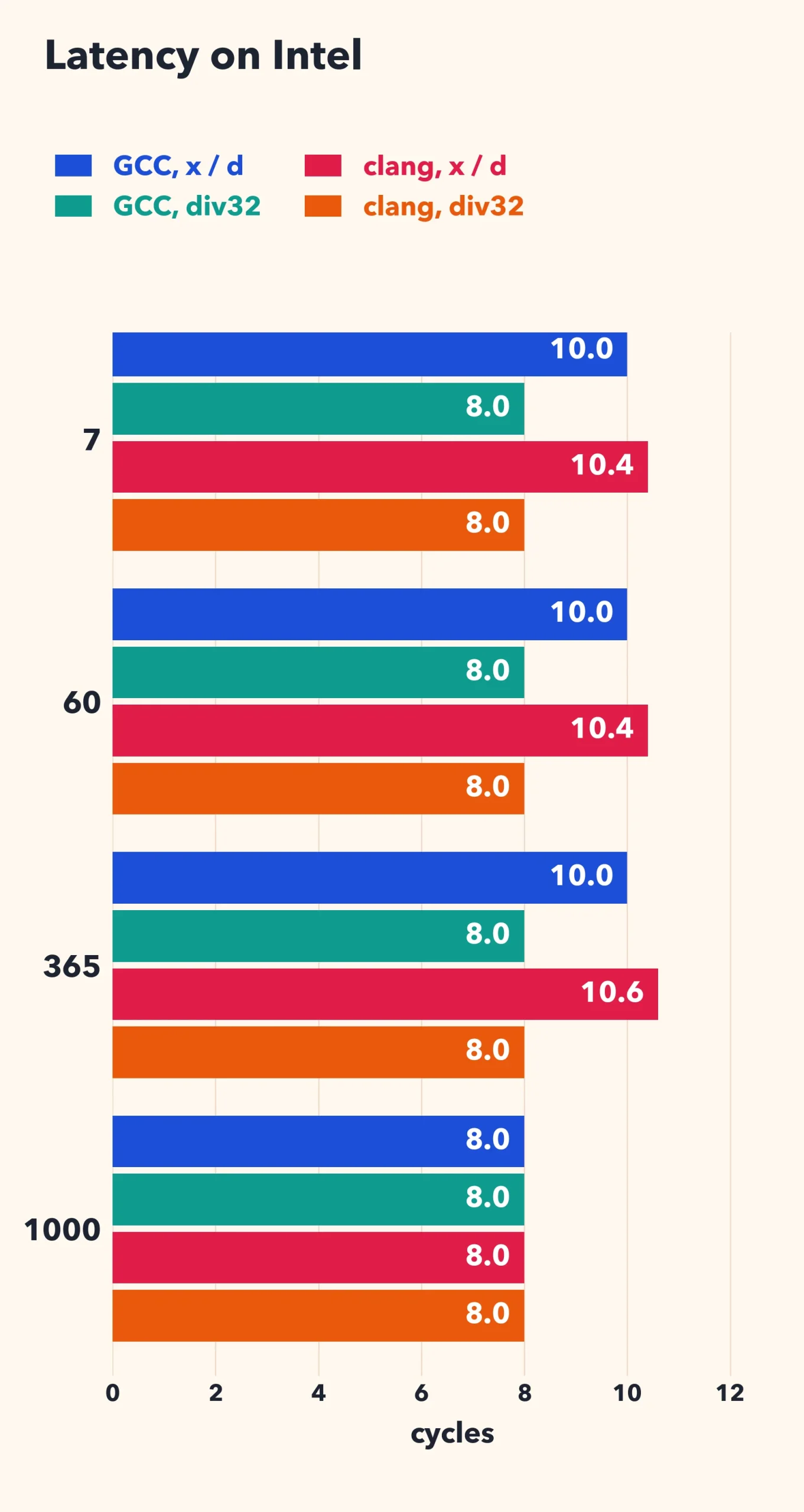
For 7, 60 and 365, the latency goes down by 2 cycles with GCC (10 to 8), and from 10.4 or 10.6 to 8 with clang. On the M4 it goes down by 12%. With clang on the Intel processor, the throughput improves by more than 20%. With GCC, the throughput does not change in my benchmark.
The divisor 1000 is a control. The compiler’s multiplier is 274877907, which fits in a signed 32-bit register, so there is nothing to add back. On the Intel processor both versions take 8 cycles. Each one starts with movsx, then a multiplication, a shift, and an add or a subtract.
On the M4, div32 is slightly slower: 1.77 ns against 1.57 ns. The compiler’s multiplier fits in a signed 32-bit register, so it uses smull, which sign-extends as part of the multiplication. Our multiplier (2199023256) does not fit in a signed 32-bit register, so we need a separate sxtw instruction before the multiplication. Thus you should only use div32 when the compiler needs the correction step.
When the divisor is only known at runtime, the compiler cannot help and it emits the division instruction. Years ago, I wrote a small library, fastmod, that precomputes a 64-bit multiplier , about , once, and then divides with a multiplication. It is described in Faster Remainder by Direct Computation (Software: Practice and Experience, 2019).
Its signed division function treated as an unsigned integer. Multiplying an unsigned 64-bit integer by a signed integer requires a correction when the signed integer is negative. The 0.1.0 code branches on the sign of . On x64 the compiler leaves the branch in place. With random signs, it is often mispredicted: in my tests, that happens in 36% to 48% of the divisions.
The same observation applies: the absolute value of is at most , and as long as , is less than . So a signed 64-bit multiplication gives the right answer directly. When , we add back. The new function has no branch:
int32_t fastdiv_s32(int32_t a, uint64_t M, int32_t d) {
  int64_t signed_M = (int64_t)M;
  int64_t highbits = mul128_s64_hi(a, signed_M) + (a & (signed_M >> 63));
  // Round toward zero: add one when a < 0.
  int32_t q = (int32_t)highbits + (a < 0 ? 1 : 0);
  // Negate when d < 0.
  int32_t sign_d = d >> 31;
  return (q ^ sign_d) - sign_d;
}
The function mul128_s64_hi returns the most significant 64 bits of the 128-bit product of two signed 64-bit integers: it compiles to a single instruction (imul on x64, smulh on ARM). The value signed_M >> 63 is zero unless ; it only depends on the divisor, so the compiler can compute it once, outside the loop. I released this change as fastmod 0.2.0.
Here are the results for a divisor (7) passed on the command line, with random signs. I report the time per division in nanoseconds: throughput (latency).
| system | division instruction | fastmod 0.1.0 | fastmod 0.2.0 |
|---|---|---|---|
| Intel, GCC 14 | 1.72 (4.0) | 3.07 (4.2) | 0.77 (3.2) |
| Intel, clang 21 | 1.72 (4.0) | 3.42 (3.4) | 0.78 (2.9) |
| Apple M4 | 0.44 (2.2) | 0.39 (2.0) | 0.38 (2.0) |
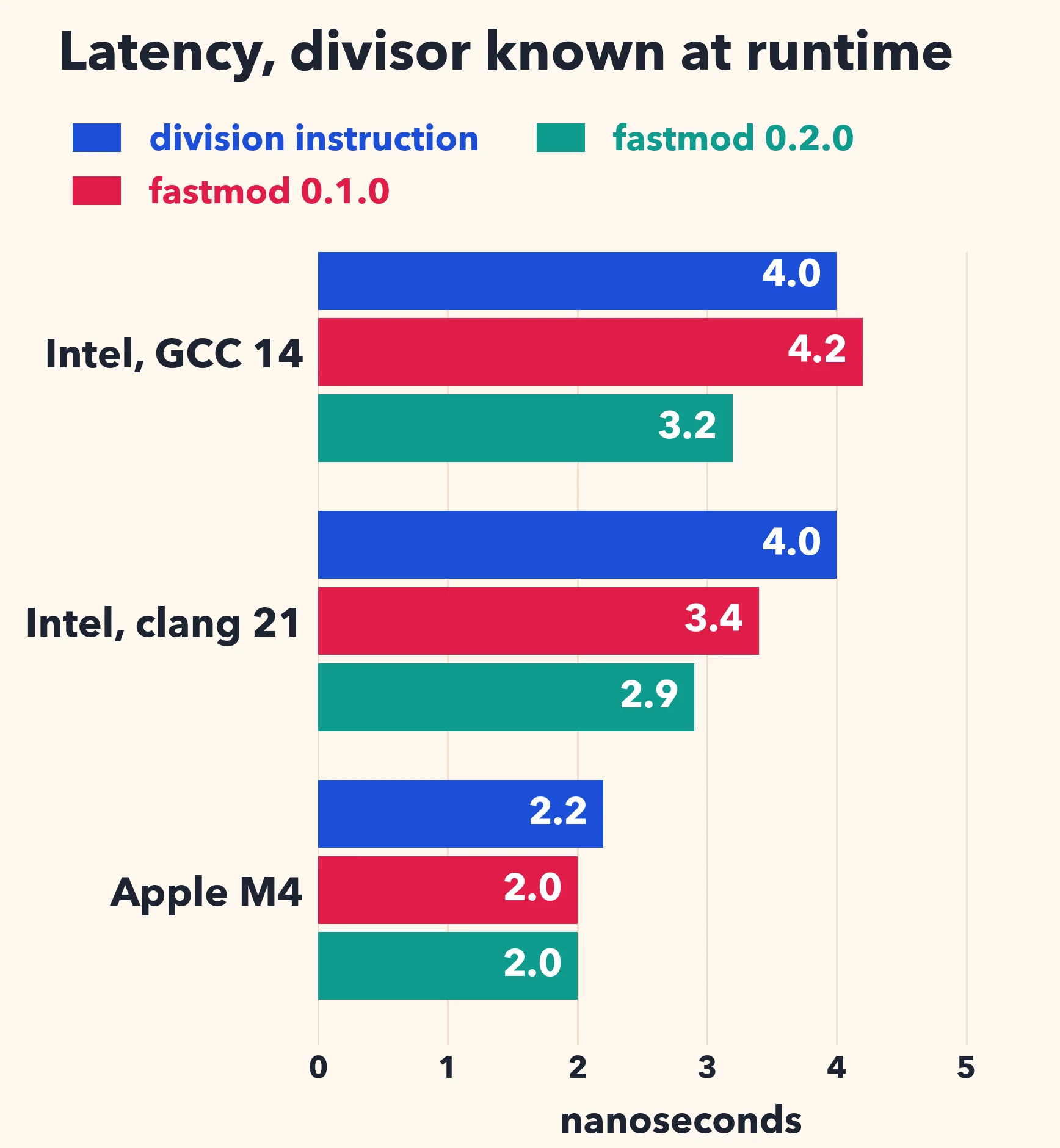
On the Intel processor, the previous version of the library was slower than the division instruction with random signs because of the mispredicted branches. The new version is four times faster than the previous one, and more than twice as fast as the division instruction. On the Apple M4, the previous version did not branch (the compiler computed both cases and selected one), so there is little difference in scalar code. However, without the branch, clang can partially vectorize a loop calling the new function: if I allow autovectorization, the new version takes 0.22 ns on the M4.
When dividing signed 32-bit integers on a 64-bit processor, there is a free bit. Compilers do not use it. For more than a third of the divisors, we can avoid two instructions on the critical path, and in a library that divides by a runtime divisor, we can avoid a branch.
This investigation was prompted by Ben Joffe’s recent post on fast floor division by constants, which you should read.
References
2026-10-27 02:23:08

A lot of software spends its time mapping strings to values. A web server must identify the HTTP method (GET, POST, …). It must recognize header names. A URL parser must recognize the protocol (http, https, ftp, …). A compiler must recognize keywords.
In C++, the default approach is to put the strings in a std::unordered_map.
std::unordered_map<std::string_view, Method> methods = {
    {"GET", Method::GET}, {"POST", Method::POST}, {"PUT", Method::PUT},
    {"DELETE", Method::DELETE}, {"PATCH", Method::PATCH}};
It works. But notice something: the keys are known when you write the code. They never change. And yet we pay at runtime as if they could change at any time: we hash the whole string, we pick a bucket, we follow a pointer, we compare, maybe we walk a list.
A hash function maps keys to slots. When two keys land in the same slot, we have a collision, and we must deal with it. Collisions are what make hash tables complicated and slow.
If you know all of your keys ahead of time, you can construct a hash function designed for your keys, a function that never produces a collision. It is called a perfect hash function. The idea is old: the GNU gperf tool has been doing it since 1989. You give it a list of keywords, and it generates C code.
We follow the same design as gperf. The slot for a key is computed as follows.
slot = (length + asso[key[i]] + asso[key[j]] + ...) % table_size
We add the length of the key to a few small values taken from an association table (asso) indexed by the characters at a few selected positions. Usually, one or two positions are enough. The table size is a power of two, so the modulo is a single bitwise AND.
Consider the four HTTP methods GET, PUT, POST and DELETE. We use only the first character. Set asso['G'] = 0, asso['P'] = 1 and asso['D'] = 0. Then GET goes in slot 3 + 0 = 3, PUT goes in slot 3 + 1 = 4, POST goes in slot 4 + 1 = 5 and DELETE goes in slot 6 + 0 = 6. No collision.
To look up PUT, we compute the slot (4), and we compare PUT with the one key stored in slot 4. One hash, one comparison. If you look up PATCH, which is not in the set, you land in slot 5 + 1 = 6, you compare with DELETE, and you are done: not found. There is no probing, no chain to walk.
How do we find the association values? We sort the characters by how many keys they touch. We then take them one at a time and try 0, 1, 2, … until we find a value that does not cause a collision. We never revise a value once it is set. It is a greedy algorithm with bounded work. The bound matters because we do all of this at compile time, and C++ compilers limit how much work a constexpr function may do.
With our library, you write ordinary C++23. There is no external tool to run.
#include <ConstexprCore/perfect_hash.h>
using namespace ConstexprCore;
enum class Method { GET, POST, PUT, DELETE, PATCH };
constexpr auto methods = make_perfect_map<
    kv<"GET",    Method::GET>,
    kv<"POST",   Method::POST>,
    kv<"PUT",    Method::PUT>,
    kv<"DELETE", Method::DELETE>,
    kv<"PATCH",  Method::PATCH>
>();
The map is a compile-time constant. The compiler searches for the perfect hash function when it compiles your code. At runtime, computing the hash can take as few as four instructions: load one byte of the key, load one byte from the association table, add the length, apply a mask.
Computing the hash is cheap. But we still need to check that the string we are looking up matches the key stored in the slot. And comparing strings can be expensive: the textbook approach is a loop over the bytes with a branch for each byte. You can easily end up with dozens of instructions and several branches, and the branches are hard to predict when the strings vary.
Instead, we treat the key as a vector. Our processors, whether ARM or x64, have 16-byte registers. So we load 16 bytes unconditionally, even if the key is only three bytes long. We then use a shuffle instruction (tbl on ARM NEON) to zero the bytes past the end of the key. The stored keys are zero-padded at compile time. A single vector comparison handles the whole key. We go from about forty instructions and eight branches to five instructions and no branch.
But wait: is it safe to read 16 bytes when you only have three? Reading past the end of a buffer is fine as long as you do not cross into another memory page, and pages are at least 4 kilobytes. So we check whether the address is within 16 bytes of the end of its page. If it is, we take a slower path. Otherwise, we do the wide load. We traded several unpredictable branches for a single branch that is almost always taken the same way.
I ran the benchmarks on an Apple M3 Max with AppleClang 15. We look up the keys in random order and we report the time per lookup. Let us first consider the 20 standard HTTP header names.
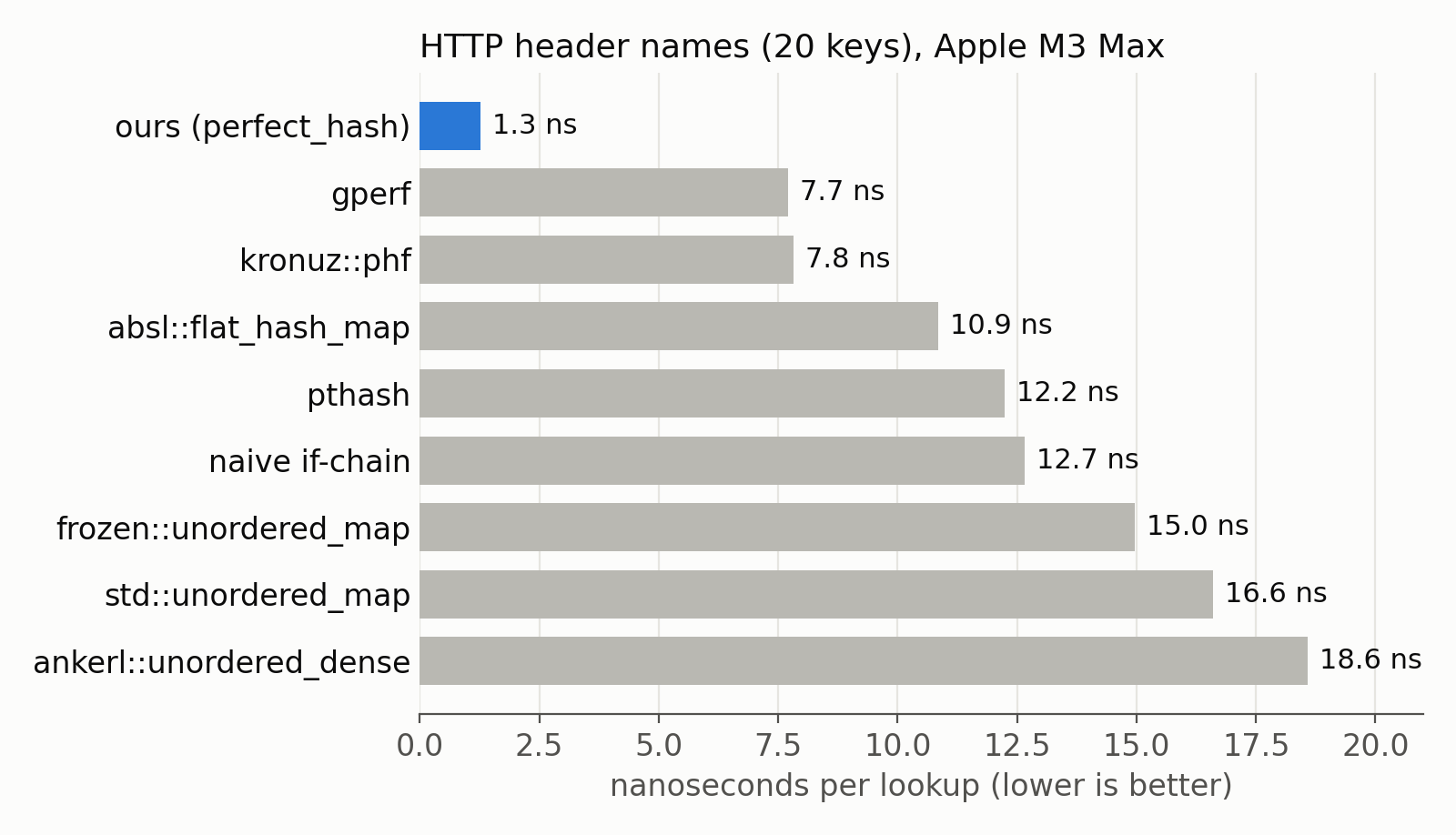
We need about 1.3 ns per lookup, or about 5 cycles. The classic gperf needs 7.7 ns. Abseil’s flat_hash_map, an excellent hash table, needs 10.9 ns. And std::unordered_map needs 16.6 ns. We are thirteen times faster than the standard library.
It is not one lucky key set. Here are the results over several sets of keys, from 6 URL protocols to the 100 tickers of the S&P 100.
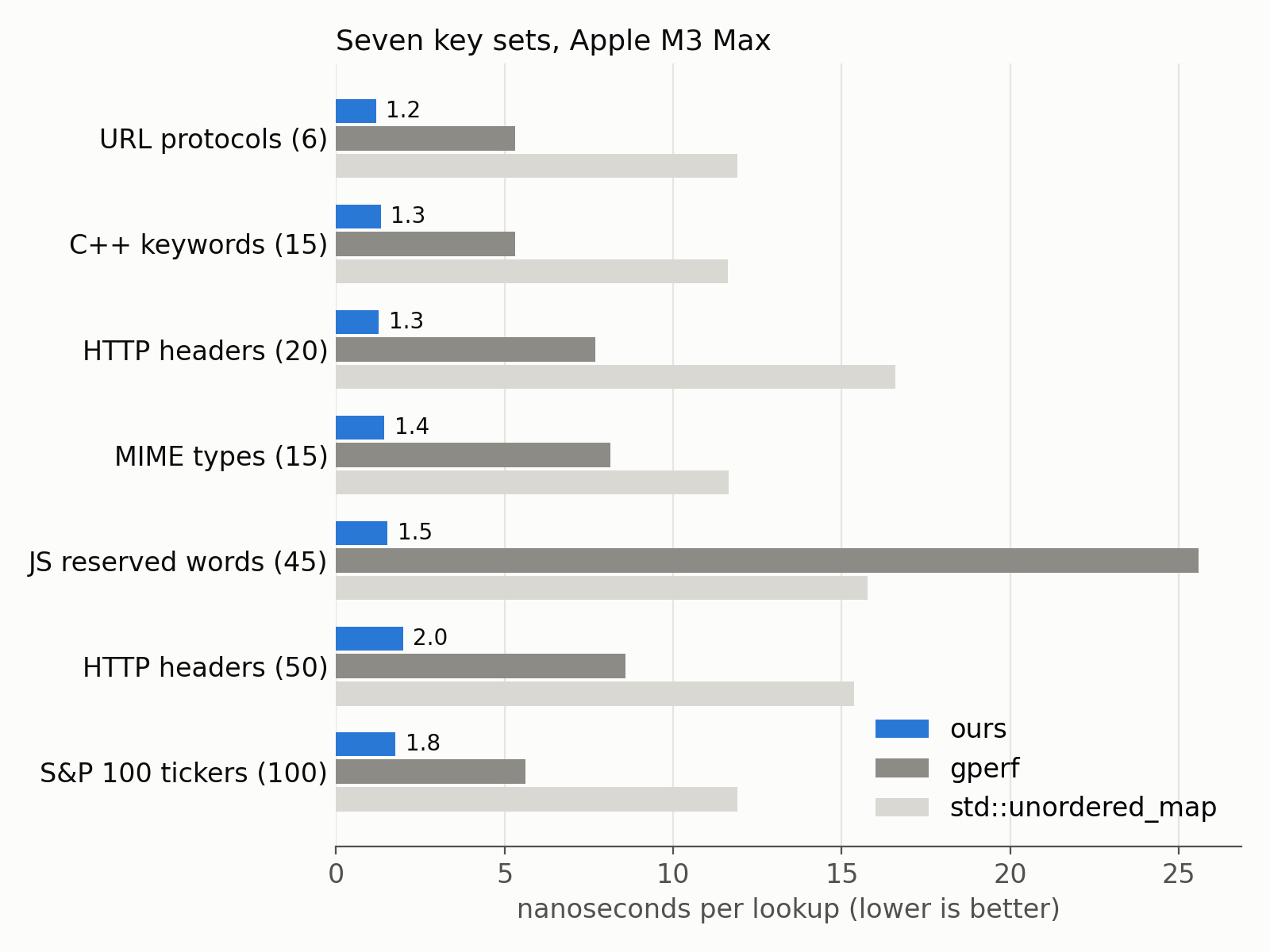
We stay between 1.2 ns and 2 ns per lookup. We are 3 to 6 times faster than gperf, and 7 to 13 times faster than std::unordered_map. Notice how gperf struggles with the JavaScript reserved words: there we are 17 times faster.
Why is std::unordered_map so much slower? The C++ standard essentially requires a chained hash table. A lookup hashes the whole string by calling a function, follows a pointer to a heap-allocated node and walks a list. Our lookup does a few loads and has no function call. The processor can retire over 8.6 instructions per cycle with our code, which is about as good as it gets on this chip, and it almost never mispredicts a branch.
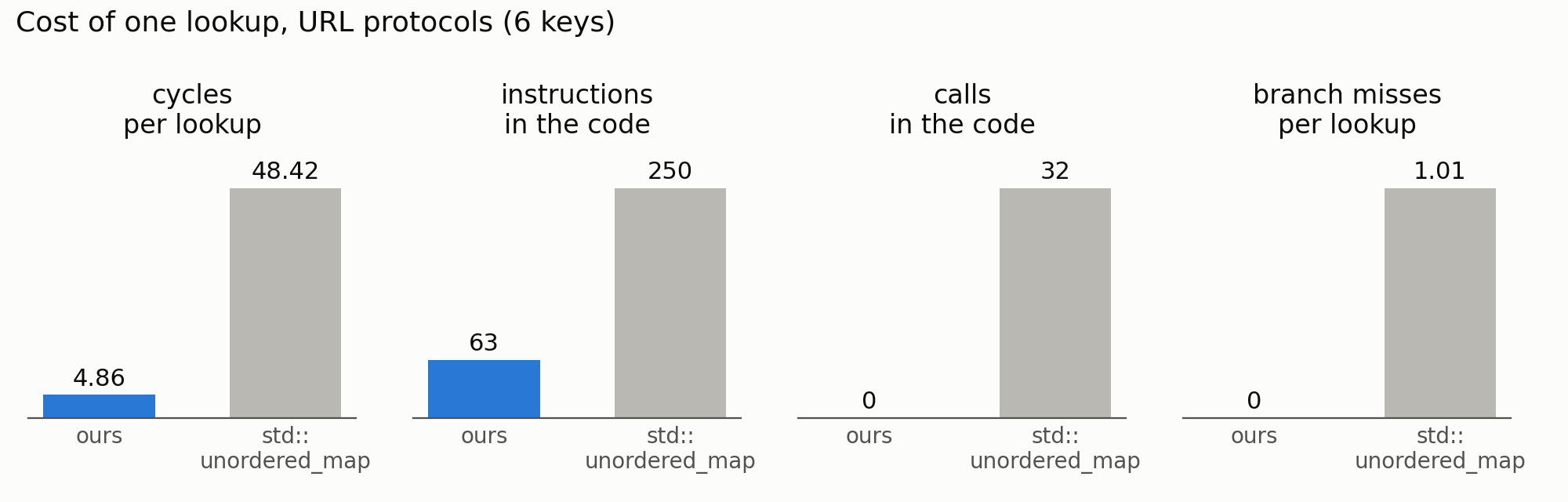
On an Apple M4, with the URL protocols, we exceed one billion lookups per second.
If your keys are known at compile time, you should not pay for collision handling at runtime. A perfect hash function gets you down to one comparison. With some care, a lookup costs about five cycles. The library is a single header you can drop in your project: github.com/ConstexprCore/perfect_hash.
This is joint work with Francisco Geiman Thiesen (Microsoft). We presented it at P99 CONF 2026. You can watch the talk on YouTube.
The benchmark numbers and the plotting script are available.
2026-10-17 12:40:34

We sometimes need to convert binary data to text. For example, your emails must be stored as text files. Naïvely, you could just use a string of 0 and 1, but it would mean using one character per bit. We can do better by using 64 ASCII characters: all letters, all numbers, plus a few extra characters. Base64 represents three bytes with four ASCII characters.
Base64 is how email carries attachments, how certificates are stored, how images get embedded in web pages (data URLs), and how binary data is encoded inside JSON.
Python comes with a base64 module. It is written in C, but it processes the data one character at a time. There is a popular alternative, pybase64.
We have been working on base64 for years. With Wojciech Muła, we showed how to encode and decode base64 with SIMD instructions. More recently, I worked on forgiving base64 decoding: the variant used by web browsers, which skips spaces and line breaks. Our simdutf library implements these ideas. Mainstream browsers rely on it.
But simdutf had no Python binding. So we wrote one: fastpybase64.
pip install fastpybase64
import fastpybase64 as base64
base64.b64encode(b"hello")      # b'aGVsbG8='
base64.b64decode("aGVsbG8=")    # b'hello'
It is meant as a drop-in replacement for the standard base64 module.
How fast is it? I use an Intel Xeon Gold 6548N (Emerald Rapids) pinned to one core, with Python 3.14.6. I installed fastpybase64 0.1.0 and pybase64 1.5.1 from PyPI. I decode the base64 encoding of random bytes, and I report the speed in gigabytes of decoded data per second. A lot of real base64 has line breaks. MIME, the format of email attachments, breaks the base64 text into lines of 76 characters. So that’s what I use as an example. We use a single thread.
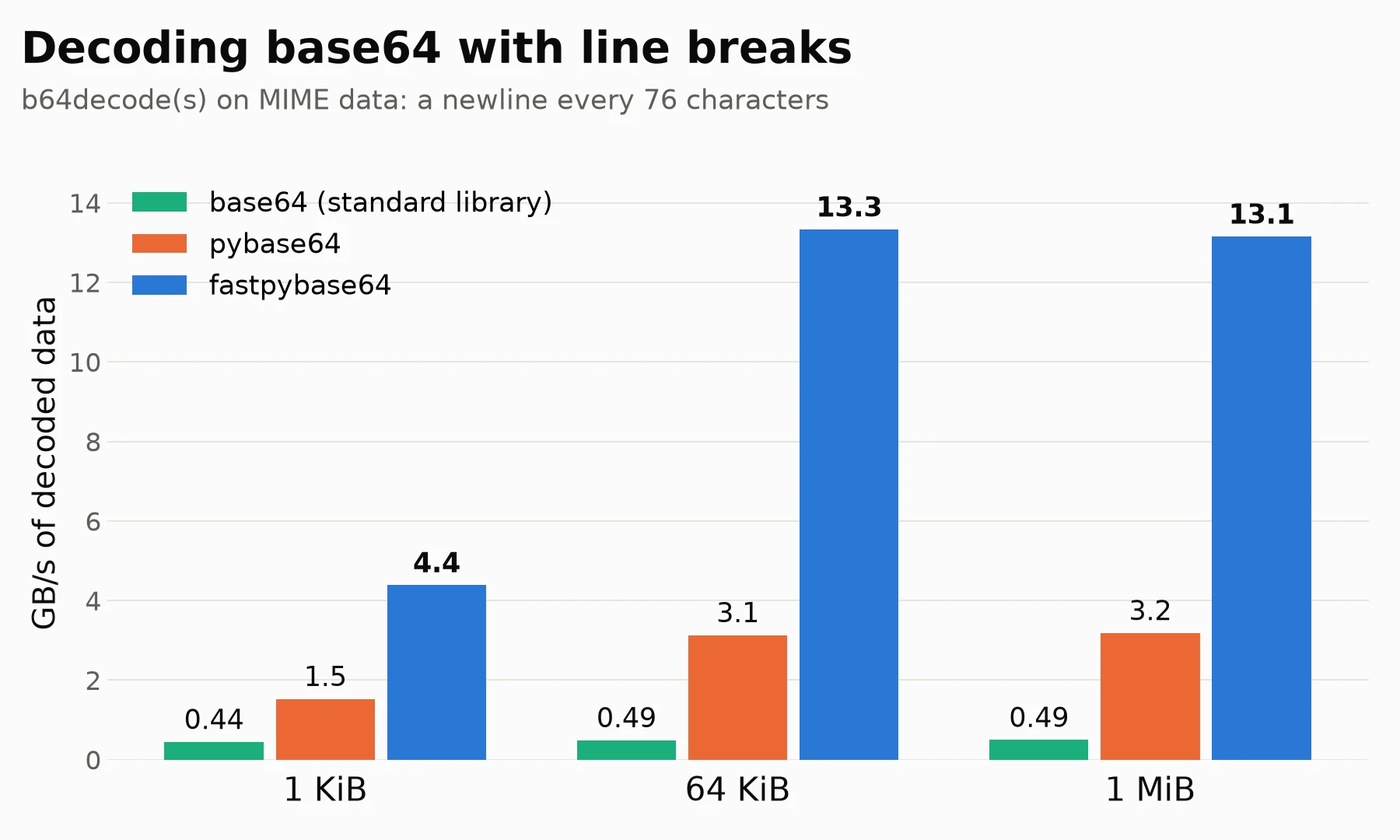
| size | base64 | pybase64 | fastpybase64 |
|---|---|---|---|
| 1 KiB | 0.44 | 1.5 | 4.4 |
| 64 KiB | 0.49 | 3.1 | 13.3 |
| 1 MiB | 0.49 | 3.2 | 13.1 |
The fastpybase64 module is four times faster than pybase64 and 27 times faster than the standard library.
The fastpybase64 module is available on PyPI for Linux, macOS and Windows, for Python 3.10 to 3.14, including free-threaded Python 3.14. My benchmark is available.
Further reading


