


2026-10-17 20:00:00
Imprint’s average engineer is merging 4x more PRs than 2 years ago. Yay. Aggregated behind the average is something even more interesting: we have two teams that are merging 10x their PRs over that period. One engineer is merging 25x the PRs per week of our average engineer two years ago, and a number of others are closing in on that number. That’s pretty neat, and the slope of the line suggests our average in a year is going to look much closer to today’s p90 than today’s p50. Even more importantly, we aren’t just shipping more, our quality has improved: incidents are down 42% half-over-half, and critical incidents are down 78% half-over-half. I think we’ve always known the quality/velocity tradeoff wasn’t a particularly useful construct, but that’s undeniable today.
As we’ve walked this path, we–like everyone else progressing down it–have run into the problem of pull request review. The p50 pull request review took about 33 minutes to complete 2 years ago, but now takes us about 77 minutes. The slope here correlates tightly with the number of pull requests getting merged. Tightly enough that addressing it became one of my priorities for the week.
We solved it! Just kidding, we’ve absolutely not solved it, but I think our current
approach is an interesting one, which we call the small-change.
The work discussed here was shaped and done by many folks at Imprint including Dan, Joy, Daniel, Lenny, Taylor, Ted, and Annie, among many others.
There are four reasons we review pull requests:
In the modern development paradigm, we think there is a better solution for each of these problems. But, we also want to make these changes very cautiously.
small-change
We believe we move fast by finding narrow, contained ways to validate new practices,
so to iterate our way into an effective solution, we’ve developed the concept of a
small-change. Here’s how it works:
small-change.
This is represented as a passing Github check. There is also a label for visibility,
but it is the check itself, managed by the build and not human modifiable, that determines eligibility.
(The label is used for initial filtering, but the check is still independently verified.)small-change if it meets all of these criteria:
ai-code-review automated review botN distinct services or applications. N is 1 on our frontend monorepo,
and N is 3 in our backend monorepo, where typical changes will modify both a gRPC service and a common HTTP gatewaysmall-change
.small_change file which allows per-path customization while we continue to tune the behaviors.
For example, a service dealing with money movement can be excludedsmall-change reacji that indicates which of those pull requests meet the small-change criteriareview-small-change which takes a list of repositories and reviews all open, non-draft, small-changes,
including providing approval if they meet the review’s criteria (all checks pass including small-change check,
and not touching on sensitive topics such as payments and security).
Importantly, this skill has only two options: approve or ignore. It never comments on the PR to avoid the proliferation of “meat proxy review” which has become a bottleneck-pretending-to-be-a-solution on some teams
review-pr-cluster which reviews batches of pull requests to identify common themes that came up, and suggest opportunities
for discussion and adding verifications
small-change is a failure in our system,
and has to be solved at the system level: improvements to ai-code-review, to our verification mechanisms,
to our CICD, to our harness, etc.This took about two days of infrequent attention to implement and rollout, although I imagine we will be tuning the knobs here for a long time. Maybe forever.
I mentioned this in 4.1 above, but meat proxy review has become
an interesting bottleneck for many teams. It’s a particularly difficult bottleneck because it initially looks like a solution,
but it makes things worse. The pattern is roughly:
In every case that meat proxy review is performed, the team would get better outcomes by investing into the centralized review mechanism, the harness’ loop for addressing the centralized review’s feedback, and simply stamping approval.
fleet: centrally orchestrated harnessI’ll briefly mention our other approach to reducing code review
volume, which anchors on our centrally-orchestrated harness, fleet.
(Which is similar to Stripe’s Minions
although not following the one-shot approach in particular).
We rely on fleet
to implement and verify software in a highly controlled harness running in the cloud, with independent
evaluation mechanisms to identify the correct number of independent reviewers for
any given change. That number can be as low as one (e.g. fleet writes, one human reviews)
for changes evaluated as safe.
I’ll be honest, it’s too early to give a useful result here.
From early results, about 10% of changes qualify as a small-change.
Those are now eligible for very fast approval, and generally get it unless
they trip a flag, generally due to touching a security or money adjacent topic.
While 10% is a small percentage, the core concept here is working, and ultimately will succeed or fail based on our ability to expand that percentage over the next few months in tandem with expanding our verification mechanisms to be increasingly comprehensive. This is ultimately going to fail or succeed depending on our ability to improve our verifications, which does require more difficult sorts of techniques to accomplish in low scale-complexity, high domain-complexity software than in the high scale-complexity, low domain-complexity products where many techniques like incremental rollouts are exceptionally effective. (Don’t get me wrong, they still work, they just provide less coverage when most users have different configuration and behavior.)
Folks have not been uniformly excited about this, it’s a substantial change from how we’ve learned to be good engineers, and it’s uncomfortable to reevaluate whether a long-held best practice has become merely dogma. The most energizing part of the current cycle is that we get to reevaluate these practices we grew up on every week; the most painful part of the current cycle is that we’re likely to fall behind if we ever stop reevaluating them.
2026-09-20 20:00:00
One of the interesting challenges of the AI ecosystem in 2026 is that new, effective patterns emerge faster than I can adopt them. I’ll find a handful, get back to work, and realize a month later that I’d missed four or five more. The adoption cycle for Imprint this year has been something like:
The most recent question for me has been figuring out how to adopt the software factory pattern. (After some light research, the specific AI-context origin of this term is slightly messy to attribute, but I think it might be Justin McCarthy in February 2026’s Software Factories And The Agentic Moment.)
The software factory pattern is looping on a broad goal, and then relying on the harness to drive progress towards that goal. Our first pass at implementation is fairly basic:
An agent skill /linear-project-loop which reads in a Linear project and starts by auditing
that project’s goal definition on these dimensions:
If those are missing, or the Linear project is missing in its entirety, it iterates with you on creating those missing tools.
Then it reviews the state of the metrics and issues for the project. If new work is identified, it adds those issues to the project. It updates the state of issues that have moved.
It works on the non-blocked tasks based on the project’s current state. This is often writing a pull request, updating a pull request, pinging for review, asking a clarifying question, etc.
When a task completes, if the project description is fresh, it takes on the next task. If the description hasn’t been updated in a while, it reruns the loop starting with the first step.
Right now I am running this locally in a local harness, but it’s working well enough that I anticipate moving the behavior to be driven by the same orchestrated harness that we assign one-off tasks to.
What I particularly like about the factory pattern is that it parallels very closely how I’ve been working locally, while forcing me to recognize the places where I was accidentally hoarding parts of the state for myself regarding the goals of the project. I was already asking agents to iterate on specific Linear projects, but they didn’t have the ability to evaluate if they were going in the right direction, or if it was missing necessary tasks. Now it does. The other place this has been extremely helpful for me is checking in on projects post-release. For example, I shipped our passkeys implementation earlier this year, but some months go by without my checking in on how it’s going. If we saw adoption spike, or error rates start to turn, I might miss it, but running the factory in a less frequent post-release mode would catch it immediately.
The final thought that’s been interesting to me is how much all of the pieces here compound only to the extent that you have the other pieces. For example, this factory pattern depends on having Datadog MCP and Snowflake access available to manage goal-tracking, but it also depends on Linear being the single source of state for the company’s work, and an orchestrated harness that can perform work independently from your laptop. Keeping up with this many migrations is a fascinating industry moment.
2026-08-11 22:00:00
One thing that bothered me about Imprint’s product after joining was our lack of passkey support. Passkey support is a rare opportunity to increase resiliency to phishing attacks while simultaneously reducing login friction. If it’s good for our members, our partners, and our product, it felt like something we should have already shipped. Nonetheless, it was hard to get it onto the roadmap alongside everything else we were working on.
To dig into passkeys, I started sketching out the implementation as a side quest. Some iterations later, I had something implemented behind a disabled feature flag for team review. At that point, most problems had a concrete solution implemented, and the remaining issues were messy intersections between passkey implementation and user experience. Issues remained, but the tangible implementation made tradeoffs explicit, and we were able to work through them. Soon thereafter, we launched passkeys to a small group in our web experience, iterated on feedback, finalized the details, and brought those details forward to our native mobile experiences as well. It never got onto the roadmap, but it did ship.
Our passkey release planted a seed for me, but it required another experience to fully germinate. We had a discussion about hitting a date for a product extension we’re developing. Our conversation kept anchoring on the idea that pulling in a date was dependent on pushing out dates for other projects. Presenting two conflicting projects as requiring timeline tradeoffs wouldn’t have caused me to blink an eye five years ago, but in this conversation it inspired a sort of instinctual revolt: with modern development techniques, I believe very few projects are essentially constrained by execution bandwidth. Some are constrained by approvals, others are constrained by cross-team and cross-functional handoffs, and many are constrained by missing decisions, but almost none should be constrained purely on time. Shifting blocks of time across projects to speed up delivery felt wholly divorced from the reality I work in.
Grappling with my frustration for some time didn’t lead to a profound awakening, but it did help me bring together my thoughts about how effective modern organizations operate. The modern organization operates most effectively by orienting itself around highly empowered teams who broaden their capabilities to absorb cross-team and cross-functional handoffs, can rely on automated harnesses to address most remaining cross-functional approvals, and accelerate high-quality decision making through rapid prototyping. The premise here is an old one, but AI-tooling has shifted what’s possible in remarkable ways.
In 1975, Fred Brooks’s The Mythical Man-Month warned us that adding individuals to a late project makes that project even later rather than speeding it up. However well-understood this is, it remains extremely common for leaders to repeat this mistake, even today. My personal theory is that most leaders performing the “ask for more staffing” gambit intuitively know they are optimizing to “get stuck” in a way that shifts responsibility off them because they didn’t get the requested funding, rather than that there is no way to accomplish the task at hand.
Even if teams avoid the simplest versions of the mythical man-month’s trap, organizations that operate through strict ownership of defined boundaries introduce the same problem. Well, of course your team can’t launch that without approval from the architecture team and the security team and performing a user research study. That’s not really your team’s ownership area, you’ll need approval from the membership accounts team, at a minimum! Agile, with the idea of collective code ownership, rejected this idea in principle, although certainly it remains messy in practice.
Even with strong AI-enhanced workflows, I still find human review of load-bearing technical decisions (e.g. a decision that will meaningfully impact subsequent decisions) to be extremely valuable. This is why the highly-empowered team model is an effective compromise: there needs to be an experienced engineer whose perspective is infused into the architecture, who shares the team’s context, and who is aligned with the team’s priorities. This creates space for earlier career folks to be highly effective, while also allowing teams to largely operate independently across complex, intersecting goals.
The final piece of driving accountability is rejecting the argument that a problem is too confusing or too hard for someone to know the consequences of their work. There are a lot of hard problems, and that’s what makes creating software such an interesting job. However, in a world with infinite feedback readily available, even if that feedback is of inconsistent quality, getting surprised or being unable to unpack a problem is an algorithmic gap in how work is being approached. Learning how to manage that gap is a core part of being an engineer, and something we are accountable for learning.
To be explicit, the argument isn’t that folks should be flawless: mistakes are fine, even laudable in some cases. Laudable mistakes are almost always couched in a web of derisking, often feature flags, to make them inexpensive. If someone isn’t increasingly effective at derisking their decisions throughout their career, then they’re not being accountable for their impact as an engineer.
The above section has been fairly standard advice for decades, but I believe AI-tooling has substantially changed three dimensions of this approach:
Maintained context in e.g. AGENTS.md files can improve the overall approach of the company working
on a given area. It’s very hard to train an entire company, but today you can get many of the outcomes
of training by manipulating centralized context. This makes it far easier to operate decentralized teams
than in prior eras.
Inconsistent patterns in a codebase will “poison” an LLM’s context window with bad patterns, but it’s never been easier to simply remove those bad patterns from the codebase. Bad patterns within your codebase are largely a problem you can choose not to have at this point. This further simplifies operating decentralized teams, especially if you love introducing tighter typing and linting. Which I do.
One high context engineer can scale themselves across a team’s scope much more easily than before by using LLM-tooling to investigate, debug, monitor and influence agent development.
The broader this engineer’s judgment extends, the more effective they’ll become. I don’t think that any of design or product or engineering are going away, but individuals whose judgment spans across multiple of these fields are increasingly impactful on their teams because they can breeze through the easy cross-domain problems rather than get hung up on them.
In aggregate, I believe that these changes in degree become a change in kind for running an empowered team.
Even if code ownership is shared, it can become impossible to move forward if there’s enough cross-functional permission required to make changes. To a small extent this is due to inherent misalignment in incentives across functions, but it’s much more driven by incompatible priorities. Where possible, it’s ideal to embed functions into a common pod to align priorities, but in an era of lean teams, that’s not a particularly accessible solution.
Instead your two most likely solutions are the same ones that have always been there. First, building relationships across functions to help get your project unblocked by a helping hand from within that function. Second, an effective executive team is able to make collective tradeoffs–and share some of their treasury of cross-functional relationship merit–to unblock a given project.
Now, however, I think we finally have a playbook for speeding up cross-functional approval in a meaningful way, which is providing function-specific harnesses that can perform elements of their function’s work, especially of the approval variety. I don’t see substantial adoption of this technique yet, but I see it coming, and Imprint has spun up an internal AI team to iterate our way through deploying this approach. Hopefully we’ll be writing about our learning there in a month or two.
Our goal is that every function has a centrally managed harness that can perform an increasingly large portion of their team’s work, prioritizing the sorts of things that require cross-team approvals. They would have a collection of general tools–e.g. search indexes of their work corpus–and also very function specific tools–e.g. access to a tool like Zip for financial approvals on the Finance team–along with the ability to provide skills and direction to the harness. Assuming this idea works, this harness will become a shim on top of functions to further allow teams to focus on the highest value work rather than getting caught up in the least interesting approvals.
With less accidental complexity slowing down our organizations from cross-team and cross-functional dependencies, we still have one very large remaining: deciding what software to write. Software is not, as some argue today, free, but it’s no longer constrained on implementation weeks but instead on correct decisions.
Grounding this in an example, for an upcoming release we found ourselves grappling with implications of changing how applicants applied for a new credit card. There were concerns that we didn’t have enough weeks to implement the change. However, the actual work to be done was roughly two weeks, and we were talking about the initiative taking two months. The gap between the two weeks and the two months was a dozen ambiguous decisions. Those proposing the longer timeline assumed we’d continue making decisions at the current decision-making pace, resulting in the longer schedule.
There was some discussion around how we might find that number of months to complete the project. Treating decision-making speed as a fixed constant oriented the discussion around a complex, low-value workstream of deciding the relative priority of other tasks we were currently working on and then reranking them to free up more calendar time. But we were never constrained on calendar time, what mattered was accelerating the pace of high-quality decision-making.
In my experience, calendar discussions are another way that folks deliberately get stuck, because no company ever has a central list of the true priority of every task. Asking for that non-existent list shifts accountability for forward progress off the asker, but it’s a fundamentally unreasonable thing to ask for. Thinking about things from a CPU scheduling perspective: any scheduler that tried to centrally orchestrate priority within every thread would be extraordinarily slow and stuck all the time; it’s only by locally determining priority–often through extremely crude methods–that things move quickly overall.
Decision-making at a fixed degree of complexity hasn’t gotten easier with AI-tooling but AI-tooling has dramatically reduced the complexity of most decisions I see in practice. Going back to the passkey problem, trying to make those decisions from a blank slate was very difficult. I was simply too ignorant of the handshake’s constraints to correctly decide the UX details. However, I was able to iterate through the open decisions as a side project, until the answers became obvious. The answers became obvious not because I got smarter–I didn’t get smarter–but because iterative exploration discarded many of the initial options until the inherent constraints of passkeys and our user experience simplified the problem.
Prototyping–e.g. the iterative application of judgment–can turn most complex problems into a series of simple problems, and the rate of prototyping today makes it a substantially more accessible strategy than in the past. Yes, prototyping has always been a well-received solution to validate ideas, but it used to be expensive enough that many teams didn’t take advantage of it, but these days I think it is the most accessible way to find high-quality decisions within an ambiguous problem space.
Combining all of these ideas, the world we live in is increasingly constrained by access to high-quality decisions. Rather than talk about scheduling software around software, we should be fixated on the idea of accelerating making high-quality decisions. Every hour we spend deciding priorities or timelines is a distraction from making the next decision.
As an ending caveat, this isn’t an argument that we shouldn’t have dates on projects. Dates are the external interface for coordinating across companies, so you still need dates. However, I think teams are better picking a plausible, slightly conservative external date and then entirely ignoring that date internally. Instead, they should focus on the list of decisions to be made, and work through them directly. Dates, global priorities, stack ranked items… An engineer who doesn’t know the release date can still ship.
2026-08-08 22:00:00
Six years ago, I wrote Tech Lead Management roles are a trap. My argument then was that TLM roles present themselves as easier than moving into a full management role, but the tension between doing the software engineering and engineering management aspects of the role made being a TLM a much harder first management role than a pure engineering management role. I still agree with that post, and I have some additional bad news to share: middle management roles are mostly a trap as well, if you goal is to become an executive.
The core aspects of middle management roles are:
These are all extremely important skills to be an effective executive, and they make up the bulk of The Engineering Executive’s Primer, but they are insufficient to make you a great executive. If you don’t have them, you will be a deeply flawed executive, but even if you’re an expert at them, you can still be a terrible executive.
That’s because the most important skills of an effective executive are the same exact skills that make an excellent line manager: developing domain expertise, driving execution (including setting pace), and translating both of those into an organizational culture that extends beyond you (in any of innumerable different ways). All of them are more easily practiced and mastered as a line manager than as a middle manager. Most middle management roles make practicing those skills difficult, and sometimes negatively select against developing them.
As a middle manager, if you drive execution too closely, you might get told off as a micromanager. As a middle manager, if you go too deep on domain expertise, you might get told that you’re not focusing enough on your internal stakeholders. That’s undoubtedly valid feedback in many middle management roles, but it’s the perfectly wrong feedback to someone who is trying to become an effective executive. As a result, I’ve come to believe that the filters for good middle managers inadvertently negatively select out the “challenging” line managers who actually have the best chance to be excellent executives. That’s not even necessarily irrational: most companies are developing middle managers to take on more complex middle management roles; very rarely do they worry about growing future executives from within.
If you’re willing to embrace this fact that a little bit of time in middle management roles is important preparation to become an executive, but spending a great deal of time in middle management only prepares you for further middle management roles–and makes you less effective as a potential executive–then the AI-driven shift in managerial fads might be a threat to your current role, but it’s likely to improve your chances to succeed as an executive.
2026-07-12 05:00:00
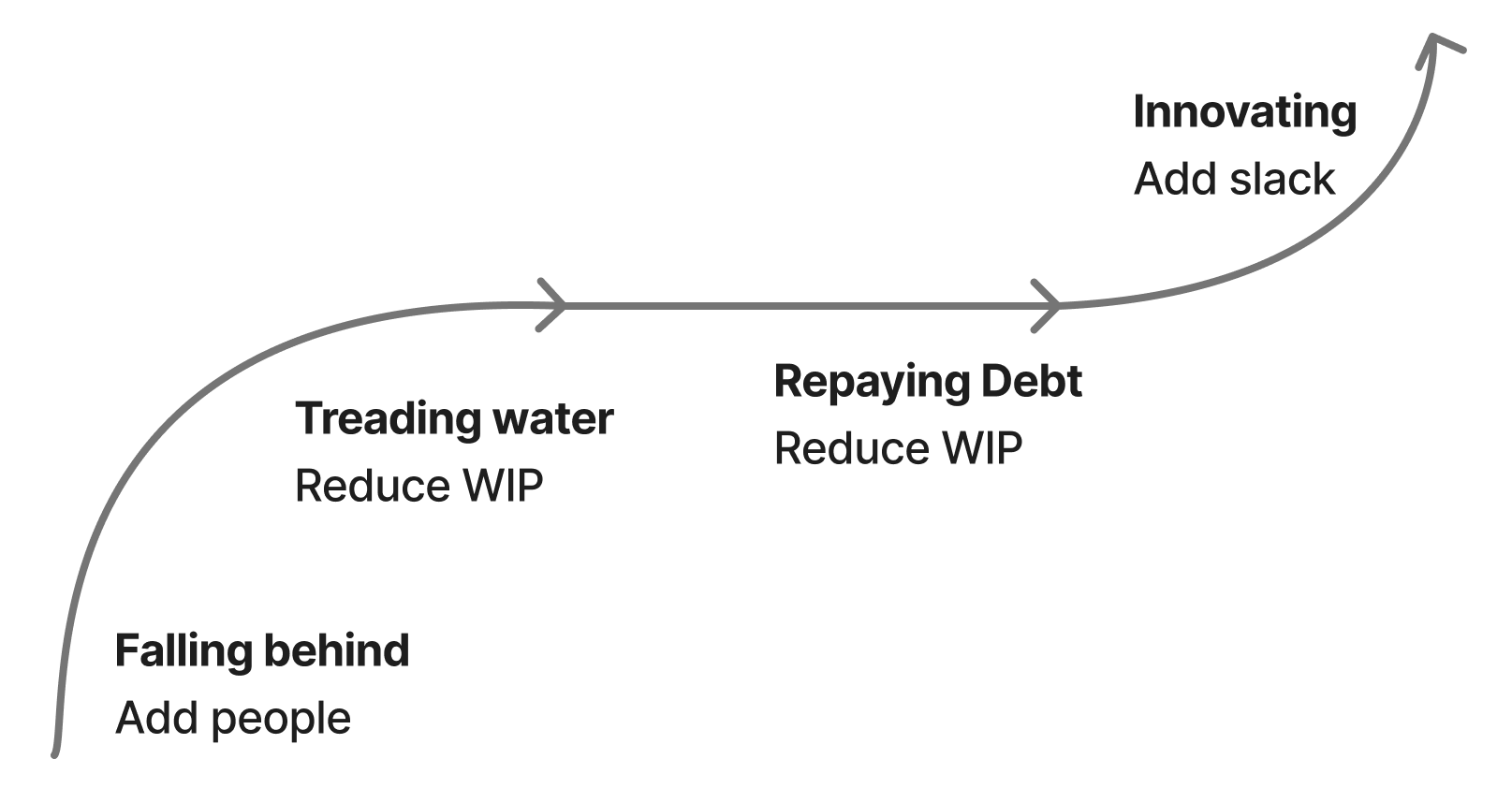
Eight years ago, I wrote about my theory of restoring struggling teams, which came down to four steps:
Even now, I find this mental model extremely valuable, but I do think it is missing one interesting nuance that I’ve seen many teams run into in high-growth environments: suppressed and generated demand. Suppressed demand is the idea of incoming work that isn’t incoming, because teams stop asking you for help. Generated demand is when an increasingly effective team’s progress is noticed, and the previously suppressed demand is converted into actual demand.
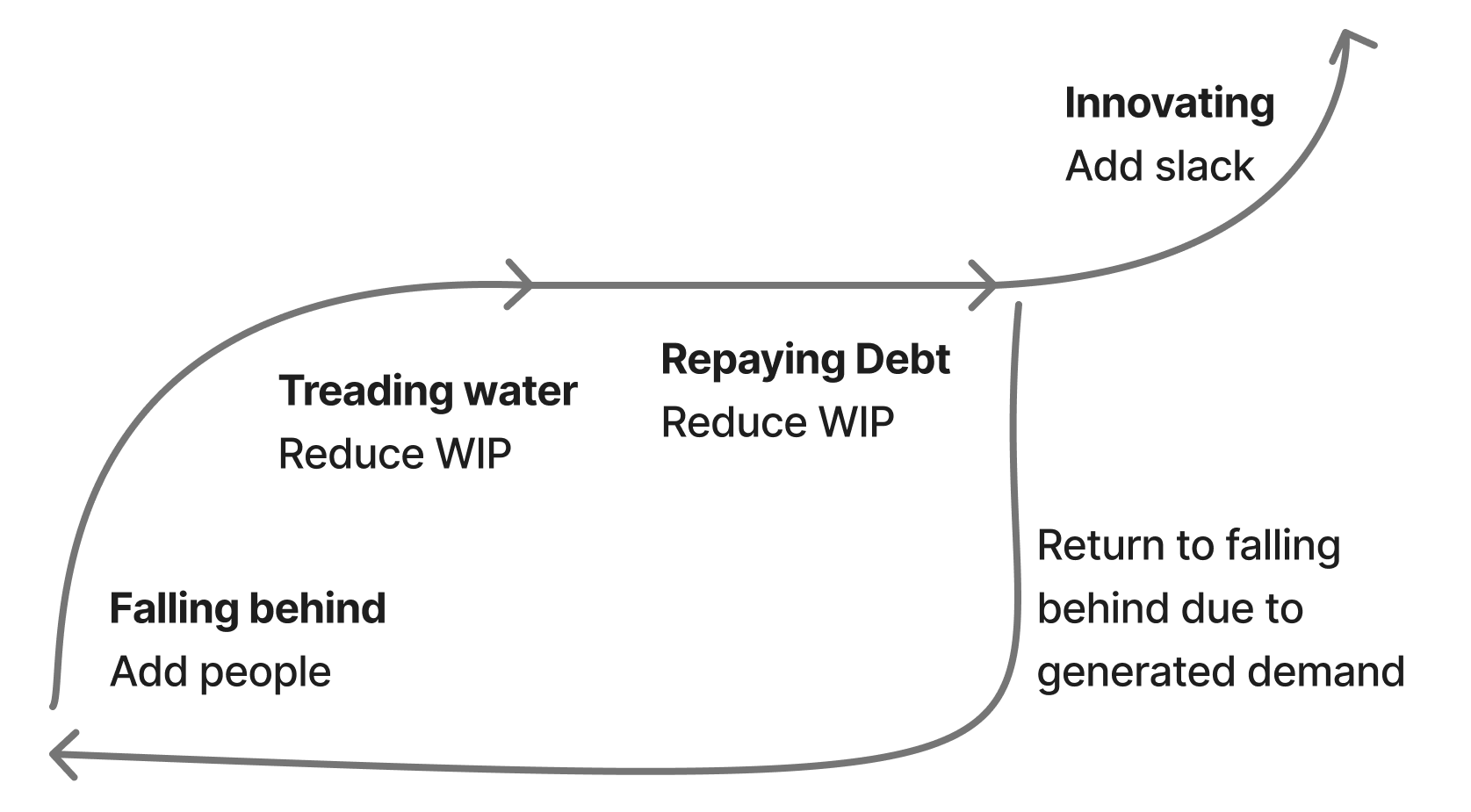
The consequence of generated demand is that a team that was struggling can successfully recover, work through much of its backlog, and then shortly thereafter be just as far underwater as they were at their worst. This is a very disorienting experience, and even a demoralizing one. The team has done everything right, shipped a bunch of genuinely valuable work, and are nonetheless just as far underwater as they were before.
To give a concrete example, our Customer Operations Engineering team didn’t exist a year ago, and instead we invested in customer operations engineering tasks by prioritizing them into a larger team’s tasks. This often meant we had very valuable projects that didn’t get staffed. We then split it out into its own team, launching a number of projects like reworking our internal customer operations tooling and integrating Sierra for our IVR, both of which worked out quite well. As a result of working out well, there are far more requests for work. Despite accomplishing so much, the team is even further behind on the incoming requests than they were a year ago, when they had shipped relatively little and had relatively little capacity to ship more.
Unfortunately, the solution here is not particularly novel: you have to run through the cycle again. And potentially a third time. And potentially a fourth time. You just have to keep running through it until you’ve surfaced the entire backlog of suppressed demand. This is very similar to the problem of latent incidents which cause effective reliability programs to look like they’re failing as they drain the stock of previously created latent incidents. Sometimes you’re doing the right thing, and it just takes a while to work. Your challenge in that moment is building conviction that you are indeed doing the right thing, and convincing your team and leadership of that as well.
Finally, it’s interesting to attempt to predict which teams are, and which aren’t, sitting on top of a backlog of suppressed demand. Some teams run through the recovery cycle, and find that there simply isn’t much else to do. These tend to be teams with very narrow interfaces, for example a team whose job is providing internal queues probably won’t have much generated demand after clearing the initial backlog. Teams with broad interfaces, like customer operations or developer experience, are generally sitting on an incredibly large, albeit currently invisible, backlog of suppressed work.
2026-07-11 21:00:00
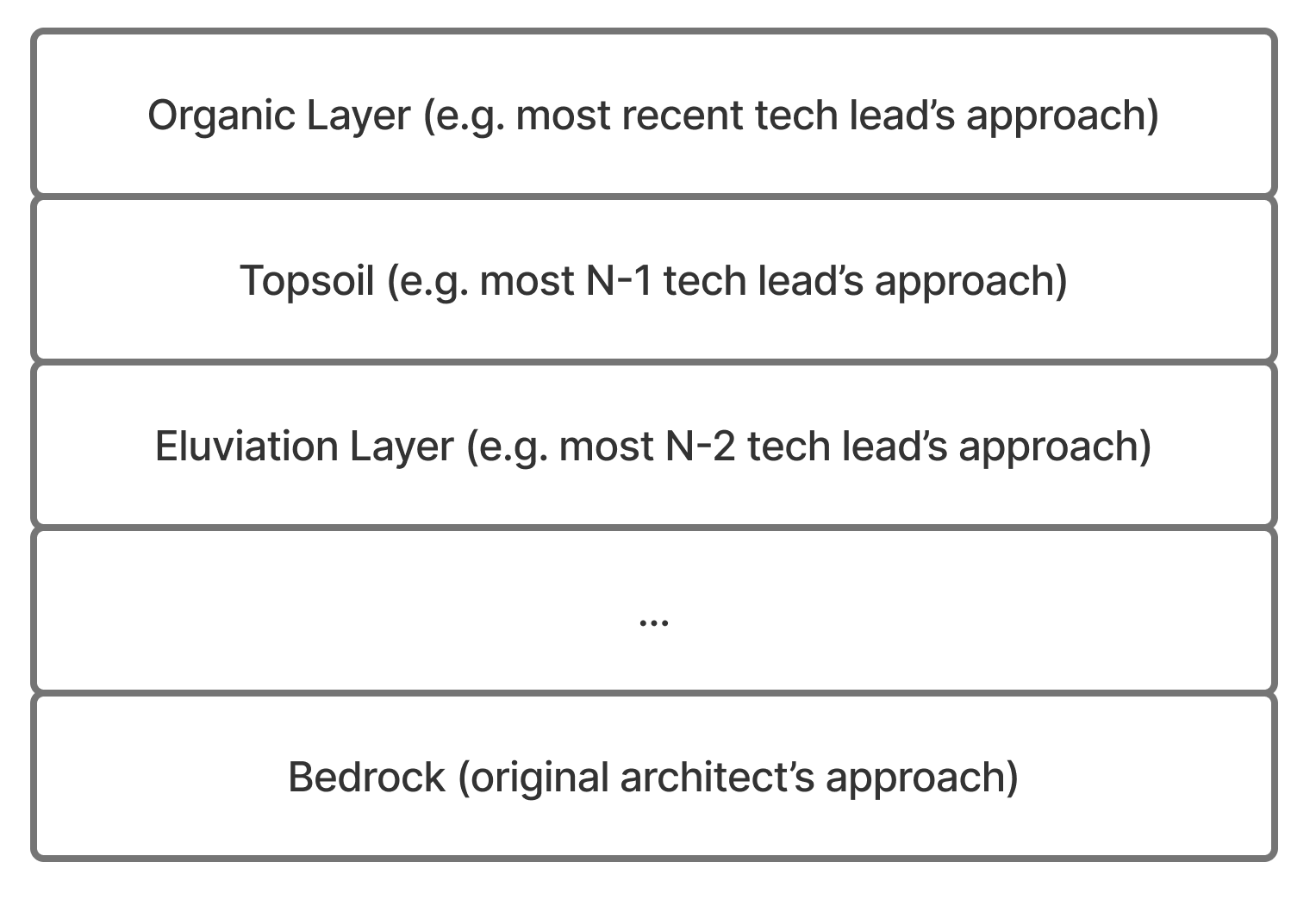
I’ve recently been thinking a lot about the concept of “soil horizons”, which is the idea that there are many distinct layers of soil, from topsoil all the way down to bedrock, which all combine into a soil horizon. Translating this idea into software, the ideal codebase would have a single uniform “code layer”, but a surprisingly large percentage of production software has numerous, distinct code layers as the leading architect shifted over time. I’ve found this particularly true for software in problem-spaces with high essential complexity and low scale complexity, where the purifying challenges of scaling never create enough pressure to compact disjoint layers into a unified layer.
Codebases with the most code layers tend to be created by small teams working on complex domains over a long period of time. In many companies this might be an identity, permissions or payments team: stuff that’s permanently valuable, but usually not the central concern at any given time. On such teams, there is often only one architect who understands the nuances of the domain well enough to make tradeoffs. When that architect leaves, they are replaced by someone who aspires to operate in the same code layer, but simply cannot because they lack enough context to do so. As a result, that new replacement creates a new code layer, despite not intending to. If the team runs through a handful of folks as the new team leads struggle, it’s easy to end up with a complex code horizon very quickly.
The problem of messy code horizons is not a new one, and the general approach to addressing them is the same one I wrote about seven years ago in Reclaim unreasonable software, but with the proliferation of coding and non-coding harnesses, lately I’m running into the problem of messy code horizons more frequently. Even more concerning, I’m seeing this problem expand from impacting code horizons into impacting how organizations make decisions outside of software, e.g. the company’s general reasoning horizons. When individuals or teams rely on LLMs to reason to conclusions, rather than using LLMs to explore or draft options, it’s possible for even the most important decisions to be built on top of flawed reasoning layers underneath.
In the next section, I’ll develop the problem statement a bit about what I’m running into, and then in the final section I’ll lay out the approaches that I am finding (moderately) effective to navigate that problem.
If you give three enthusiastic engineers a problem, a new codebase, a coding harness, and self-approval rights, it’s very easy to end up with three new soil horizons as their harnesses gleefully commit code. However, in engineering we have a number of techniques to derisk this problem. First, we have manual and automated code review, and second we increasingly have the ability for the harnesses to operate off sufficiently clear instructions that they write new code consistently with the existing code, even if the operator is unaware of what good looks like. This is also true for code review, where coding harnesses can drive consistency across pull requests even if the person (or harness) creating the pull requests is not operating off the same shared context as the wider team.
Many codebases are not well-configured for this new reality, and those codebases are getting worse at an accelerating rate as more harness and agent contributions get added. Legacy codebases that reach a certain size before introducing these better practices are easier to fix than before, but still require a lot of work to fix.
That said, I’m confident that coding harnesses are going to substantially improve the quality of code horizons over the next year or two as the way we configure harnesses improves. That’s not the problem I’m worried about. What I’m worried about is the application of harnesses to problems outside of writing software, where there’s no static typing, linting, or unit tests to validate the output.
Let me provide a very recent example from my own work that highlights this problem: I wanted to understand how our incidents were trending over time. So I pulled data via an MCP, and the analysis was unintuitive to me, in particular I thought we were having more Data related incidents than the results reflected. I had to look at the incidents in Slack, then the results in our incident tool, and understand why the two conflicted. After a bit, I recognized the results in our incident tool were only showing incidents that properly tagged a team when the alert was triggered, so it was omitting about half the relevant incidents. After having the agent manually tag the incidents without team assignments, the data made a lot more sense. After recognizing the issue, it was trivial to fix. However, if I had simply accepted the initial analysis, I would have made the perfectly wrong conclusion about what was happening. On top of that wrong conclusion, I could have easily pushed the team to take on a project to solve an illusionary problem.
What’s so pernicious about messy reasoning horizons, is once any reasoning layer is poisoned, it’s impossible to reason effectively on top of it. If you take the incident analysis example, it’s easy to imagine prioritizing the perfectly wrong set of remediations, which have the artifacts of solid strategic reasoning, but are nonetheless just wrong. It’s easy to imagine a team wasting a quarter of time building a solution to this sort of problem that never existed.
It’s true that poor reasoning has always existed, long before harnesses, but my experience is that poor reasoning wearing well-formatted clothing is proliferating more widely than I’ve previously seen, and it is increasingly difficult to combat because certain social norms are – at least temporarily – collapsing around folks actually thinking. That collapse is largely driven by unprincipled adoption of AI techniques without paying attention to whether they work. Widespread adoption is, in my opinion, the fundamental risk for most companies at the moment, and something companies need to be doing, but many approaches inadvertently mix play (experimenting with something new in ways that are likely to fail!) with production (creating load-bearing work product!) in ways that erode social norms for quality.
The norms are not uniformly collapsing by any means, they are generally intact, but even a small increase in the proliferation of low quality reasoning layers has a devastating effect on your ability to reason successfully. Especially true the further up the poor reasoning occurs (sloppy reasoning from senior leaders) or when senior leaders rely on layers of reasoning without inspection (leaders who aren’t sufficiently “in the details” to spot likely reasoning errors in reasoning layers).
As a result, we now live in a world where accepting any part of the reasoning context before inspecting it might lead to making a catastrophic mistake. This is an exhausting way to live.
Accepting that this is the world we live in, I wanted to lay out the techniques that I am finding useful to deal with it. Some of these are novel, but many of them are the same techniques I was using before the LLM-advent:
Make no assumptions. When new hires join my team or my company, the first thing I tell them is that it’s essential that they “make no assumptions.” This is difficult to do, and it goes against every instinct because it forces you to inspect each aspect of how the company works and thinks, but I do think it’s the necessary approach. It’s a bit like learning “internet-skepticism” at some point in your life, where you realize that everything on the internet is self-motivated in some way, and you have to maintain a strict filter on what ideas you accept.
This is a hard change to make, but I genuinely believe this is the correct mindset for accepting new information in the current era. The combination of fewer management layers and more flawed reasoning layers means that the core job of leadership is inspecting the details.
The author must be the first human in the loop for their output. The biggest cultural failure with harnesses is when you can tell that you–the recipient of a piece of work–are the first human in the loop reviewing it. You must set a cultural norm that the creator of a piece of content is always the first human in the loop before asking another human to review it. If you fail to set that cultural expectation, then you will quickly crush the remaining team with a high standard for quality reasoning, which will lead to a full destruction of your reasoning horizon.
Prioritize reasonable software. Run the Reclaim unreasonable software playbook, recognizing that migrations are cheap in 2026, so it’s much faster to remediate gaps. The core idea here is that relying on convention doesn’t work, and instead you have to rely on deterministic decisioning for each approach. For humans this can feel overly prescriptive, but harnesses don’t care.
Learn faster by separating play and production. Many folks trying to learn how to use harnesses and LLMs leap directly into using them in their most critical work. This is a slow way to learn, and can lead to substantial errors in your most critical work. It’s much faster to work by buffering small pockets of time to learn.
For example, our head of data has spent time building an iOS app fully “hands off the keyboard” to get a better feel for the tools. This sort of experiment goes much faster and gives you more repetitions in less time. The very practical version of this is setting aside a day or two periodically for folks to experiment.
Structure how you think with LLMs. In Crafting Engineering Strategy, I lay out a structured approach to reasoning through creating a strategy document, which aims to prevent the reasoning errors that folks make in their thinking. This applies equally in how we use LLMs, and I think you can substantially reduce the chance of introducing flawed reasoning layers by focusing LLM work on exploration (gathering information on internet and via various MCPs), refinement (presenting gathered information effectively), and a final formatting pass. That takes much of the work out of strategy creation while constraining the areas you have to avoid making any assumptions about its output.
I’m certain there are more things! What are you trying?