


2026-09-23 23:10:00
And I am aware this is not an airport.
As of today, this site has been on the web for exactly eight years. I’ve decided to let this anniversary also be the date of its final new post.
Yeah, I know: “This isn’t an airport, so you don’t have to announce your departure.” I do get that. In fact, that very bit of snark has been hanging around my brain for weeks now, intruding into my consciousness whenever I’ve considered making this move. It’s especially valid when I think about how few people actually visit the site or read its content. (Oh, it’s had a few interesting attention spikes when, say, a post was mentioned prominently on one social media platform or another; but those have been rare.)
That said, I’ve sometimes heard from readers about my various posts over the years; and it’s because of those folks, as well as the tiny number who’ve actually followed the site through its feeds, that I felt obliged to offer what is, yes, a departure announcement.
I always told myself I would keep adding new content to this site as long as: (1.) my mind was sufficiently clear; (2.) my health was sufficiently good; and (3.) I still enjoyed doing it.
Well . . .
I still retain about as much clarity of thought as I would’ve hoped to have while in my early seventies, so I’m fine on Point Number One.
My health was somewhat dicey a couple of years ago, but eventually settled into a “new normal” with which I’ve learned to live, so Point Number Two also isn’t a blocker.
Point Number Three is where things have run aground. Now, don’t get me wrong: I haven’t grown to hate writing. Indeed, I don’t think that’s even possible for me. But, now, I find it increasingly difficult to find topics on which I can offer thoughts worthy of other people’s reading time. (Truth be told, I probably haven’t been able to come up with that kind of content for a while now, but I soldiered on anyway.)
Any hardy souls who might still find usefulness in my existing posts can rest assured that the site itself will continue online for as long as I have the marbles to keep it there. On that note, please be aware that, some time ago, I quit worrying about trying to fix every little bit of past content, especially when it came to technical details that had changed over the years — I decided that the posts’ dates made it clear enough that, ahem, this crap is from the past.
Working on the site certainly has been a source of personal joy throughout these eight years. Like its creator, the site never was great, attractive, or smart; but I still was proud to stand behind it.
Thank you for whatever time you spent here. Au revoir.
2026-08-31 01:18:00
I still love watching sports in the abstract, but that’s where it stops.
One thing my long-time readers (all three or four of them) have noticed about me over the years is that I’ve often made references to being a big fan of major pro and college sports, all the way back to my childhood when I regularly spent weekend afternoons in the living room with my parents watching ballgames.
Time moves on and things change. Sadly.
As I write, football1 is rearing its head for the 2026 season. The pros are finishing up the pre-season, colleges are getting ready to start up over the upcoming Labor Day weekend, and here in Texas the high schools are already playing — and, be it noted, probably going through their weight in Gatorade as we sweat through a particularly nasty late-summer heat wave, but that’s another story.
In any other year up to now, I’d be champing at the proverbial bit to watch as much of that on TV as I could from now through next February’s Super Bowl.
Instead, I spent much of last football season deciding that, as of that Super Bowl, I’d be done with following not just that sport but also the other biggies (baseball, basketball, and hockey). So far, I’ve adhered to that decision. Lest you think that’s not a big deal, understand that I was breaking a habit of well over sixty years.
Why? Well, I finally became tired of observing the unchecked growth of two cancerous growths on these activities: the legitimization and intensified promotion of gambling; and how “student athletes” jump from institution to institution chasing NIL dollars without even pretending anymore that they’re getting an education.2
None of this happened overnight, and I probably should have walked away before now; but, finally, I did.
Does this mean I don’t still enjoy seeing videos of my grandson playing T-ball? Of course not. Indeed, that still provides the joy of watching people playing just for the love of it, with nothing else at stake. Would that it could be true for what I’ve left behind, but that ship sailed some time ago, and I finally quit standing forlornly at the pier, waiting in vain for it to come back.
I refer here to what the rest of the world calls “American football” and not what we Americans call “soccer,” just to clarify for any folks from other countries who may be visiting. ↩︎
And, no, I don’t excuse them just because coaches also shamelessly eschew “loyalty” in favor of The Next Big Money Bag; that part has always sucked, too, but also has gotten worse in the last few years. ↩︎
2026-07-15 03:28:00
My new choice turns out to be not new at all.
I wrote nearly three years ago about wanting to simplify the chore of keeping bookmarks synchronized across multiple web browsers. While I’ve tried various possible solutions, I’m now on another. And, to my embarrassment, it seems actually to have been around well before some of the others I’d tried; I just hadn’t heard of it until recently. In case you haven’t, either, I invite you to meet Floccus.
Before I tell you about Floccus, I’ll rehash my aforementioned 2023 post about syncing bookmarks.
Up to that point, I had long been using xBrowserSync for this purpose, but that choice had grown increasingly unsatisfactory for a variety of reasons, not the least of which was that xBrowserSync was no longer under active development. That sadly remains true: the latest version is still v.1.5.2 from mid-2020. Making this worse is that, since then, the whole Manifest V3 drama has ensured that any browser extension of such vintage probably won’t work with any reasonably up-to-date Blink-based browser (e.g., Google Chrome, Microsoft Edge, Brave, and Opera, among many others). Eventually, that’s likely to be the case, also, for Gecko-based browsers like Firefox and its numerous forks.
I’d also hoped to include Safari in the sync, which wasn’t possible with xBrowserSync chiefly because of Safari’s limitations concerning extensions in general. So, after briefly trying the venerable and highly capable BookMacster, I wound up using Raindrop.io. It’s a different kettle of fish altogether, in that it stores bookmarks in its own app and UI rather than working with a browser’s typical bookmarks-storage process.
Although that served my needs well enough for nearly three years, I finally realized a few weeks ago that the Raindrop.io approach, while certainly quite competent and usable, just wasn’t my cup of tea. In the end, what I still wanted was what had originally attracted me to xBrowserSync in the first place: the ability to make all the browsers I use — well, at least, the Blink-based browsers and Firefox, since Safari was and is a lost cause on this front — share in their own storage and bookmark bars exactly the same bookmarks, including all the numerous, multi-leveled folders thereof, I’d built over the years.
And, then, I learned of Floccus. It’s a very actively developed FOSS project, appears to have been around since the mid-2010s (!) even though it was new to me for some embarrassing reason, and — so far — has worked very well for me.
Mind you, “for me” is referring to desktop browsing, because I care very little about bookmark-syncing involving mobile devices; as long as I can sync across Blink-based and Gecko-based browsers on multiple desktop OSs, I’m good. However, for those of you who do want to sync bookmarks with mobile devices, Floccus offers a slightly different, Raindrop.io-ish path through its apps for iOS and Android.1
As for where your bookmark storage will “live” for syncing purposes, Floccus works with various self-hosted platforms as well as Google Drive and Dropbox. It even can use a Git repository, whether only locally hosted or on GitHub, GitLab, and such. Floccus also can sync open browser tabs, but I have no need to try that capability.
The following video, from the YouTube channel of Floccus creator Marcel Klehr, gives you a brief overview (and I do apologize for its somewhat annoying narration-by-AI, something that’s increasingly hard to avoid out there in WebVideoLand):
[Video playback capability requires JavaScript to be enabled.]
Note: Clicking the video constitutes your consent to view it via YouTube (including cookies). To view it on the YouTube site instead, please use this link.
As I noted above, Floccus’s tab-syncing powers don’t interest me; this is mainly because I’m not a tab hoarder, unlike what seems to be true for many folks I encounter online.2 I might, however, be accurately termed a bookmark hoarder. My growing collection of bookmarks, and their incorporation within the bookmark bars of my daily-driver browsers, combine to form a must-have aspect of how I use the web. Floccus makes that just a little easier, and that’s proving to be enough to keep me happy with it. Perhaps you will find it an equally satisfying addition to your own browsing toolbox.
In fact, at least one user has even tried running the Floccus iOS app on Apple Silicon Macs as a way of melding Floccus functionality with the desktop version of Safari, albeit with only limited success. ↩︎
Reading others’ comments about keeping hundreds or thousands of open browser tabs, much less for weeks or months on end, gives me the same kind of inner shudder as when I see a screenshot of an email app with a badge indicating the user has thousands of unread emails. Yikes. ↩︎
2026-06-21 05:21:00
Apple may never give us this answer to a long-standing itch; but, fortunately, someone else did.
We macOS users have long been familiar with using Apple’s included TextEdit app for, as the name suggests, editing plain-text files. However, we macOS users who also like using Markdown have found TextEdit lacking — it can open and edit such files, of course, but it can’t do Markdown-ish things in them — and wished Apple would make it Markdown-savvy. While there’s no indication Apple ever intends to do that, the good news is that there now is a FOSS app, MarkEdit, which is essentially TextEdit that speaks Markdown. And that may well be good enough.
The vast majority of my Markdown-editing endeavors over the last few years, especially for this website, have been spent in iA Writer, and I suspect that will continue to be the case long-term.1 That said, I wrote this post mostly in MarkEdit, and found the experience to be a good one.
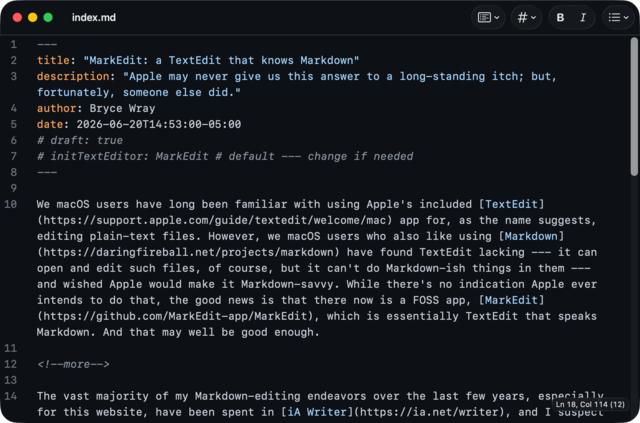
Other than its ability to be “Markdown-savvy TextEdit,” another of MarkEdit’s key advantages is that it’s a native macOS app. To put that another way, it doesn’t rely on Electron or any other bloated framework. This keeps it small (four MB as installed), light, and quick, even on older Macs — although it’s mainly for newer ones, albeit with special, additional versions for macOS iterations from several years ago. MarkEdit also works, looks, and feels like a real macOS app. As its GitHub page explains:
UI controls remain native to macOS in both aesthetics and behavior, including force-touch word lookup, inline predictions, and Writing Tools.
Oh, and for those like me who care about such things: it appears MarkEdit is not (yet?) vibe-coded. How long that will continue to be the case, I obviously can’t know; but, for now, MarkEdit seems to be a human(s)-built endeavor.
Correction: I looked again at MarkEdit’s GitHub repo and saw that multiple LLMs are in the list of contributors. [Sigh.] My apologies for the mistaken and now stricken-through assumption above.
Incidentally: to date, although the original TextEdit is on iOS/iPadOS as well as macOS, MarkEdit is macOS-only.
One other (and unrelated) item while I have your much-appreciated attention . . .
I’ve spoken here a number of times about how I converted my old Intel iMac to Linux. Most recently, my Linux distribution of choice was the Arch-based CachyOS, after I’d spent over two years with Fedora. But, while I still think CachyOS itself is pretty interesting, I’ve now reversed course and gone back to Fedora because of the craziness — still ongoing as of this writing — that we’ve seen in the Arch Users Repository (AUR) over the last few weeks. Yes, I knew and observed the correct procedures for safely using the AUR; and, besides, I really wasn’t using the AUR all that much anyway (just two packages, one of which is provided by no less than 1Password); but I simply felt better and safer in going back to Fedora. At my age, I’ll gladly pass up a little performance for greater peace of mind.
2026-06-04 03:27:00
AVIF support in Hugo, hashes in action(s), floaters, and clankers.
For no major reason other than that I feel like writing about a few odds and ends which have recently occupied my mind, here’s yet another “Mixed nuts” post.
Although I haven’t yet tried it on this here site, the Hugo static site generator has added AVIF support to its already impressive image processing capabilities as of v.0.162.0. The curious may want to check out this demo repo and its corresponding site. Note that, apparently, not all browsers handle the HDR aspects equally well.
When I build this site through CI/CD, I typically use a GitHub Action which, in turn, calls on other actions to facilitate things — e.g., checkout for accessing the site repo’s contents. After reading about one supply-chain attack after another over the last few months, I finally decided to heed widely discussed advice and pin those actions by their respective commit-hashes, not their release tags. This means that even if a bad actor manages to hijack the repo of (again, e.g.) checkout, my overarching GHA won’t be affected. This article by Rafael Gonzaga explains; and this one on the StepSecurity website gives you additional details, notably how you get each hash in the first place.1
Ah, me, but getting old does so bite sometimes. To quote T. S. Eliot’s The Love Song of J. Alfred Prufrock:
I grow old . . . I grow old . . .
I shall wear the bottoms of my trousers rolled.Shall I part my hair behind? Do I dare to eat a peach?
I shall wear white flannel trousers, and walk upon the beach.
Well, that’s all well and good, but Eliot never said a word about floaters; and, boy, are they ever in my eyes (which are both aged and myopic2, an especially floaters-friendly combo). So much so, in fact, that my web-browsing habits have veered away from a position I took here six years ago — in one of the earliest “Mixed nuts” posts, as a matter of fact — on the question of light mode vs. dark mode. Despite studies I cited back then, I am now making use of dark mode whenever possible because, simply put, the floaters make reading light text on dark backgrounds far less aggravating than is the case with dark text on light backgrounds. I will reserve judgment on the trousers, the hair (as if I had enough to consider), the peach, and the beach.
I’ve added another “slash page.” This one explains my stances on AI where the site is concerned. The bottom line: I don’t use AI for writing, although I do let it give me limited assistance in coding. The day when I can no longer write without the help of clankers will be the day when I call it a day, website-wise. There’s already enough slop out there without this site’s adding to it.
In short: you navigate to the web page of the commit itself and copy the hash from the end of the page’s URL. ↩︎
Sort-of correction: Actually, on second thought, it’s not accurate to say that I have myopia now, because I had cataract surgeries nearly ten years ago which fixed that. However, I suspect that my having had myopia (and severe myopia, at that) for a bit over sixty years prior to those procedures may still be contributing to my floaters-related woes. ↩︎
2026-05-05 04:29:00
Improving my scripting following hvm’s recent changes.
Late last year, I had to adapt this website’s repository to accommodate a change in how Hugo’s macOS version is packaged. In short, I started to use the hvm (Hugo Version Manager) app to manage my computer’s use of the Hugo binary. More recently, after a change to hvm itself, I made a further adaptation. Fortunately for me, as in the case of that earlier post, Hugo maintainer and hvm creator Joe Mooring gave me help in overcoming, as I described to him, “my embarrassing lack of scripting-fu.”
I will assume you’ve already read the aforementioned post from last December; that way, I needn’t go into a huge amount of detail about why I switched to hvm, how it works, and so on. Instead, this post is about the latest incarnation of hvm, how it works, and what that meant — and, to be fair, made possible — for my purposes.
When I first began using hvm, it was at v.0.9.0. At that point, and for a few versions thereafter, it was providing only one edition of Hugo, the extended one. As a result, hvm’s auto-generated .hvm file needed to give you only the Hugo version number being used by your repo, such as:
v0.153.0Then, a few weeks ago, Mooring released hvm v.0.14.0, the first version which allowed the user to choose from among multiple different Hugo editions. Currently, those are standard, standard-with-deploy, extended, and extended-with-deploy.1 This change in hvm, thus, would require the resulting .hvm file to provide more information. For example, as I write, here is the content of my repo’s .hvm file:
v0.161.1/standardI initially thought this change would bollix up the local scripting I described in that previous post, but it didn’t because hvm 0.14.0+ installs the user-specified Hugo binary in a directory structure that corresponds exactly to the mini-path in that .hvm file. In other words, this:
/Users/$USERNAME/Library/Caches/hvm/$HUGO_VERSION/hugo. . . still works the same, because $HUGO_VERSION continues to be the same as what’s in .hvm:
/Users/$USERNAME/Library/Caches/hvm/v0.161.1/standard/hugoI got an additional benefit from hvm 0.14.0+, thanks to Mooring’s helpful suggestion: it now makes my site-deployment CI/CD a little less needful of my attention. (After all, automation is supposed to be less troublesome, not more so, than doing everything manually.) He showed me, in part of a demo repo he maintains, how he uses the .hvm output to tell a GitHub Action which version of Hugo it should download. Previously, I’d always provided that information through manually updating my GitHub Actions workflow file whenever I updated Hugo. Now, with a slight variation2 on Mooring’s code, the workflow file gets that info from .hvm:
- name: Hugo download/install
 run: |
 if [ -f .hvm ]; then
 hvm_raw=$(cat .hvm)
 HUGO_VERSION=$(echo "${hvm_raw%/*}" | tr -d 'v')
 fi
 wget https://github.com/gohugoio/hugo/releases/download/v${HUGO_VERSION}/hugo_${HUGO_VERSION}_linux-amd64.deb -O hugo_${HUGO_VERSION}_linux-amd64.deb
 sudo dpkg -i hugo*.deb
In the third line of that if/fi loop, ${hvm_raw%/*} reads the .hvm file’s contents up to the slash, while tr -d 'v' removes the v that precedes the version number (since that v isn’t used in the actual file names for the Hugo release assets). The result provides only the Hugo version number as HUGO_VERSION, which the succeeding lines use to download the desired version of Hugo onto the GitHub Actions runner.
Incidentally, if you prefer a GitLab CI/CD version of this, here’s one I’ve used:
- >
 if [ -f .hvm ]; then
 hvm_raw=$(cat .hvm)
 HUGO_VERSION=$(echo "${hvm_raw%/*}" | tr -d 'v')
 fi
- echo "Downloading and installing Hugo v.$HUGO_VERSION ..."
- curl -LJO https://github.com/gohugoio/hugo/releases/download/v${HUGO_VERSION}/hugo_${HUGO_VERSION}_linux-amd64.deb
- apt install -y ./hugo_${HUGO_VERSION}_linux-amd64.deb
Of course, given how the various CI/CD platforms seem increasingly overwhelmed by AI-created traffic, I may end up reverting to my previously used direct deployment method — in which case, I wouldn’t have to inform any remote code runner of the Hugo version I’m using. However, while I’m still using remotely hosted CI/CD, I’m pleased to use these methods to simplify things just a tad.
Update, 2026-05-05: On a slightly related note, I learned while researching for this post that, at long last, GitHub Actions now allows you to set your runner’s time zone (including for cron jobs) by simply using a TZ variable, as has long been possible in GitLab CI/CD. This eliminates the need to access other, mostly (apparently) unmaintained Actions to perform that one basic function within one’s workflow file.
Hugo’s extended edition (and, presumably, its extended-with-deploy edition) will be deprecated sometime within the next year or so. With the recent deprecation of its embedded LibSass (which itself is long since gone), the extended edition’s only remaining raison d’être has ended, so removing that edition from the list of regular releases will ease the Hugo team’s maintenance burdens. ↩︎
I now always use the standard edition of Hugo, so I didn’t need an additional line from Mooring’s code that also pulled the Hugo edition. Instead, my script simply gets the standard edition of whatever Hugo version is mentioned in .hvm. ↩︎
