


2026-09-08 17:45:00
Welcome to this edition of our Tools for Thought series, where we interview founders on a mission to help us think better and work smarter. Dr David Urbansky is the founder of Linkflare, a universal bookmark manager that helps you save links, read distraction-free, and never forget the information that matters to you.
In this interview, we talked about why saving information is not the same as remembering it, how to turn bookmarks into useful knowledge, why spaced repetition belongs in a bookmarking tool, how automation can reduce the work of organizing information, why personal knowledge may matter even more in the age of AI, and much more. Enjoy the read!
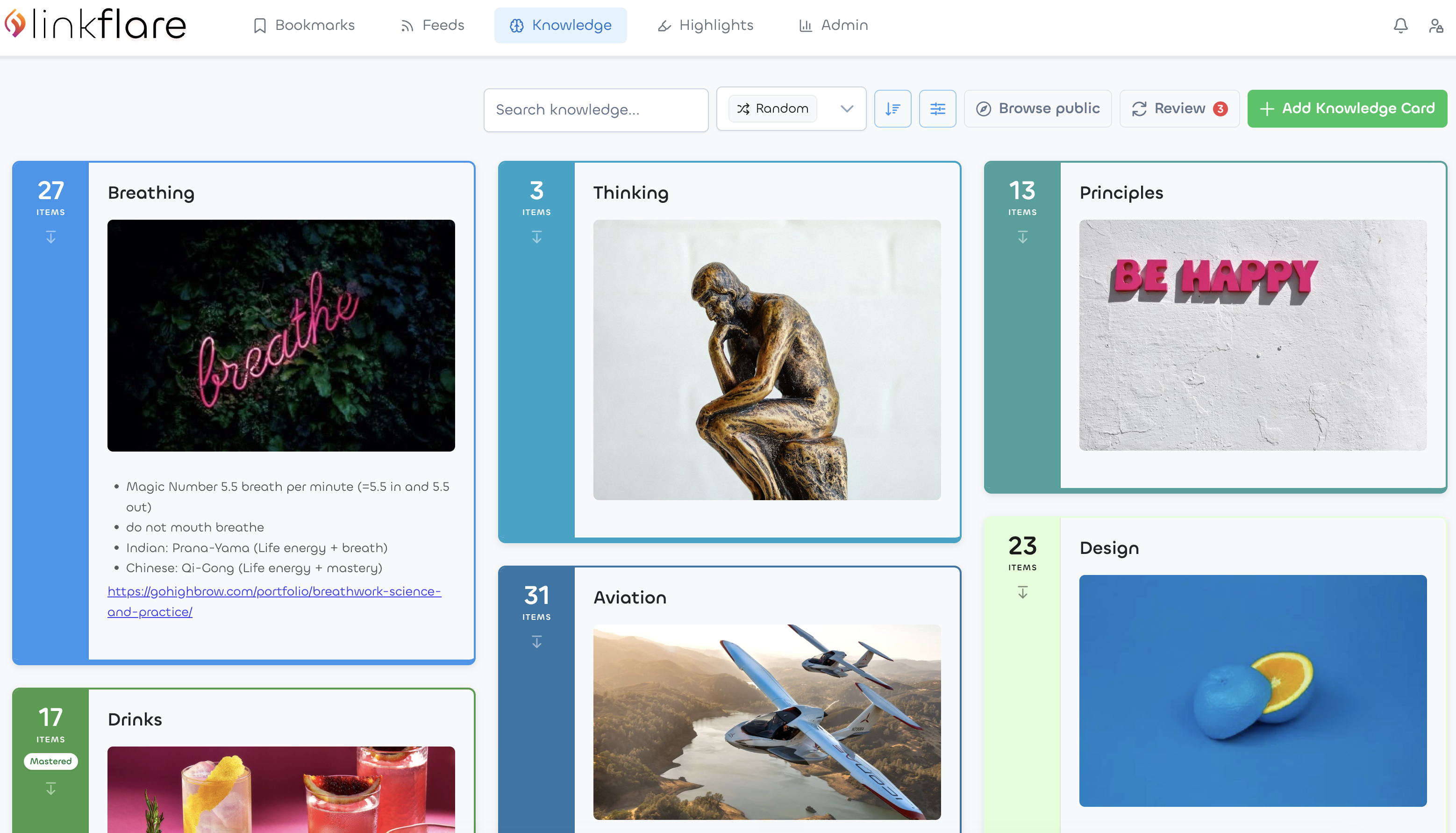
Hi David, thank you for joining us. You believe that bookmarks should be more than a collection of saved links. Why does that matter?
I’m the kind of person who keeps lists of everything. I’ve been running my life on David Allen’s Getting Things Done for years, so I have to-do lists, someday-maybe lists, lists of things to remember. And it doesn’t stop at tasks: movies I want to watch, recipes I want to try, books, places we might visit one day. Capturing things is how I close open loops. Once something is written down, my head can let it go.
The problem was never the capturing, it was where everything ended up. The movies lived in watchlists on three different streaming platforms. The recipes sat in chat threads. Interesting quotes and facts went into a notebook or onto sticky notes, and book takeaways into OneNote, where I’ve kept my lists for twenty years now. Every app is happy to hold its own little list. None of them talk to each other, and none of them care whether you ever come back.
But coming back is the whole point. A bookmark is a small promise to your future self: I will read this, cook this, remember this. Most tools let you break that promise silently. I’d finish a book full of ideas, write down the takeaways, and six months later I couldn’t find the notes, let alone remember the ideas. Saving something feels productive in the moment, but saving is not remembering. That gap between what I collected and what I could actually find and use again bothered me for a very long time.
How did you come up with the idea for Linkflare?
My whole career has been about teaching machines to read the web. I did my PhD on web content extraction and assessment, and afterwards I built data APIs for developers. The biggest one, spoonacular, takes recipes and food content and turns them into structured information: ingredients, amounts, nutrition, cooking times. So for about fifteen years my job was helping companies turn messy web pages into clean data they could build products on.
Meanwhile, my own saved knowledge was a junk drawer. My bookmarks were plain URL strings. My reading backlog lived in Pocket. My lists were scattered across half a dozen apps. At some point the irony became hard to ignore: I was pointing extraction technology at the web all day for other people’s products, and never at the thing I personally cared about most, which is my own library.
Pocket shutting down was the final push. I had years of saved reading in there, and suddenly the platform underneath it was simply gone. That made something very clear to me: what we save is only as durable as the app we save it into. So I built Linkflare, which is essentially everything I know about understanding web content, pointed at your personal library. When you save a link, the system should understand what it is, pull out the parts that matter, and help you actually come back to it.
Most bookmarking tools are good at saving content. Linkflare seems much more focused on what happens after you save them. Can you tell us more about that?
Saving is the easy part. Every tool can store a URL. The question I find much more interesting is what all those saved things should turn into later.
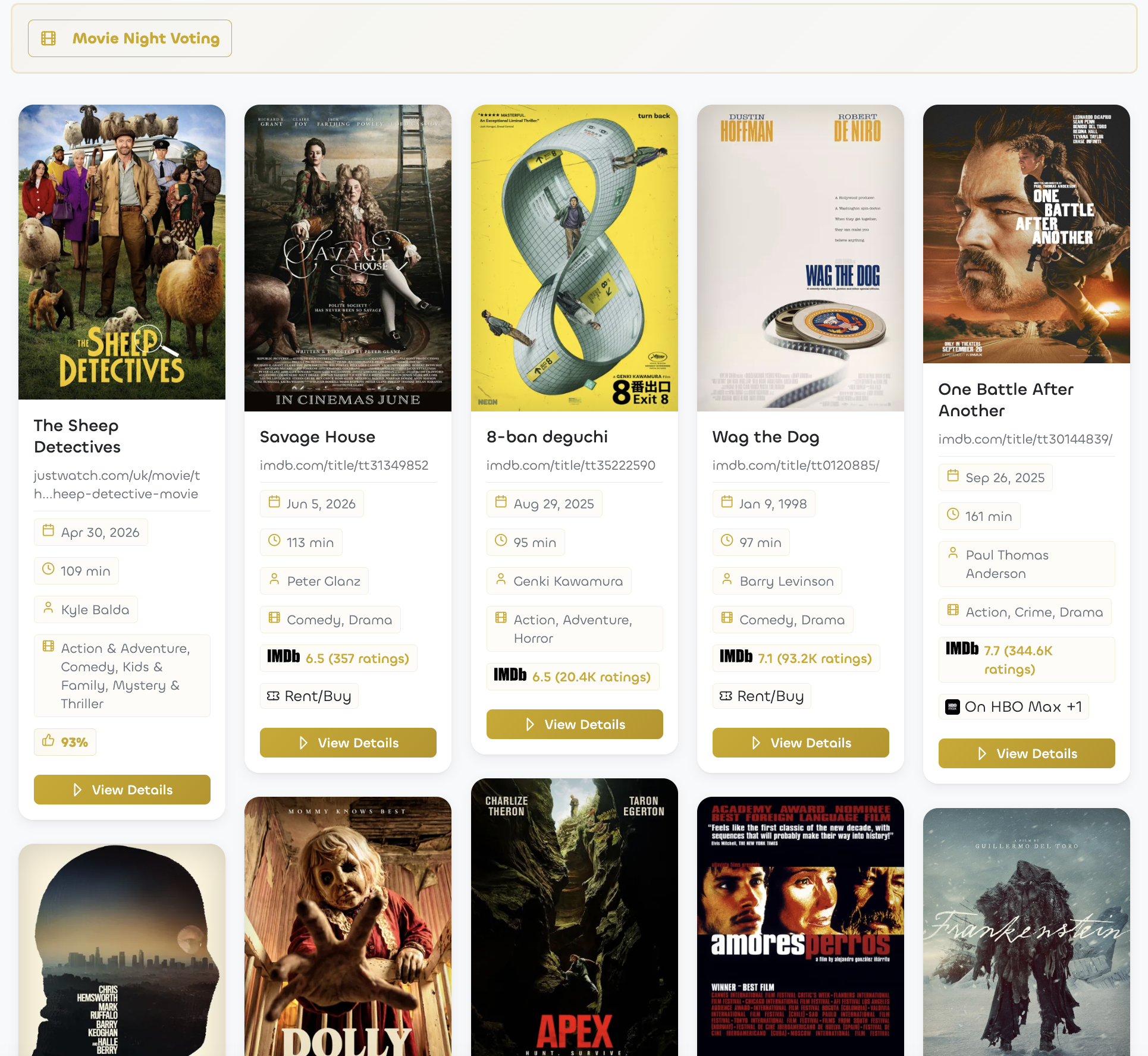
Sometimes the answer is very practical. My fiancée and I save recipes all week, and on the weekend they become an actual meal plan instead of a pile of screenshots. Before a movie night we don’t scroll through streaming menus for half an hour, we open our shared watch list, sort by rating and pick something. And when friends are over, there’s even a little movie-night voting mode, so everyone gets a say. None of that works if a bookmark is just a dead string.
But the deeper answer is about memory. When I read an article and highlight the two paragraphs that actually matter, those highlights shouldn’t be buried in an archive. In Linkflare they can become knowledge cards, small pieces of knowledge in your own words, still connected to their source. And because knowledge fades when you never meet it again, spaced repetition is built in: the app resurfaces your cards for a short review right around the time you’d otherwise forget them. The reviewing happens in the same place as the collecting, with no extra app in between.
That’s the loop I care about. Save something in two seconds, actually read it, connect it to what you know, and remember it. Most tools stop after the first step.
People already have browser bookmarks, read-later apps, notes, and knowledge-management tools. What do you think is missing from that workflow?
Each of those tools holds one shard of the workflow. Browser bookmarks are just a title and a URL, no context, no memory. Read-later apps quietly fill up with things you’re never going to read. Notes apps hold pasted links nobody ever clicks again. And the knowledge-management tools are wonderful for your own thinking, but they’re an awkward home for the constant stream of things you find. The way I’d put it: Obsidian is where your own thoughts live. Linkflare is where the web’s knowledge lives, and gets remembered. They complement each other well.
What was missing for me personally was one trusted place with a loop built in. Take newsletters. I subscribe to more than I can read, Ness Labs included, and for years all those unread issues piling up in my inbox just made me feel guilty. My workaround was to save the article link to Pocket and archive the email, just to feel better. Now Linkflare subscribes to those feeds directly. New issues land in my link inbox next to everything else I’ve saved, I read them when I choose to, and my email inbox is for humans again.
Open tabs are the same story. If something looks interesting, I save it and close the tab with a clear conscience, because I know I’ll find it again.
Let’s talk about how Linkflare works in more detail. What does the experience look like for someone using it day to day?
My day starts in the inbox. Overnight, my feeds have delivered new articles, and instead of doomscrolling, I read a few of them. When I’m short on time, the built-in summaries help me get through more. I subscribe to Arnold Schwarzenegger’s Pump Club, for example, which is excellent but comes out every day, and that gets overwhelming fast. For those, the summary pulls out the most important points so I don’t always have to read the whole issue. Funnily enough, they clearly know it too: each issue now ends with an AI-generated summary of its own, and those are great.
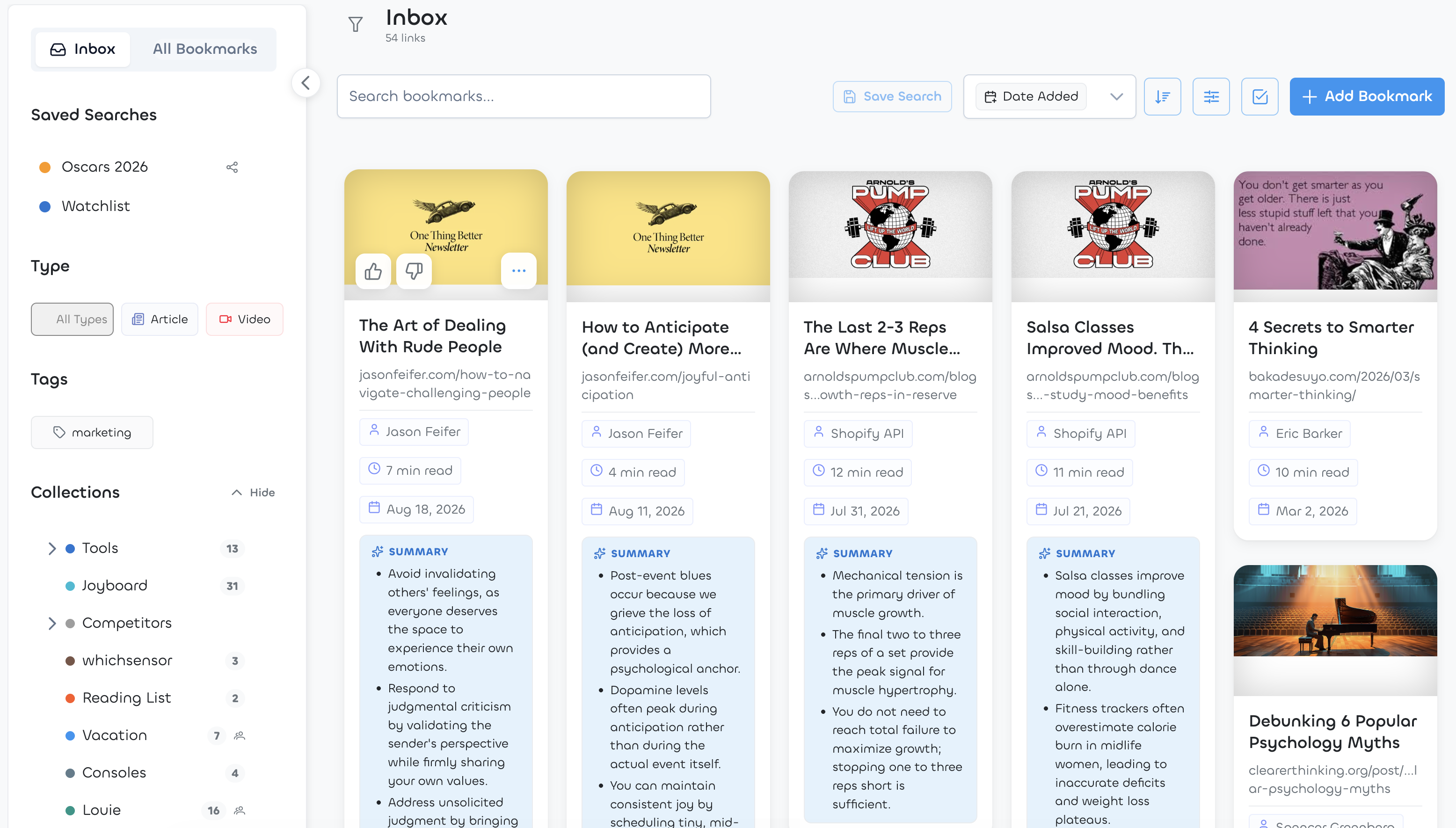
During the day, saving is a reflex. I come across a paper or a blog post, click the browser extension, done. My fiancée sends me a recipe on TikTok, I share it to Linkflare, and it extracts the actual recipe out of the video: ingredients, steps, servings. There’s an oven-baked Big Mac wrap in my account right now that started as a TikTok video she sent me, and we’ve cooked it many times since. I hear about a film, save it from IMDb, and it lands in the watch list with its rating and where it’s streaming.
The important part is that Linkflare does the librarian work to save time. It recognizes what kind of thing you saved, an article, a recipe, a movie, a place, fills in the right metadata, and my rules do the filing. Videos, for example, go automatically into my inbox to watch later.
In the evening I read saved articles in the clean reader view, or I have one read aloud to me while I go for a walk. Whatever I highlight along the way is waiting for me afterwards, ready to become something more permanent.
One of the distinctive ideas in Linkflare is that different bookmarks become useful in different ways. How does that work?
A recipe and a movie need different things from a bookmarking tool. “I’ll cook this” needs different help than “I’ll watch this” or “I’ll read this”, so Linkflare treats them differently.
When you save something, it figures out what it is and enriches it. Recipes get ingredients, cooking times and nutrition information, even when the source is a video with no written recipe anywhere. Movies and shows get the director, the IMDb rating and where you can currently stream them. Books get the author and page count, places get a map, products get the current price and can alert you when it drops. Articles get a reading time, a distraction-free reader, and audio if you’d rather listen than read.
That metadata is exactly what makes a collection useful later. When we can’t decide what to watch, I sort our watch list by IMDb rating and we pick from the top. When I want to bake something ambitious on a weekend, I check the time first: there’s a sourdough bread in my account that takes 60 hours from start to finish. That’s exactly the kind of thing you’d never find again in a chat thread. And none of it costs you anything at save time: you press one button and the rest fills itself in.
You offer quite a bit of automation, from metadata and AI tagging to organization rules. How do you balance automation with letting people organize things their own way?
My rule is that automation prepares and the user decides. Linkflare fills in everything it can on its own: the type, the metadata, a preview image, tags if you turn on automatic tagging. But every field it writes is editable, so it never turns into a black box.
On top of that there’s automation you author yourself, which I like even better: rules. “Everything from YouTube goes to the inbox.” “Recipes go into Cooking.” You describe the rule once and the filing happens forever after. And when the built-in metadata isn’t enough, you can define your own structured fields, a number, a date, a text, whatever matches how you think, and filter and sort by them like everything else.
I tried hard not to impose my own organizational religion on anyone. Some people maintain a meticulous tree of collections, others throw everything into one big pool and rely on search and filters. Both work fine. The point is that organizing never becomes a second job. You already did the interesting part when you decided something was worth keeping.
Linkflare has spaced repetition built in, which most people associate with flashcard apps and language learning. Why bring memory practice into a bookmarking tool?
Because the forgetting curve doesn’t care where you learned something. Read a brilliant article on Monday, and by Friday most of it is gone. That’s just how memory works when you never revisit material.
That always struck me as a waste. We put real effort into finding and reading good things, and then let almost all of it evaporate. There are excellent flashcard apps, but hardly anyone sits down after reading an article to author flashcards about it. The friction is too high. So in practice, spaced repetition stays locked inside vocabulary drills and exam prep, while the knowledge we deliberately gather as adults gets nothing.
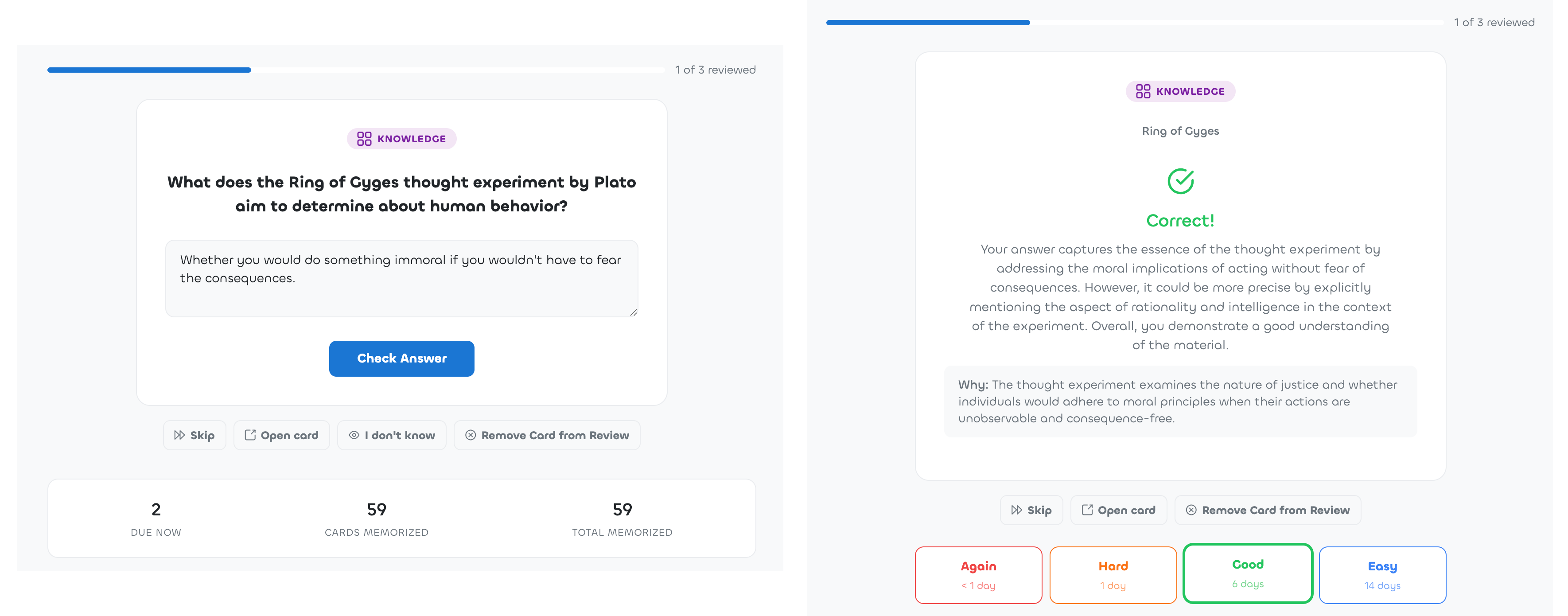
So we removed the friction. While you read in Linkflare, you highlight. Highlights and takeaways become knowledge cards, which you organize into topics. Any card you want to keep, you toggle into review, and the review queue does the rest: it brings each card back right around the time you’d otherwise forget it, at growing intervals. You can grade yourself, or have Linkflare generate a quiz question about the card and evaluate your answer.
Reviewing your own material also feels completely different from studying somebody else’s deck. You picked every single card, so every question is about something you once cared enough to save. A few minutes between two work sessions. It never feels like homework, but fun and thanks to some AI always different and fresh.
With search engines and AI assistants one keystroke away, some people would argue we don’t need to remember anything anymore. Why do you think internalizing knowledge still matters?
Knowledge you carry is the only knowledge you can think with. Connections don’t happen in a database, they happen in your head. You notice that an idea in an article contradicts something from a book you read last year, or that a concept from biology maps beautifully onto a problem at work. If neither of them is in your memory, no search engine will produce that spark for you.
There’s a social side too. Everyone can look facts up now, which is exactly why carrying knowledge has become rarer and more interesting. The most interesting person in the room isn’t the one who can google or ChatGPT fastest. It’s the person who can tell you the story behind the fact, connect it to what you just said, and pull in something surprising from a completely different field. That’s taking advantage of your curious mind.
I actually think AI assistants make remembering more valuable, not less. When answers are cheap, what sets people apart is judgment, taste, and the things they really know. The assistants are great at retrieving. The connecting and the doubting still happen in a human head, and they work with whatever you’ve actually retained.
Who exactly is Linkflare designed for?
Curious people and lifelong learners, first of all. People who read and watch and save a lot, and want it to make them smarter, which only works if you remember any of it later. They’re the ones who get the most out of highlights, knowledge cards, and the review queue.
And people who like order. If you recognize yourself in the mess I described earlier — movie lists on the streaming platforms, books in one app, recipes in chat threads, articles in a read-it-later tool, notes in a PKM system — Linkflare is one tidy home for all of those lists. No clutter, and everything stays findable.
And families. Some of the most-used collections in my own household are the shared ones.
What about you, how do you personally use Linkflare?
Everything I’ve described is from my real account, but here’s a bit more of it. The daily backbone is the inbox: newsletters and feeds land there, and I work through it in idle moments. Our watch list currently holds about sixty movies and shows, sorted by IMDb rating, which has ended more than one “what should we watch” discussion in under a minute. Recipes my fiancée and I save during the week turn into the weekend’s cooking. When we plan a trip, everything goes into a vacation collection, sights, restaurants, hotels, so the itinerary basically assembles itself.
The collection I cherish most is the one we share for our son: things we’d like to get him, places we want to take him. Either of us saves something in passing, and both of us see it.
On the knowledge side, I turn book takeaways and article highlights into knowledge cards. My review habit is nothing heroic: around ten cards a week, in the moments between work sessions when I would otherwise just check email. And lately, because Linkflare has an MCP server, I sometimes let Claude quiz me on my own cards in the middle of a work day. Being interrogated by my own library is still a slightly surreal experience.
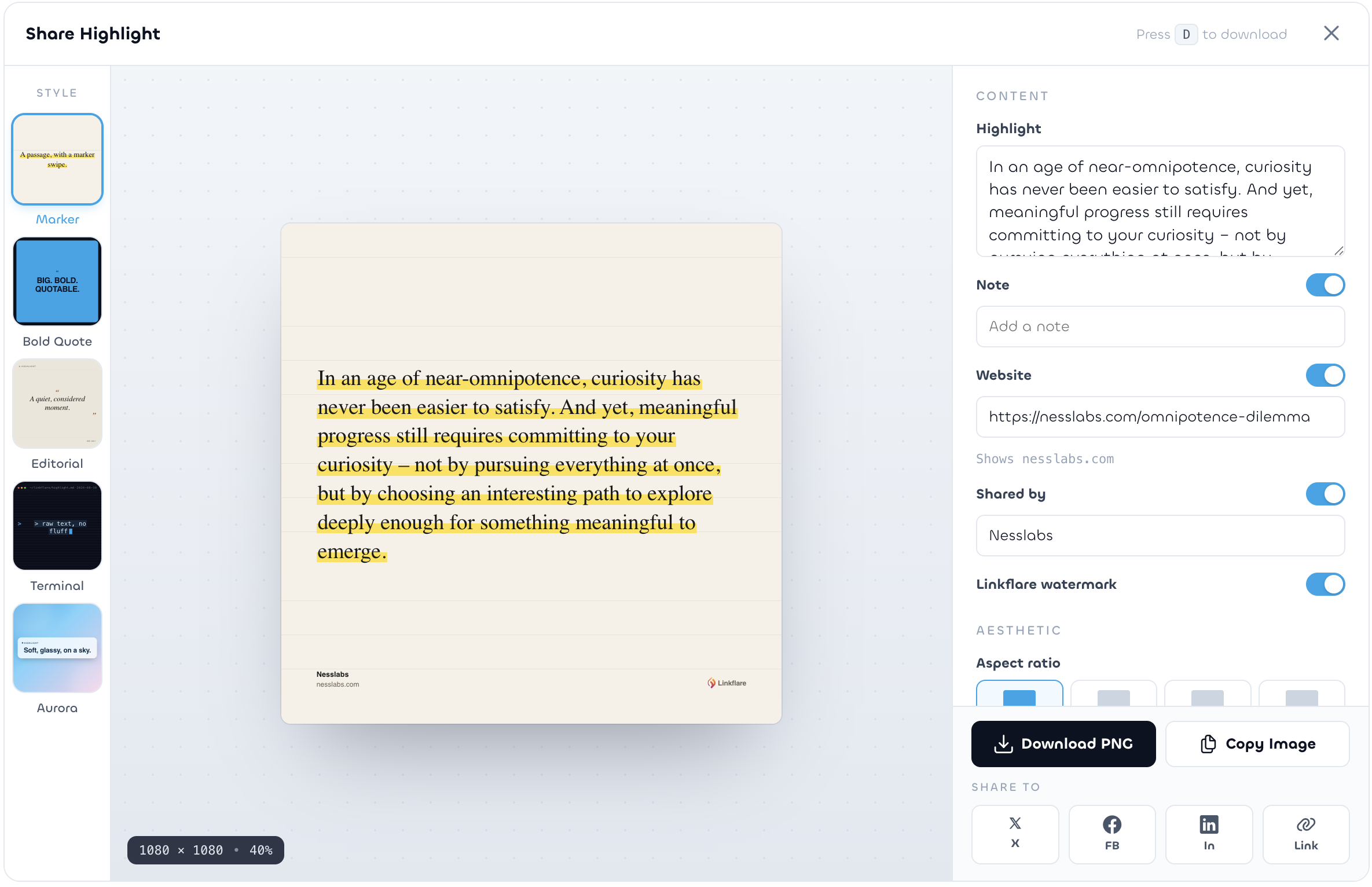
And since we’re at Ness Labs: the highlight in the screenshot below is from one of yours, “The Omnipotence Dilemma”, a line about committing to your curiosity instead of chasing every thread at once — more or less the philosophy behind the whole product. Any highlight can be turned into a share card like that straight from the app.
Looking ahead, how do you see Linkflare and personal knowledge management evolving over the next few years?
There are two things I keep coming back to. The first: your library has to outlive any platform. Pocket’s shutdown was a warning shot for the whole industry. So your data stays exportable, and the business is funded by subscriptions rather than attention, which means I have no incentive to keep you scrolling. A tool for thought has to be on your side.
The second: your library should start working for you. Linkflare has an MCP server, which means AI assistants can, with your permission, search your bookmarks, save new ones, and quiz you on your knowledge cards. I find that direction far more interesting than generic chatbots, because this assistant knows what you’ve collected over the years, not just the internet at large. “What was that article about sleep I saved last year, and what did I highlight in it?” should simply have an answer.
Beyond that, I want the connections to get deeper. The tool should notice that something you save today relates to something you highlighted months ago, and tell you. I think the next years of personal knowledge management will be less about capturing more, because everyone has capture solved, and much more about resurfacing better — showing you the right memory at the moment you can use it, from a library you own.
Thank you so much for your time, David! Where can people learn more about Linkflare?
Everything starts on our website, and you can use it for free. I’m on X and on Bluesky as well, and I’d love to hear how you organize your corner of the web.
For Ness Labs readers we’ve set up something small: the code NESSLABS gets you 30 days of Linkflare Pro for free.
And if you only try one thing, make it a tiny experiment, in proper Ness Labs fashion: for one week, save everything interesting into the inbox instead of leaving tabs open, and spend five minutes a day reviewing what you captured. Watch what it does to your focus, and to how much you remember.
The post Never forget what matters with Dr David Urbansky, founder of Linkflare appeared first on Ness Labs.
2026-08-20 21:23:40
Welcome to this edition of our Tools for Thought series, where we interview founders on a mission to help us think better and work smarter. Jim Lau is the founder of Flowing, a desktop writing application for researchers and students who want AI assistance without losing touch with their sources. It allows you to import your reference PDFs into a local library and use AI features that attach verifiable library snippets to every suggestion.
In this interview, we talked about how writing is a form of thinking and not just text production, how to use AI to strengthen human judgement, the importance of context and the challenge of resurfacing what we already know, how trust is based on traceability, and much more. Enjoy the read!
Hi Jim, thank you for joining us. You’re building Flowing around the idea that AI-assisted writing should stay grounded in the researcher’s own sources. Why do you think that matters?
Thank you for having me. I think the reason this matters comes down to a fundamental difference between writing and simply generating text.
Academic writing is not only about producing sentences that sound clear or convincing. It is a process of building a coherent argument where ideas, claims, evidence, and prior research connect with each other. A strong manuscript depends on how a research question is motivated, how previous studies support or challenge an argument, and how evidence connects with the conclusions.
Much of this coherence comes from the researcher’s years of reading, experiments, notes, and the specific body of literature they have built around a topic.
Researchers often do not struggle because information is unavailable. Over years of research, they build extensive research libraries containing hundreds or thousands of papers. The challenge is that valuable insights are often buried inside those PDFs, and reconnecting them with the writing process at the right moment can be difficult. A paper a researcher read months ago may contain exactly the idea or evidence they need, but finding that specific passage again while drafting can interrupt their train of thought.
For me, evidence-grounded AI writing means bringing a researcher’s own research library back into the moment of writing. The goal is to keep that knowledge present during writing — helping researchers reconnect with what they have learned while giving AI better context to work with.
How did you come up with the idea for Flowing?
Flowing evolved from my earlier exploration of how researchers interact with knowledge throughout their workflow.
Before Flowing, I built a research paper reader called Paperly. I initially focused on making references more accessible during reading, helping researchers move between papers and their cited sources without breaking their flow. Over time, I realized that reading was only the beginning of the challenge — the deeper question was how researchers could bring the knowledge they had accumulated back into the moments when they needed it most, especially during writing.
The emergence of generative AI brought a new dimension to this question. As researchers started experimenting with AI-assisted writing, it became clear that AI could provide valuable support during the writing process, but it also introduced new challenges around reliability and trust.
A chemistry professor I worked with experienced this while experimenting with AI-assisted writing for a manuscript. Although the generated text was often fluent and well-structured, he also encountered cases where some statements sounded convincing but did not accurately reflect the underlying research. This created a natural concern: how can researchers benefit from AI assistance while ensuring that their writing remains connected to reliable evidence and the actual context of their work?
That experience shifted my attention toward a different question: how could AI work with the literature and context researchers already rely on? Flowing grew from that direction.
A lot of the conversation around AI writing focuses on the model itself. You seem to believe context may be just as important. Can you tell us more about that?
I think the progress of AI models has been remarkable, and model quality will continue to matter. But when AI is working inside a specific manuscript, another question becomes important: what context does the model actually have access to?
We explored this through a comparison using a real chemistry research manuscript. We gave Flowing and ChatGPT the same manuscript, the same writing position, and the same instruction, and compared their continuation across four examples from different sections.
What we found was that both approaches could produce fluent academic writing, but the literature-grounded workflow was often better aligned with the manuscript’s existing terminology and reasoning. The difference came from having relevant research context available during the writing process.
I shared the full comparison, including the four examples and screenshots, here. What this suggested to me is that model capability and research-specific context are not competing ideas. They solve different parts of the problem.
Researchers already have search engines, reference managers, PDF readers, and AI chatbots. What do you think is missing from that workflow?
I think the interesting thing is that researchers already have many powerful tools. Search engines help them discover papers, reference managers help organize their libraries, PDF readers help them understand individual documents, and AI assistants can help with drafting and editing.
These tools are valuable on their own, but researchers often have to manually move between them throughout their workflow. A paper discovered through a search engine becomes a reference in a library, annotations remain inside a PDF reader, and writing happens somewhere else. The context built during the research process does not always follow naturally into the moment when researchers start writing.
This is the gap Flowing is trying to address. Rather than treating the research library as a separate archive, we want relevant knowledge to come back into the writing process when it is actually useful — without researchers repeatedly searching for the same passages or manually moving context between tools.
I also had an interesting exchange with Rob Cuthbert, Editor of SRHE News and Emeritus Professor of Higher Education Management. He mentioned that some of the workflow ideas behind Flowing resonated with his own thinking about academic writing. It was useful to hear a similar concern from someone who has spent a long time thinking about academic practice.
I don’t see Flowing as replacing the tools researchers already rely on. I see it as trying to make the knowledge accumulated across those tools much easier to carry into the actual process of thinking and writing.
Let’s talk about how Flowing works in more detail. What does the experience look like for someone writing a paper?
A typical workflow starts with importing the researcher’s existing papers into Flowing. From there, they can write directly in their manuscript while Flowing retrieves literature that is relevant to what they are currently working on.
For researchers who are just getting started, having a complete literature library is not a requirement. When relevant sources are missing, Flowing can analyze the current writing context and help identify highly related papers that researchers can choose to add to their library. Over time, the research library becomes richer and more closely aligned with the researcher’s ongoing work.
As researchers draft a paper, Flowing analyzes the current manuscript context and retrieves relevant information from the literature library to support different writing tasks. Instead of asking researchers to manually copy background information into an AI prompt, the relevant research context can be brought into the writing process when it becomes useful.
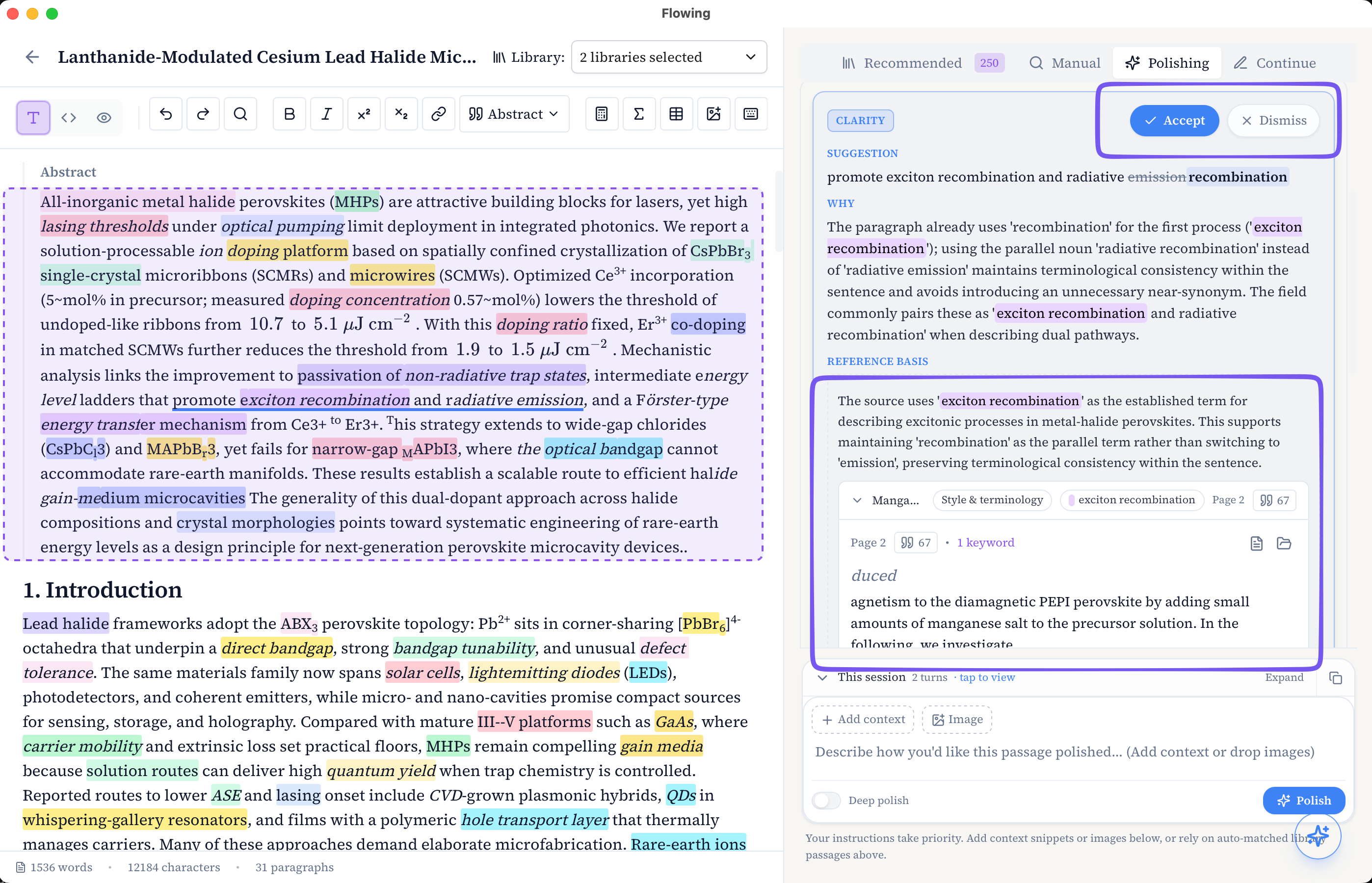
For example, when refining a paragraph, researchers can use Flowing’s polishing workflow to improve clarity and expression while keeping the terminology, concepts, and reasoning consistent with the underlying research context.
Similarly, when continuing a manuscript, Flowing can suggest possible next sentences or paragraphs based on both the existing manuscript and relevant literature context. The goal is to help researchers explore possible directions while staying connected to the knowledge behind their work.
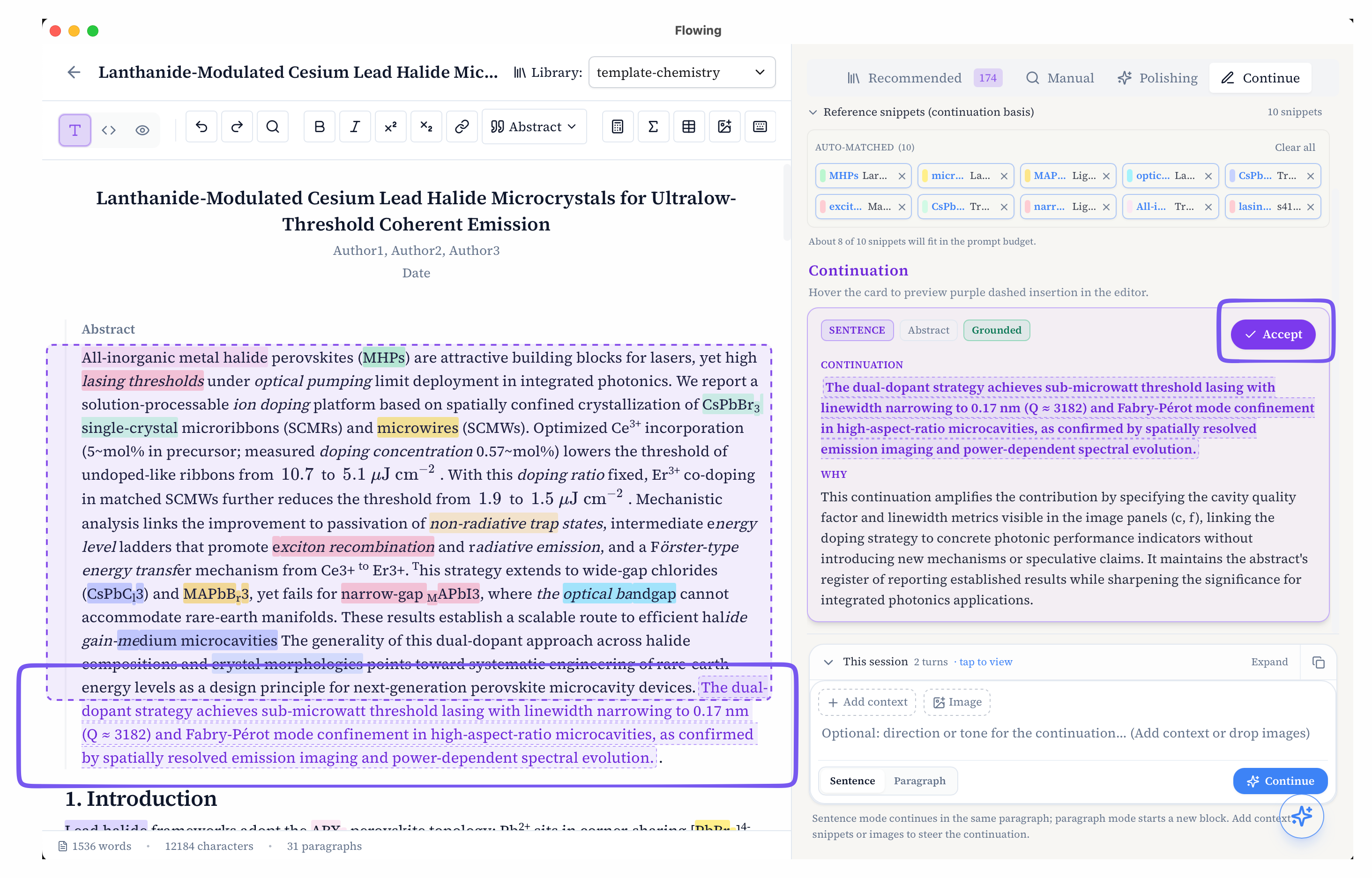
Throughout this process, researchers remain in control of the final decisions. They can review suggestions, examine the supporting context, and decide what best fits their argument and research goals.
One of the distinctive features is the way Flowing surfaces evidence alongside the manuscript. How does that work?
One of the ideas behind Flowing is that evidence should be brought closer to the writing process itself. In many existing workflows, researchers have their papers organized in reference managers or folders, but the connection between those sources and the manuscript often requires manual searching. When a researcher is writing a specific paragraph, finding the exact passage that supports an idea can interrupt their flow.
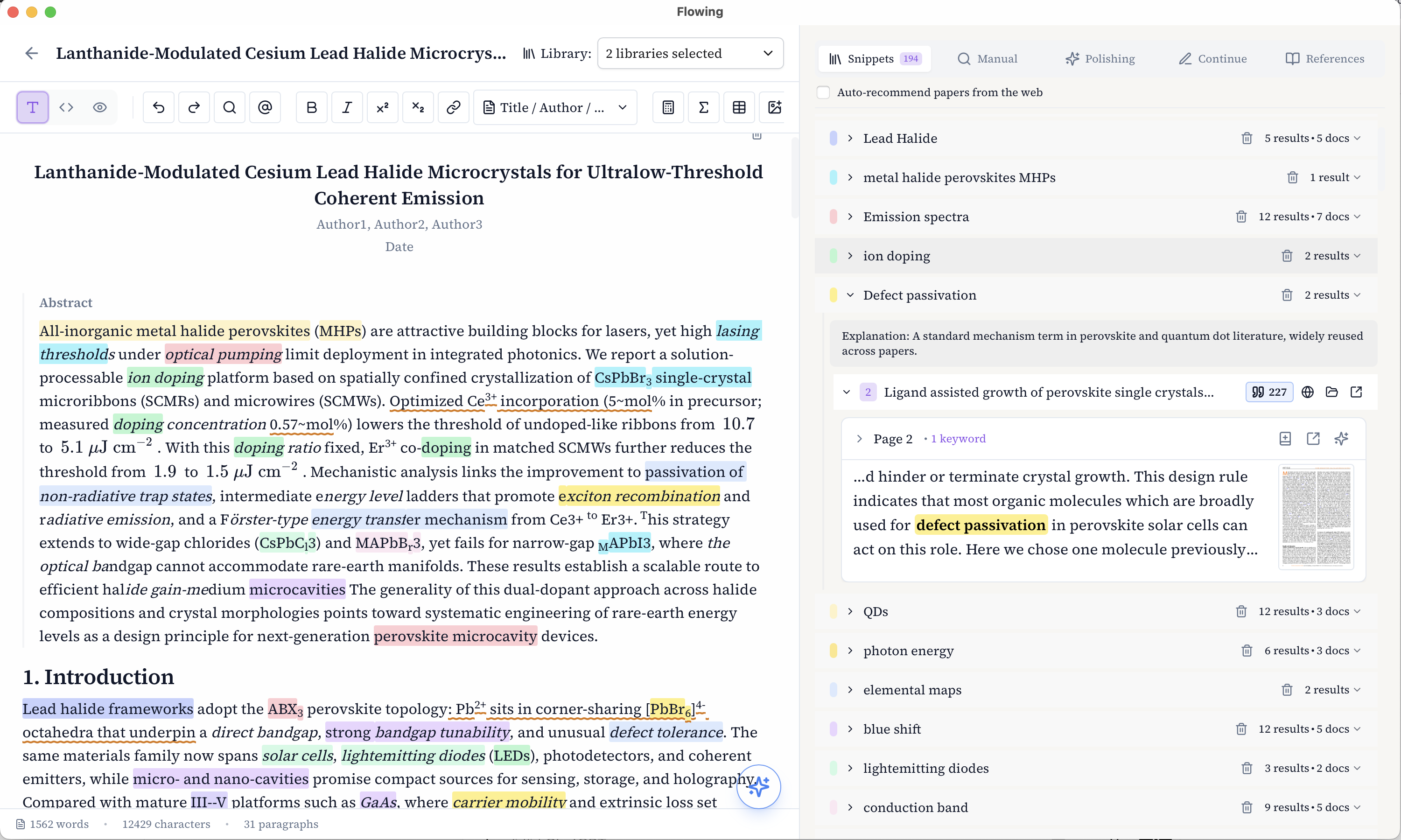
Flowing addresses this by making snippets from the research library context-aware. Based on what the researcher is currently writing, Flowing surfaces relevant passages from their papers and presents them as Evidence Cards alongside the manuscript.
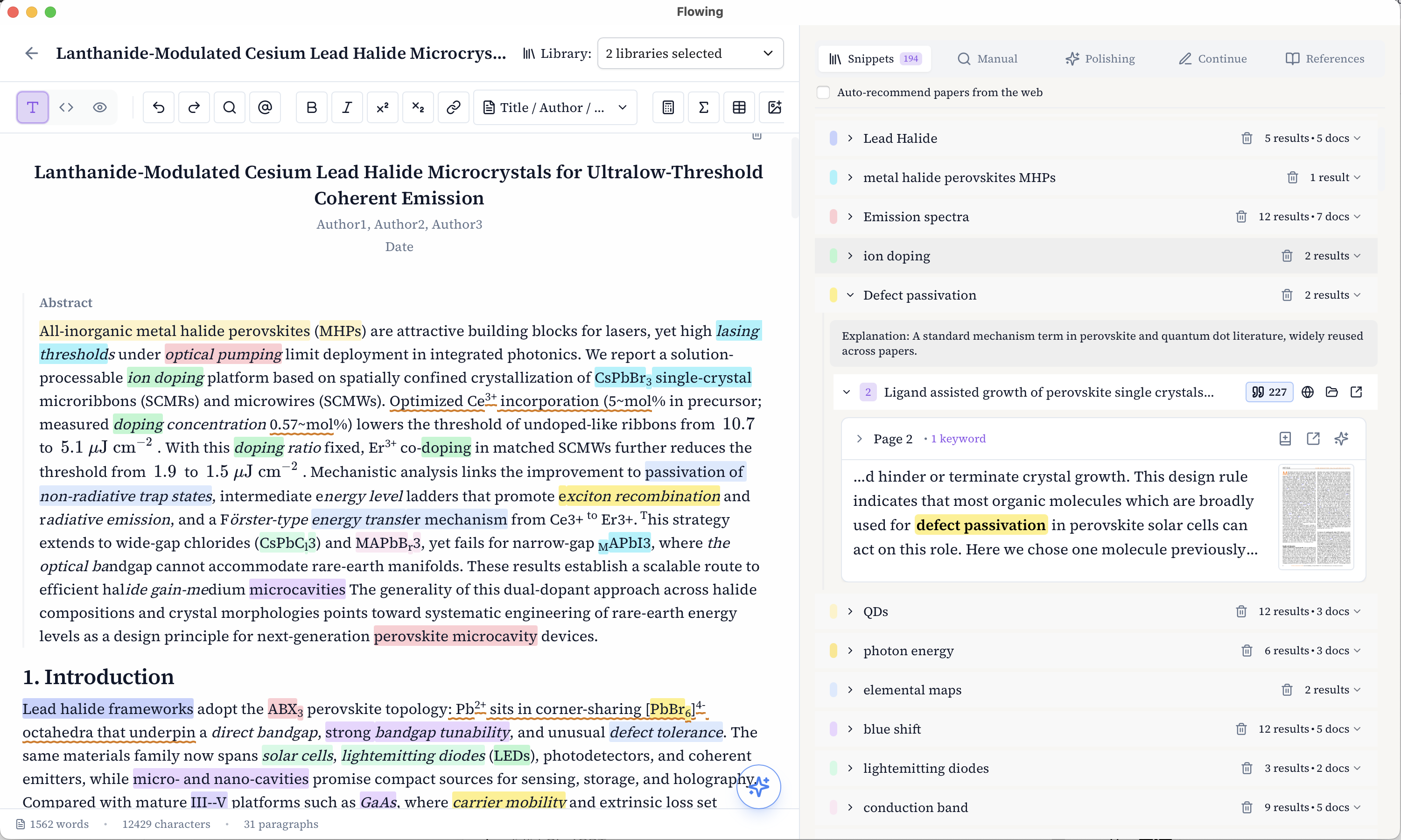
Each Evidence Card keeps the original source visible. Researchers can quickly review the relevant snippet, understand its context, and jump directly back to the original paper when they want to examine the full passage. This makes it easier to verify the connection between the writing and the underlying research.
Sometimes an Evidence Card also resurfaces something the researcher had forgotten — perhaps an explanation or perspective from a paper they read months earlier that suddenly becomes relevant again. I find that particularly interesting because the retrieved evidence is not only useful for AI; it can also help the researcher rediscover connections in their own reading.
AI can make writing faster, but writing is also part of how researchers think. How do you avoid automating too much of that process?
I think writing is not only a way to communicate research — it is also part of how researchers develop and refine their thinking. The goal of AI assistance should therefore not be to replace this process, but to support it.
AI can be valuable for reducing friction in writing, such as helping researchers refine expressions, explore possible structures, or continue developing an idea. However, the deeper parts of research writing — deciding what matters, how evidence should be interpreted, and where an argument should go — require the researcher’s own judgment.
This is why Flowing is designed around keeping researchers involved in the thinking process. Instead of generating a paper from scratch, Flowing brings relevant sources and context into the writing process, allowing researchers to evaluate ideas, explore possibilities, and make their own decisions.
In some ways, the role of AI is not only to create something new, but also to help researchers reconnect with and build upon the knowledge they have already accumulated.
I believe the best AI tools for research should make researchers more connected to their work, not less. AI can help with the process of writing, but the direction, interpretation, and intellectual ownership should remain with the researcher.
Who exactly is Flowing designed for?
Flowing is designed for researchers who are working with a growing body of literature and want to bring that knowledge more naturally into the writing process.
This includes PhD students, graduate researchers, academics, and anyone working on research-intensive writing projects where the connection between ideas, evidence, and previous literature is important.
The most common use cases are manuscript writing, literature reviews, research proposals, and other forms of academic writing where researchers need to maintain consistency with a large amount of existing knowledge.
Flowing is especially useful when researchers are not starting from a blank page, but are trying to turn years of reading and accumulated knowledge into a coherent piece of writing.
What about you, how do you personally use Flowing?
One moment that stood out to me happened while I was writing about agent-related research. Flowing surfaced a passage about context building from a well-known paper at exactly the point where it became relevant to what I was writing.
What I found interesting was that, if I am being realistic, I probably would not have searched for that term myself at that moment. It was relevant, but it was not the keyword I had in mind, and there is always a bit of human laziness involved when you are already focused on writing.
Seeing that passage appear at the right moment felt surprisingly helpful. It was almost like having a research assistant quietly place a useful piece of information beside me and say, “this might be relevant here.” That is one of the moments when I personally felt the value of this kind of workflow most clearly.
I also use my own research as a way to test Flowing carefully. I check whether continuation suggestions stay consistent with the original papers, and I built a separate agent that automatically collects and analyzes the Evidence Cards Flowing retrieves so I can evaluate their relevance and quality.
At the same time, I’m working with the chemistry professor I mentioned earlier to use Flowing for review-style writing, where we often need to connect ideas and evidence across many different papers.
Looking ahead, how do you see Flowing and AI-assisted research writing evolving over the next few years?
In the future, I hope research tools can turn scattered papers, evidence, references, and ideas into a connected, traceable knowledge network that is easier to think with.
Today, researchers often have to know what they are looking for before they can find it. You remember a concept, come up with a keyword, search for it, and then try to reconnect what you find with the problem in front of you. I would like that relationship with knowledge to become much more fluid. Relevant ideas should be within reach while you are reading or writing, even when you would not have thought to search for them explicitly.
Over time, I also hope this kind of system can support more associative exploration. A paragraph you are writing might connect to a concept in one paper, which in turn leads to a related method, disagreement, or perspective from another. These connections could help both researchers and AI move beyond simple retrieval and explore how different pieces of knowledge relate to one another, while always remaining traceable to the underlying evidence.
And this network should keep growing with the researcher. As new papers, notes, evidence, and ideas are added, the system should become better at reflecting the body of knowledge they have built over time, rather than treating every writing session as a new starting point.
For Flowing, that is the longer-term direction I find most exciting: making a researcher’s accumulated knowledge easier to reach and build on, so the writing process can also become a place where new connections emerge.
Thank you so much for your time, Jim! Where can people learn more about Flowing?
You can learn more about Flowing on our website. It includes an overview video, detailed documentation, and step-by-step tutorials to help you understand how Flowing works in different writing workflows. I also share more thoughts and experiments around evidence-grounded and context-aware AI writing on my Substack.
Thank you again for the opportunity to share the story behind Flowing. I truly appreciate the chance to discuss these ideas with the Ness Labs community, and I would be grateful to hear thoughts and feedback from researchers and anyone interested in exploring new ways of working with AI and knowledge.
The post Evidence-grounded AI writing with Jim Lau, founder of Flowing appeared first on Ness Labs.
2026-06-11 11:12:42
Welcome to this edition of our Tools for Thought series, where we learn from founders on a mission to help us think and live better. Oleksandr Matsiuk is the founder of RiseGuide, an expert-powered app that gives you a clear and personalized plan for self-improvement.
In this interview, we discussed why expert-led learning is so powerful, the role of stories and role models in self-improvement, how practice-based learning helps people apply ideas in daily life, the challenge of information overload in self-improvement, why consistency isn’t a willpower problem, how microlearning can fit into busy adult lives, and much more. Enjoy the read!
Hi Oleksandr, thank you for joining us. You’re building RiseGuide around the idea of expert-powered self-improvement. Why do you think learning from experts is so powerful?
I’d start with a simple observation: people trust people more than they trust brands or institutions. This isn’t just my intuition. Nielsen’s Global Trust in Advertising study, which surveyed 40,000 people across 56 countries, found that 88% of consumers trust recommendations from people they know above all other forms of messaging. Edelman’s research shows a similar pattern: people now trust “someone like me” as much as they trust scientists. So when we talk about learning from experts, we’re working with how human trust is actually wired. Next I want to share the other 3 reasons I believe learning from experts in modern times make so much sense.
The first is skin in the game. When an expert teaches under their own name, their personal reputation is on the line, so they thoroughly check every piece of work they put out there. A brand can retire a bad course and move on, but a person usually suffers greater reputational damage – their integrity could be at stake. If someone like Charles Duhigg gives poor advice, it usually backfires. That pressure produces a different quality of knowledge. I spoke about this recently in the context of AI: a person who has done the thing they’re teaching went through years of work, paid for their mistakes, and built their knowledge with real consequences attached – something AI can’t possibly compete with.
The second is inspiration. A real expert doesn’t just transfer their knowledge to you, they set an example. When you see how someone went from where you are now to where you want to be, your brain starts to believe: if they pulled it off, maybe so can I. Nowadays, with everything competing for our attention, that spark of inspiration is oftentimes more valuable than the specific tactic.
The third is relatability. It’s simply easier to form a connection with a human than with a brand or organisation. I experienced this myself long before RiseGuide existed. I was always fascinated by biographies of remarkable people. I’d read their quotes, watched their interviews, and studied how they explained their path and failures. Those people taught me more than any school ever did, just because the connection was personal. You can model yourself on a person; “if they did it, so can I.”
I do think that learning from experts only works if you go beyond admiring them though. Oftentimes, we put famous people on a pedestal, and start admiring their charisma and personality overlooking their professional flaws or gaps in their teachings. The value experts provide comes down to taking their playbook and running it in your own context, making your own mistakes, and adjusting.
Skin in the game, specificity, relatability. That makes sense. Taking a step back, how did you come up with the idea for RiseGuide?
The honest answer is that the idea was probably forming for most of my life before I recognized it as a business.
As a kid I was a history geek. What pulled me in wasn’t dates or battles but the key figures shaping the history. Napoleon, for instance – an underdog who changed the world without any obvious starting advantages. That fascination never went away, it just changed shape in my adult life. When I look back at my professional path, the pattern is the same: the biggest lessons that shaped me as an entrepreneur rarely came from textbooks or corporate tutorials, but from the inspiring people all around me. I had a tennis coach as a kid who drilled simple things into us until we did them noticeably better than everyone else. Even if at the time I hated it, I know that thanks to his approach, the lesson stayed with me years later.
The business side caught up when I was building my previous company, Trible. We were building a star factory of sorts, a platform helping content creators grow their presence and business online, monetise their talents. Working that close to the creator economy, I kept running into the same gap: the most valuable knowledge belongs to top experts and role models, and it’s scattered across thousands of hours of interviews, books, and podcasts that almost nobody gets through. I wanted to aggregate it, break down how these people achieved what they achieved, interpret it, and make it usable. It felt like a strong format the market was missing. When we sold Trible, that idea became RiseGuide.
There was also a more personal trigger. I’m probably an unusual founder for a mobile app, because I didn’t own a smartphone until 2017 – I deliberately walked around with a button phone to preserve my attention span and avoid distractions. And even with that level of awareness, the moment I finally got a smartphone, I fell down the scrolling rabbit hole just like everyone else. I started reading less, learning less. That experience convinced me that restriction doesn’t really work, with phones or with any other addiction. Substitution does. The people building social media are very good at making products addictive, and I don’t blame them, it’s their job. But I kept coming back to one question: why can’t learning use the same principle in understanding human wiring? Why does scrolling always have to end in guilt?
Finally, I just love teaching and sharing knowledge. Education is my true passion, and I sincerely believe it’s one of the best ways a person can contribute to society. I taught entrepreneurship basics at Genesis Academy, a school for top tech talent in Ukraine, and I’d regularly stay until 10pm because I genuinely enjoyed answering every last question. When you explain something to another person, you learn it twice. Education is what I want to spend my life on, in one form or another, and RiseGuide is the current form: expert knowledge, delivered in a bite-sized format that’s engaging enough to win minutes back from social media. We launched in 2024, built SEEK (our expert knowledge search engine) a year later, and today we’re at over 400,000 monthly active users. The product keeps evolving, but the core idea is still there since the Trible days.
Can you tell us more about the research behind RiseGuide?
We covered the expert side already, so let me talk about the other two pillars, because the research behind them shaped the product more than people might expect.
The second pillar is being practice-oriented. The honest problem with self-improvement was never a lack of information – we have far too much of it. It’s that consuming knowledge feels productive in the moment but rarely changes what you do when a real situation shows up. Researchers at Harvard and Stanford even have a name for it, the “knowing-doing gap”: we watch the course, save the article, nod along to the podcast, and then in the actual meeting fall straight back into old habits.
What works is generating something yourself instead of just absorbing it – there’s solid research on the “generation effect”, where people who produce information after reading remember it far better than those who only re-read. So we built RiseGuide around doing, not watching.
For instance, to improve in your professional communication, you study a lesson on how strong communicators structure arguments – and then go and apply that framework in your next meeting. For memory training, instead of memorising random sequences, you practice encoding techniques on information you actually need in your real life – names, presentation points, reading material.
The third pillar is being “micro”, and here the research we looked at was all around the addictive social media playbook. I have no illusions that people will stop scrolling in future. As I’ve seen in my own life, restriction doesn’t really work with any addiction – substitution is what’s required. And if we want to win minutes back from TikTok, streaming, and video games, we’d be naive not to use their own already proven tactics: short vertical format, faster pace, variety of content, gamification, personalisation. The people building those products and algorithms nowadays understand human wiring very well, and there’s nothing stopping learning products and the education industry from applying the same understanding to something more useful.
There’s also a more boring reason why micro wins, and it comes from watching our users: completion beats volume. A small course that a user finished does more for them than a long course they bought and abandoned. The statistic my team keeps coming back to is the 5% industry standard for long course completion – pretty drastic, if you ask me. Fifteen minutes a day sounds modest next to a three-hour masterclass, but the person doing fifteen minutes is very likely still there on day twenty. Consistency is usually the name of the game, and we need to work around how a modern adult learns and retains information – not fight it.
A lot of people want to improve themselves, but they struggle with information overload or inconsistency. How do you address these challenges?
What’s interesting is that these two problems feed each other. When there’s too much advice, people feel overwhelmed, jump between sources, struggle to stay on one path, and then blame themselves for being inconsistent. So we treat them as one problem, really.
With overload, I think the issue isn’t really finding advice out there – it’s telling good advice from just noise. You search “how to be more confident” and you get a TED talk, a random blogger who went viral, a 19-year-old influencer repackaging someone else’s book, and somewhere on page two, a person who actually spent twenty years on the subject. They all sound equally sure of themselves.
Tony Robbins has this idea I keep coming back to: if you want a certain result, find someone who already achieved it and study what they did. It’s a simple filter, but it cuts out most of the noise. And there’s a side effect people underestimate – when advice comes from someone who visibly walked the path, you believe the path leads somewhere. That belief is oftentimes what carries you through the boring middle stretch of learning.
Inconsistency, if you ask me, is usually a design problem, not necessarily a character flaw. Around 53% of Americans say they want to cut their phone time, and only 10-12% manage to stick to strict limits. People don’t lack willpower, they lack a format that fits their real day.
So knowing all this, RiseGuide leans on two things. Tangible progress – when you try a technique in a real conversation the same day and it works, that pulls you back tomorrow much harder than discipline ever would. And low friction – the lesson has to fit into the same little pockets of the day where you’d otherwise typically scroll social media: in a queue, on a commute, or on a tired evening after work.
That’s great. Now, who exactly is RiseGuide designed for?
Our core user is probably older than people would guess for a self-improvement app – around 40. Three quarters are working professionals, mostly white-collar (managers, specialists, executives), around 60% are women, and the majority are based in the US, UK, and other English-speaking and EU markets.
Beyond the demographics, two things usually define them. First, they’re active smartphone and digital media users, and they feel guilty about it – about the hours going into feeds while their potential sits untouched. Second, they’ve already tried some form of self-help before us: a half-read book, a long course they abandoned, motivational videos. The desire to grow is there. What they’re looking for is a clear path and a format that fits a working adult’s schedule – typically to improve their communication, confidence, or cognitive skills for very practical reasons: leading meetings, negotiating, staying sharp through a long workday.
Let’s talk about how RiseGuide works in more detail. What does the experience look like for a new user?
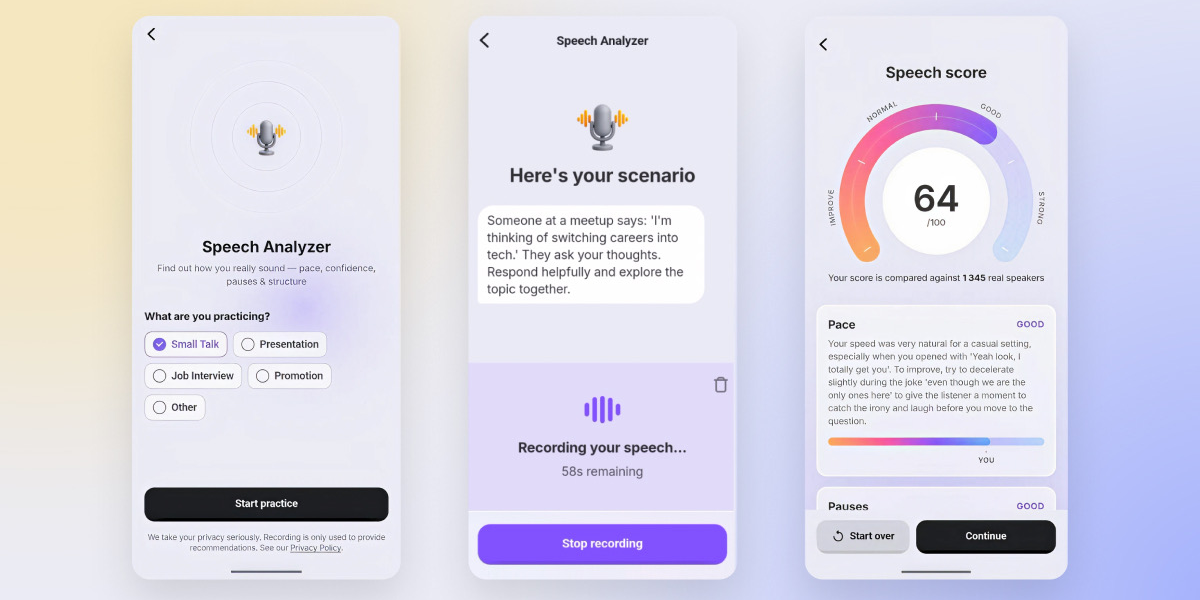
It starts with a short quiz. We ask about your goals, where you feel stuck, what you want to improve, and also which famous experts already inspire you – and based on that, the app tailors a personalized learning journey for you. Someone who wants more presence in meetings might land in Communication Mastery, someone worried about brain fog goes towards Intelligence Training.
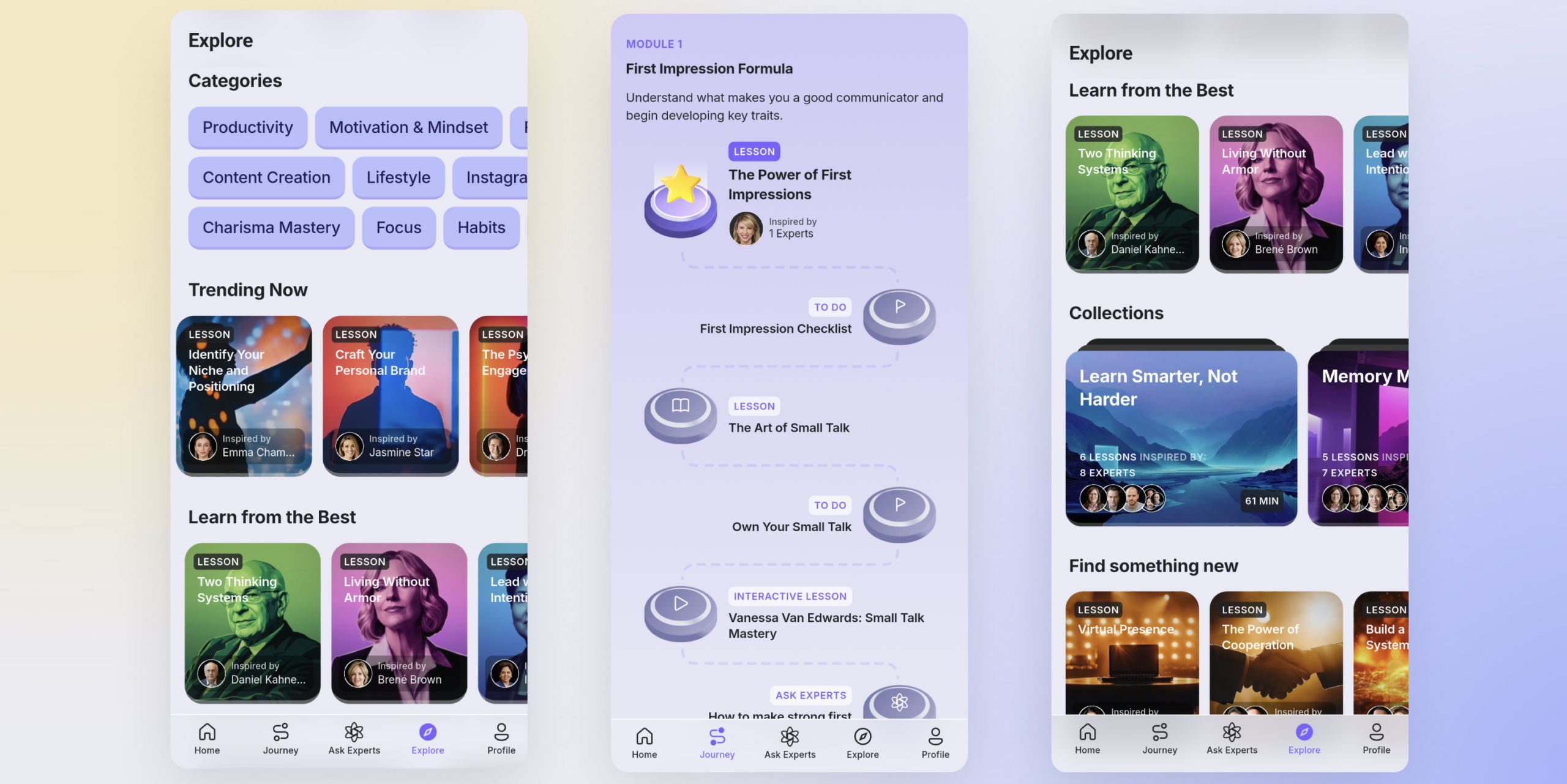
We deliberately don’t push people to binge the content – we learned that seeing forty lessons at once mostly produces anxiety, so the journey is delivered in manageable daily chunks on your Home page. Each day you get a 7-10 min lesson mix built around one specific learning outcome you’re working towards. It’s usually a combination of formats: a bite-sized lesson, a practice exercise, maybe a SEEK session where you dig into a question with answers from vetted experts, or an interactive story/video or case study where you make choices and see where they lead.
The variety is intentional – different formats reinforce the same skill from different angles, and honestly, it also keeps the experience from feeling like homework for our users.
As we already discussed, the practice part is where the progress happens. Lessons usually end with a to-do that leaves the app: try this framework in your next conversation, use this technique on something you need to remember anyway. Day by day these small applications stack up. This content diversity helps to achieve better learning outcomes and keep interest high.
Can you tell us more about SEEK, your search engine for expert knowledge? How does it work, and what problem were you trying to solve with it?
SEEK grew out of a limitation we saw in our own lessons. A lesson gives you a broad overview of a topic and establishes the context – and oftentimes that’s exactly what people need first, because many of us don’t even realise we have a certain problem, or what solutions exist for it, until somebody points at it. But once that context is there, different users want to go deeper in very different directions. One person finishing a communication module wants to handle interruptions in meetings, another wants small talk tips for a conference. No fixed curriculum can cover every branch, so we built SEEK to personalise the experience further and answer those specific questions directly.
The way it works: we hand-pick every expert and every source that goes into the closed-loop internal library – currently it’s over 300 vetted experts and more than a thousand hours of their content. You ask a question in plain language, and SEEK pulls the relevant insights from that library, with direct links to the original sources, so you can watch the expert explain it themselves. We’re already over a million searches in, and honestly that tells me the need for specific answers was even bigger than we assumed!
And the difference from general search or generic AI chatbots is the boundary of the library itself. As I’ve seen with AI tools so often lately, the answers can sound very confident while being hallucinated, and you rarely understand what they’re based on unless you dig in the sources (most people won’t).
Regular internet search has the opposite problem – everything is there, including advice from people who shouldn’t be giving it. SEEK only searches within content we’ve verified, nothing from the open internet. For self-improvement specifically, I think that matters a lot, because you’re going to act on these answers in your real life, in your career, in your relationships.
There’s also a nice side effect we didn’t fully plan for: SEEK became a discovery tool. Users find an expert through one answer, then go off and watch their full lecture or read their book on their own. We’re quite happy when that happens.
That sounds great. What are some of the main ways people are using RiseGuide today?
We’re going after the most popular and critical self-improvement topics and areas one by one – charisma and communication, intelligence and memory, habits and productivity, emotional intelligence, personal branding. The selection comes from my team who analyse social media and search trends, surges in book sales, even academic publications, to see where the demand is currently concentrated. So the range of topics isn’t wide yet, but that’s deliberate.
Each of these areas is huge on its own, and we’d rather go deep on quality than spread across twenty shallow categories. You can genuinely study and train charisma or intelligence for months. And that’s what we observe in the data – the majority of our users stay within one topic for a long time and rarely jump around.
How people use the app day to day is far more varied. Some would binge the content like a series and barely touch the practice. Some rigorously follow the exact flow we envisioned – lesson, exercise, to-do, repeat. And some skip the content almost entirely and double down on training and SEEK, treating the app as a gym rather than a library.
We also see almost equal shares of watchers and listeners – plenty of people consume lessons audio-only, somewhere between a podcast and a course. My view on this is fairly relaxed: our job is to provide the means for growth in every available format, and then let people decide how they learn best. The envisioned flow exists for a reason, but I’d rather have someone use the app “wrong” every day than not use it at all.
What about you, how do you personally use RiseGuide?
I’m a morning learner. Starting the day with self-improvement and a little bit of mental struggle instead of doomscrolling sets the tone – I stay noticeably more focused and productive after it. So my 15 minute session usually happens during breakfast or morning coffee, before the meetings take over.
Apart from that, I’m probably one of our heaviest SEEK users. During my commute or wind-down walks I queue up a sequence of questions – whatever has been on my mind that week, a management situation or even a tough negotiation coming up – and then listen to the answers back to back, like a podcast that was assembled personally for me.
It’s a very different mode from the morning session – less structured, more driven by whatever problem I’m actually carrying around that day.
Looking ahead, how do you see RiseGuide evolving over the next few years?
We’ll definitely keep expanding the content library and the range of self-actualisation topics and adding more diversity in formats along the way. We already have interactive video lessons where you choose different paths and the story branches, a bit like Netflix interactive films or games like Detroit: Become Human, and users usually come back to replay different timelines. There’s a lot more we can do in that direction.
My ambition is that every learning unit in RiseGuide contains a tool, an interactive element, or an exercise. We’ve talked about why passive consumption rarely changes people, so we want to hold every piece of our own content to that standard.
We’re also slowly building towards gamification and community as support mechanisms on the learning journey. Most people drop off somewhere in the middle of building a skill, when the novelty is gone and the results haven’t fully arrived yet. Making progress visible helps with that, and so does seeing other people walking the same path – we’re social creatures, and nothing pulls us along quite like others.
And the one I’m personally most excited about is partnering with top experts and role models to create exclusive microlearning content directly on RiseGuide. Today we curate and distill what experts have already published. The next step is designing lessons together with them, natively for our format – bite-sized, interactive, practice-first – instead of adapting content that was originally a book or a two-hour lecture.
Thank you so much for your time, Oleksandr! Where can people learn more about RiseGuide?
Thank you! You can visit our website, or follow us on Instagram, Medium, and LinkedIn for updates.
The post Expert-powered self-improvement with Oleksandr Matsiuk, founder of RiseGuide appeared first on Ness Labs.
2026-04-08 21:08:07
When people ask me why I started the Ness Labs newsletter, I always admit that it was initially for selfish reasons. As a neuroscience student at the time, I had discovered something called the generation effect: a psychological phenomenon showing that when you create your own version of something, you both understand it and remember it better.
So I decided to run an experiment: I would write 100 short articles in 100 weekdays based on my studies, trying to turn a concept from neuroscience into something practical people could apply in everyday life.
But something unexpected happened. Every time I sat down and needed to actually explain a concept – really explain it, step by step, in plain language – I’d hit a wall. What I thought was knowledge didn’t survive the simple test of having to put it into my own words.
This exercise forced me to confront what I’ve come to call the illusion of clarity: the confident feeling that you understand something, when in reality your grasp is full of gaps you’ve never noticed.
And I’m not the only one falling prey to the illusion of clarity. In a study, psychologists asked participants to rate how well they understood everyday devices like sewing machines, zippers, or cell phones and then asked them to write detailed explanations. After attempting the explanation, self-ratings dropped sharply. The act of actually trying to explain revealed how little people actually knew.
So why does this happen? There are three main reasons we experience the illusion of clarity.
We tend to store only rough sketches of how things work. We know what a zipper does but not how. The problem is that this shallow model feels complete until we try to produce an actual explanation. This is why the simple instruction “explain it in detail” is such a powerful test of real understanding. The moment you try, the gaps in your knowledge reveal themselves.
You’ve used a toilet every day of your life. You can picture one. You can identify its parts. That deep familiarity makes it feel like you understand how a toilet works. But try explaining the actual flushing mechanism step by step, and most people quickly discover that familiarity and understanding are not the same thing at all.
This is an example of a well-studied phenomenon in psychology called processing fluency: the subjective feeling of ease you experience when processing information. When something feels easy to take in, your brain interprets that ease as a signal that you understand it.
Repetition is one of the biggest culprits. Hearing or reading about a concept multiple times makes it feel increasingly familiar, and that familiarity gets reinterpreted as comprehension. When something feels familiar, we assume we’ve mastered it even when we’ve barely scratched the surface.
Another issue is that we blur the line between what we know and what we can access. Research shows that when people expect to have future access to information, they remember where to find it rather than the information itself. This is known as the Google Effect (which maybe should be renamed the ChatGPT Effect).
And the boundaries between what we personally know and what we know by accessing those external memory systems are getting blurred, inflating our sense of understanding. The easier it is to access information externally, the harder it becomes to notice that you don’t actually have that knowledge internally.
The illusion of clarity is why we confidently give advice on topics we’ve only skimmed, why we commit to plans we can’t actually walk someone through, and why teams agree on strategies that nobody can articulate.
The good news is that this illusion is remarkably easy to break. You just need to try explaining things. Here’s how to do it:
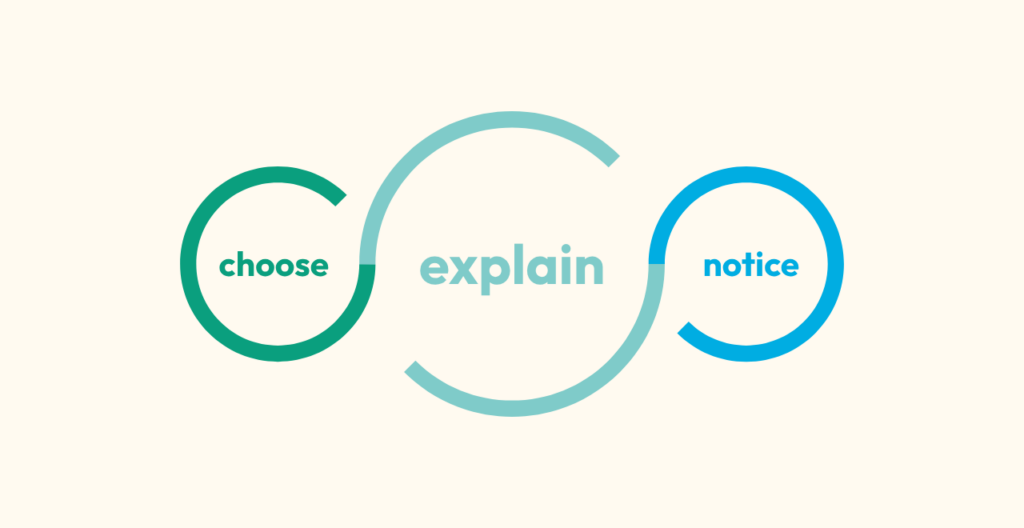
That discomfort in Step 3 is the most valuable signal you’ll get because it tells you exactly where your actual understanding ends and where the illusion of clarity begins.
Confronting the illusion of clarity is not always pleasant, especially when you realize that something you thought you knew – maybe something you’ve even taught others or built decisions on – is held together by vague assumptions rather than real understanding.
But I’ve come to see this discomfort as one of the most productive feelings available to us as knowledge workers. Every time I sit down to write and hit that gap between what I thought I knew and what I can actually explain, I know I’m actually learning.
The post The Illusion of Clarity: How to Test Whether you Really Understand Something appeared first on Ness Labs.
2026-03-26 20:42:00
Welcome to this edition of our Tools for Thought series, where we interview founders on a mission to help us think better and work smarter. Alex Green is the cofounder and chief product & technology officer of Littlebird, an AI assistant designed to close the gap between your memory and your computer. By giving AI the ability to see what you see, Littlebird helps you work faster without breaking your flow.
In this interview, we discussed the potential of a true general AI assistant, why context is king, how to use AI as a thought partner in all sorts of personal and professional situations, as well as some of the most powerful use cases Alex has seen, and much more. Enjoy the read!
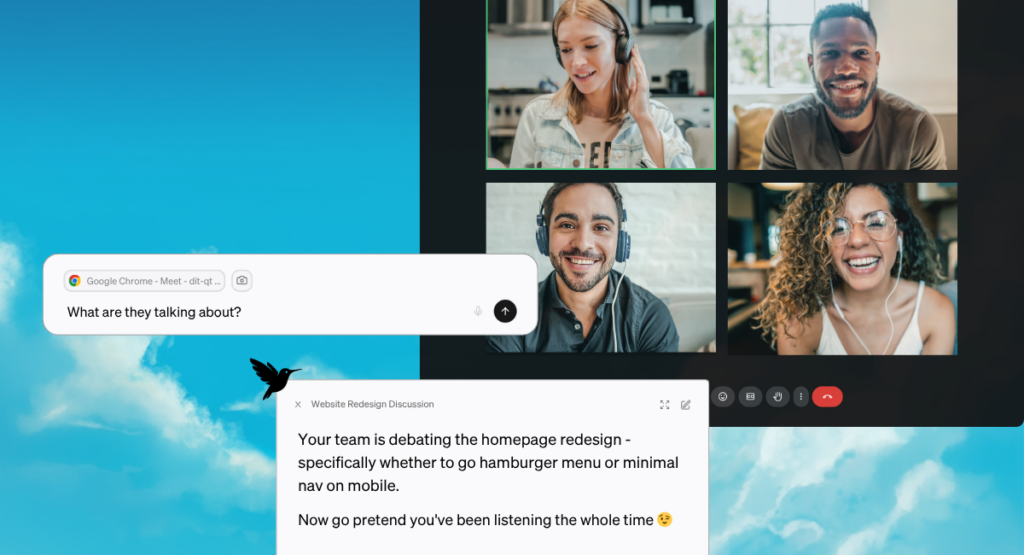
Hi Alex, thank you for joining us. Let’s start with a philosophical question. At its best, how do you envision AI helping humans focus on impact?
AI models are genuinely incredible, but they have no idea what you’re working on. So you end up spending ten minutes copying and pasting context into a chat window just to get a useful answer. You’re doing prep work for a tool that’s supposed to save you time. That’s backwards.
And meanwhile, every app and platform you use is optimized to keep you engaged, not to help you accomplish what you actually set out to do.
The vision I keep coming back to is that AI should work for you. At its best, it sits between you and the constant flood of information—the Slack messages, the emails, the meeting notes, the browser tabs—and shows you what actually matters right now so you can focus on the work that requires your judgment and creativity. The stuff only you can do.
Littlebird helps users build a memory of everything you do. Can you talk about how the idea for the product first came together?
The problem we kept hitting was this disconnect between how AI works and how people actually work. Your work doesn’t live in one place. It’s scattered across Slack, Google Docs, emails, websites, meeting notes. But every AI tool either operates in a silo (great at one thing like summarizing a meeting but blind to everything else) or it’s a blank canvas that knows nothing about you until you spend a few minutes getting it up to speed.
What was missing was an AI that has the full context of your work. Everything. Your projects, your priorities, the decisions you’ve made, the conversations you’ve had. An AI that doesn’t need to be “caught up” because it’s been paying attention all along.
So we built Littlebird to work quietly in the background, seeing what you see on your screen and creating a secure memory of your work. When you need to recall something or create something new, the context is already there. It’s like working with an assistant who’s been in all your meetings, read all your documents, and knows what you’re trying to accomplish, without you having to explain any of it.
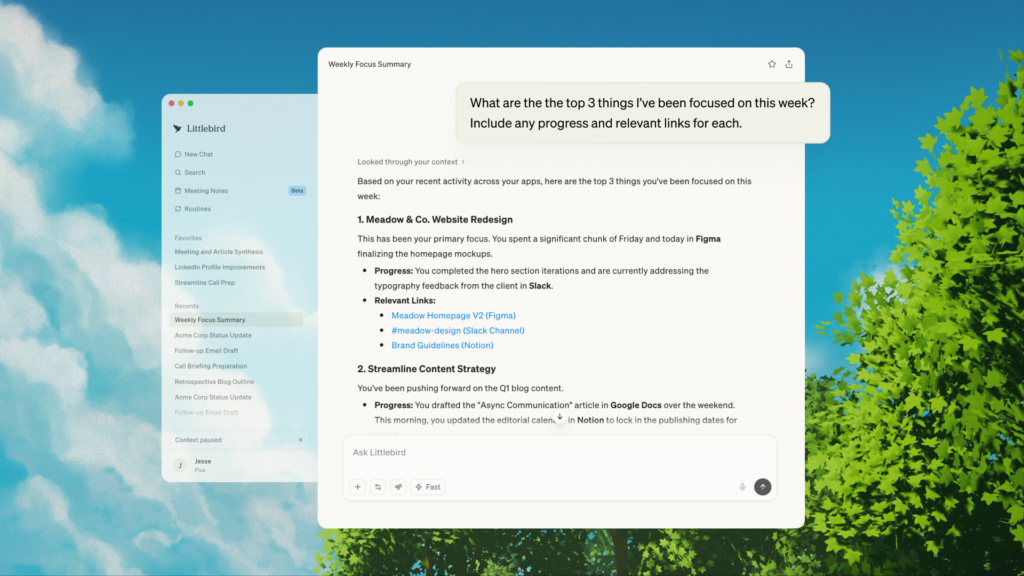
What’s the difference between a general AI assistant and Littlebird?
I don’t think anyone else has successfully built a general AI assistant, so I reject the premise. We’ve built Littlebird to be a full “second mind.” The idea is to have as much context about your life as possible in one place, accessible to collaborate with AI.
But to get at what I think the question is really asking: the biggest issue with existing tools is that even the smartest model gives you generic output if it doesn’t know what you’re working on. You can work around this by manually feeding it information, but then you’re spending time doing prep work, and you’re also having to decide what’s relevant, which is its own kind of work. And everything’s disconnected, even though your actual work is deeply interconnected. The document you’re writing relates to a meeting from last week, which relates to an email thread, which relates to a project goal.
Littlebird already knows the context from everything you’ve seen, discussed, and worked on. So when you ask it something, it has the full picture. You say “draft a proposal for [client]” and it already knows who the client is, what you’ve discussed with them, and what materials exist that it can build from.
Let’s talk about how Littlebird works in more detail.
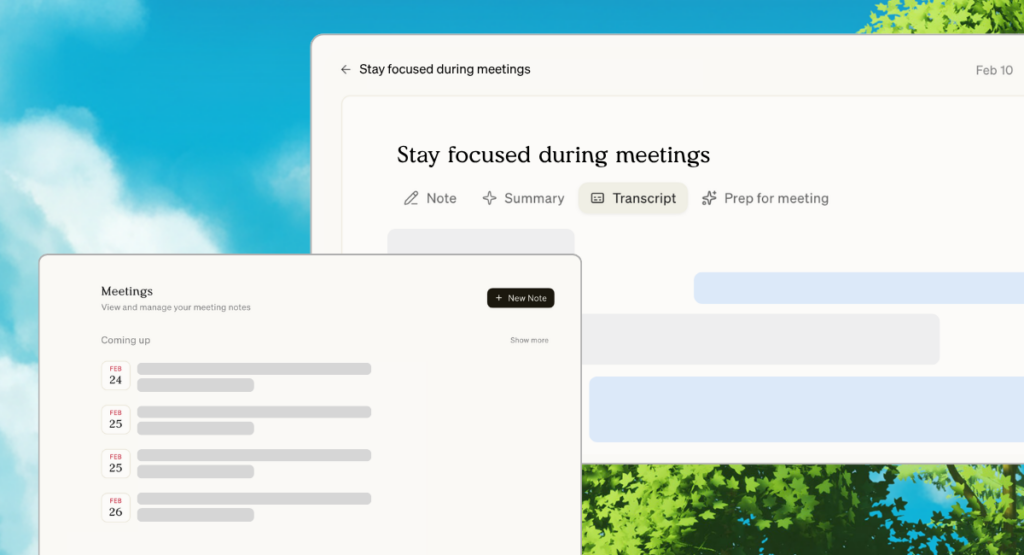
Littlebird works quietly in the background—it’s an AI that has read everything you have and remembers it. You’re responding to emails in Gmail, coordinating with your team in Slack, taking a Zoom call, browsing a few articles. In the past, all that context would disappear the moment you closed the tab or moved on. Littlebird remembers.
Say you’re heading into a client call. Littlebird transcribes the conversation in real time and afterwards summarizes everything: key points, decisions, and next steps—so nothing falls through the cracks. That shift alone changes how you show up. Instead of splitting your attention between listening and note-taking, you can be present in conversations. You ask better questions and engage with the people in the room instead of with your notes app.
After the call wraps, you ask Littlebird to draft a follow-up email. You don’t need to explain who the client is or what was discussed. It was there. Littlebird pulls from what it knows and drafts something that actually sounds like you.
Then you move on to one of the action items from that call. You start a new chat: “Draft a project brief for the website redesign.” Littlebird already knows the scope because it saw the initial proposal you sent last week, the feedback the client shared over email, and the inspiration sites you bookmarked that morning. It gives you a starting point grounded in your actual work; something that reflects the real decisions and conversations behind the project.
You’re also always in control of what Littlebird sees. You can pause context collection at any time, exclude specific apps or domains, or delete data that’s already been collected. We think about data control as foundational, not an afterthought. If people don’t trust the tool, they won’t use it honestly, and then it can’t actually help them.
Who is using Littlebird today and what are some of the main ways they’re using it?
Our users are busy knowledge workers whose work spans a bunch of different tools and conversations throughout the day: founders, freelancers, marketers, consultants, developers. What they share isn’t a job title, it’s a frustration that a lot of people feel but haven’t quite named yet: the hardest part of knowledge work isn’t the actual thinking. It’s everything around it. Finding what you need, remembering what was said, reconstructing context that existed in your head two days ago but has since been buried under fifty other things.
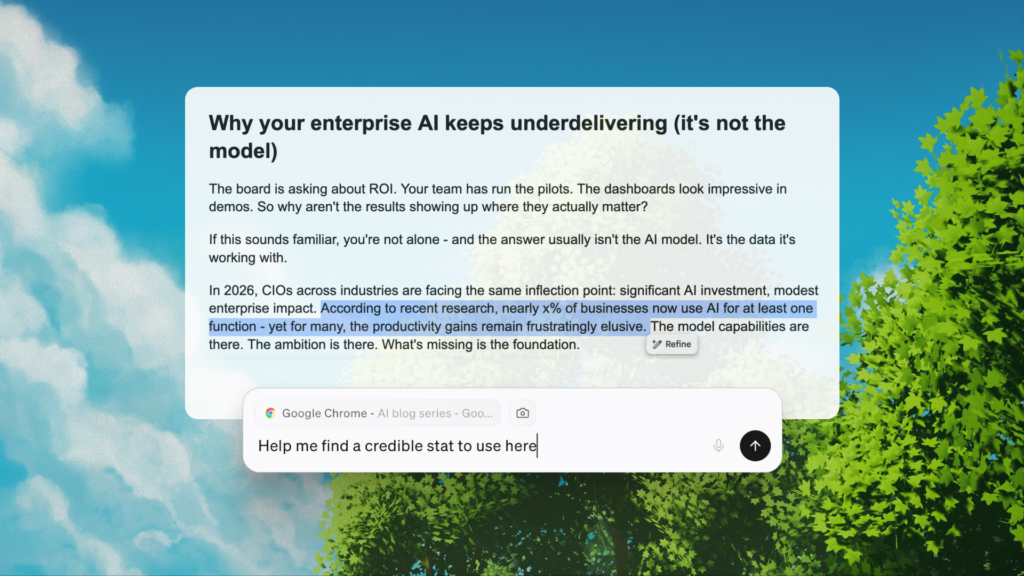
A few patterns have emerged. Recall is usually the entry point. Things like “What did we agree on in that call last Thursday?” or “Where did I see that article about market sizing?” get instant answers without the scavenger hunt. That alone is worth a lot.
Pretty quickly, most users start leaning on Littlebird as a drafting partner. Because it already knows the context behind their work, they can go from “I need to write this” to a strong first draft in minutes—one that reflects the actual details of their projects and the language they use. That matters enormously if you’re someone who spends half your day writing and communicating.
We also hear a lot from users that Littlebird has changed how they experience meetings. When you’re not frantically trying to capture everything, you can actually listen. That one hits differently than a productivity metric. It’s about the quality of how you spend your time, not just the quantity.
What are some of the most powerful use cases you’ve seen?
A few stand out because they’re only possible when the tool actually knows what you’ve been working on. The first is meeting prep. Before any important conversation, most people scramble through old notes and email threads trying to piece together where things stand. With Littlebird, you just ask: “Prep me for my 2 pm.” It pulls from everything relevant (e.g. past calls, email threads, shared documents) and gives you a rundown in seconds. People notice when you remember the details. That kind of trust compounds over time, and it’s hard to put a number on how much that’s worth.
The second is planning. Whether it’s a project, a trip, or a new initiative, Littlebird already knows what you’ve been researching and thinking about. One example I love: a user asked Littlebird to outline a three-day Lisbon itinerary based on flights and articles they’d been browsing the day before. It gave them a plan built from their own research and preferences, ready to use right away. That’s only possible because Littlebird was paying attention when they were doing the research.
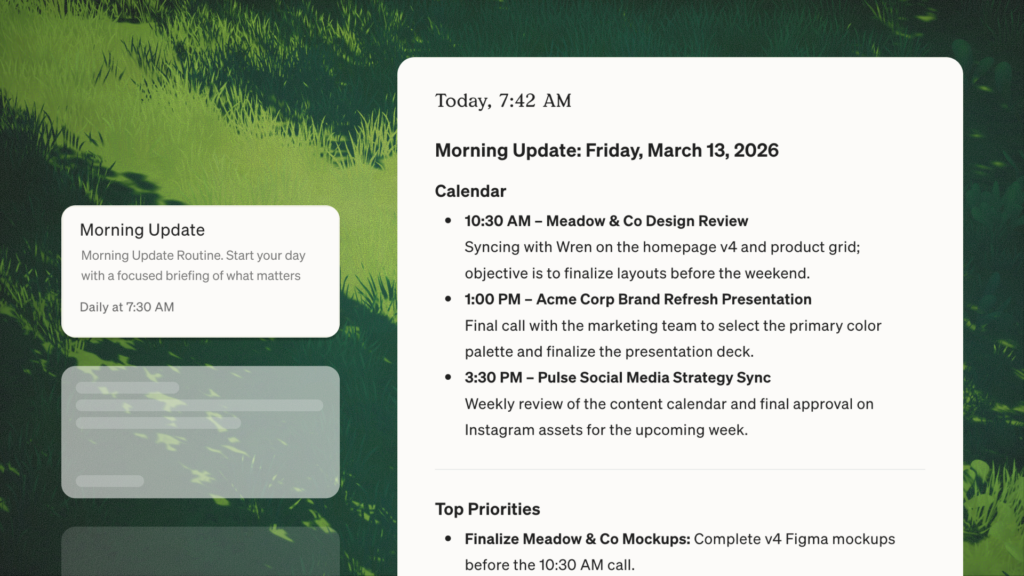
The third is Routines, which are automated briefings you can set up to run on a schedule. A lot of our users have a weekly report that runs every Monday morning covering priorities, what happened the previous week, and anything that needs attention. It’s become how a lot of them start the week—like having a chief of staff who writes you a memo before you’ve had coffee.
What about you, how do you personally use Littlebird?
Honestly, I don’t really think about it as a separate tool anymore. It’s just part of how I work. I use it all day as a thought partner—for learning about unfamiliar concepts, doing research, getting a second opinion on tricky situations, prioritizing, and tracking tasks. But the thing I rely on most is getting a quick read on where different projects stand. As a co-founder running product and engineering, I’m constantly context-switching, and before I jump into a conversation or meeting, I’ll ask Littlebird for a status update on whatever we’re about to discuss.
I also use Meeting Notes heavily. I have a lot of syncs throughout the week, and at some point the individual conversations blur together. Being able to ask “what themes have come up in my team conversations this week?” or “are there any recurring blockers?” is genuinely useful. It helps me see patterns I’d miss if I were just relying on my own memory.
Our goal is to build a universal assistant, and I think Littlebird already does a pretty good job of fulfilling that promise.
Looking ahead, how do you see Littlebird evolving over the next few years?
We’re still very early, and there’s a lot of room to go deeper on what we’ve already built before chasing the next thing.
Beyond that, we’re thinking a lot about how Littlebird can be more proactive. Right now, you ask and it answers. There’s a future where it brings you things before you ask. “Here’s what you need to know before your 2 pm,” or “this email from last week is probably relevant to what you’re working on right now.” More like a great collaborator tapping you on the shoulder at exactly the right moment. We’re building something that is truly an extension of your mind, something that helps you achieve your highest goals, focus, and cut through the noise.
Thank you so much for your time, Alex! Where can people learn more about Littlebird?
You can download and get started for free on our website, or follow our updates on X, LinkedIn, and Instagram.
The post Stop explaining yourself to your AI with Alex Green, cofounder of Littlebird appeared first on Ness Labs.
2026-03-11 23:02:49
We often talk about “trusting our gut.” But the gut feelings people refer to can actually stem from two very different sources: instinct and intuition. Because they feel so similar (fast, automatic, sometimes emotional) we tend to treat them the same, which can lead to poor decision-making in many situations.
Instinct is evolutionary and biological, designed for survival. Intuition is learned pattern recognition, built through experience. When we confuse them, we may trust reactions that deserve skepticism or ignore signals that deserve attention.
A helpful way to improve judgment is not to suppress these automatic responses but to identify which one we are experiencing so we can act accordingly.
Instinct refers to inborn behavioral responses shaped by evolution. These responses are fast and automatic because they originate in brain systems such as the amygdala and brainstem, which process threat and survival signals.
When you jump back from something that looks dangerous or feel a sudden jolt of fear, your brain is prioritizing speed over accuracy. From an evolutionary perspective, reacting quickly to possible danger increased the chances of survival.
Intuition, by contrast, emerges from experience-based pattern recognition. Research on expert decision-making shows that people who have spent years in a domain develop the ability to detect subtle signals that others miss.
Psychologist Gary Klein documented this in studies of firefighters and emergency responders: experienced professionals often sensed that something was wrong before they could explain why. Their intuition was not mysterious – it was the brain rapidly matching current cues to patterns learned over time.
A simple framework can help you interpret these signals before acting on them. Next time you experience an automatic response such as fear, attraction, suspicion, or confidence, take a moment to pause briefly and ask yourself the following two questions:
1. Is this instinct or intuition?
2. Are you in immediate danger or is this a more complex situation?
Then, use this simple Gut Decision Matrix to decide how much to trust the automatic response:
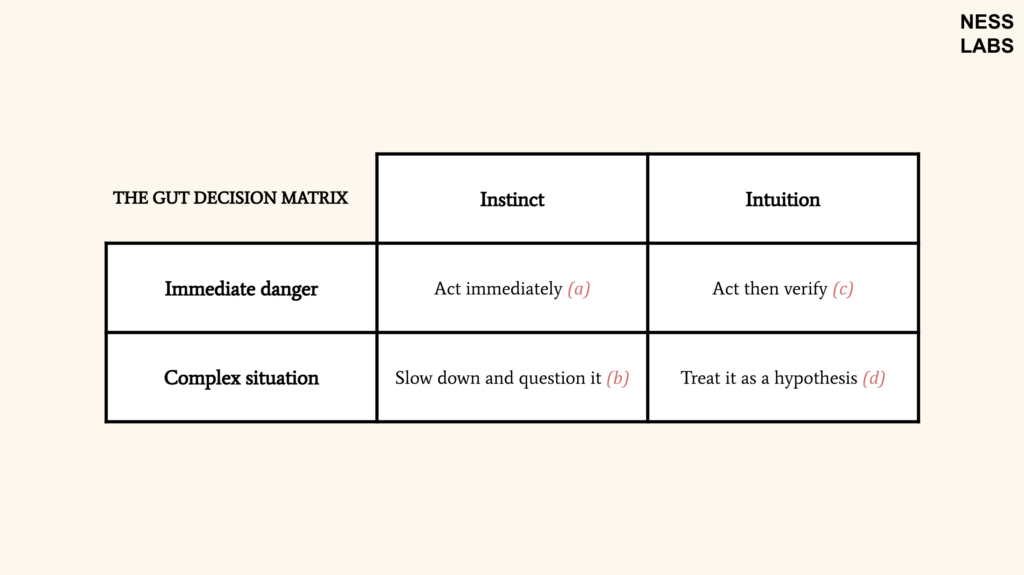
(a) If your response is instinct in immediate danger, it usually makes sense to act right away. These survival mechanisms evolved specifically to deal with situations where hesitation could be costly.
(b) However, instincts can misfire in modern contexts. When a situation is more complex, it’s often better to slow down and question the instinctive response before acting on it.
(c) If you have domain-specific expertise or experience in similar fast-moving situations, a strong intuition may be worth acting on quickly. In these moments you may not have time for deliberate analysis, so it can be reasonable to rely on your brain’s automatic pattern recognition, which can detect important signals faster than conscious reasoning.
(d) Finally, in slower-developing or more complex situations, it’s best to treat intuitions as hypotheses and examine them through additional thinking, evidence, or testing before committing to a decision.
Instinct and intuition both operate below conscious awareness, which is why they’re often lumped together as “gut feelings”, but they arise from different mechanisms and serve different purposes.
Instinct protects us from immediate threats. Intuition helps us recognize patterns we learned through experience. When we know how to distinguish between the two, our automatic responses become more useful.
So instead of asking whether to trust your gut, a better question is: what kind of gut feeling is this? Once you know that, deciding what to do next becomes much easier.
The post The Gut Decision Matrix: When to Trust Instinct and Intuition appeared first on Ness Labs.