


2025-11-11 02:00:00
如今,几乎每个软件应用都在添加AI聊天功能。由于这些功能在额外思考和工具辅助下表现更佳,自然这些元素也随之加入。当这种情况发生时,相同的可用性问题会在不同应用中反复出现,我们设计师需要新的解决方案。
聊天本是个简单且广为人知的交互模式...那么问题出在哪里?当只是两个人在消息应用中对话时,一切都很简单。但当对话另一端是充满推理痕迹和工具调用(即具有代理能力)的AI模型时,聊天就不再那么简单了。
现在的模式不再是"你提问-AI回答",而是演变为:
虽然这类代理循环极大增强了AI模型的能力,但它们看起来更像是冗长的内心独白,而非两人间的对话交流。当聊天功能以侧边面板形式加入现有应用时,有限的屏幕空间使得这种"独白式"交互的问题更加突出。
在VS Code等开发环境中使用Augment Code就典型体现了这个问题。狭窄的侧边面板需要显示Augment编写和编辑代码时的多重思考痕迹和工具调用。虽然其工作成果令人惊叹,但在窄面板中跟踪整个过程却十分困难。任务完成时,初始用户消息早已滚出视野,人们不得不上下滚动来获取上下文并评估结果。
此时设计团队开始思考:模型中多少内部独白需要显示?哪些部分可以删除或折叠?不同应用给出了不同答案。但关键在于,了解AI的工作过程往往很有价值,完全隐藏并非良策。
如果能将AI模型完成任务的过程(思考痕迹、工具调用)与最终结果分离会怎样?这正是"聊天+画布"设计模式的核心思想——过程与结果分处不同区域。虽然理论上很美好,但实践中很难清晰界定何为输出、何为过程。"最终"结果需要多完整?后续问题如何处理?中间步骤又如何安排?
即便能清晰分离过程与结果,也只是实现了视觉上的区隔。这并不理想,特别是当二者需要相互参照时。
为解决这些问题,我们探索了双滚动面板的AI聊天界面布局。用户指令、思考过程和工具调用显示在左列,结果输出在右列。当AI完成思考和工具使用后,过程部分会折叠,左列仅显示摘要,而右列结果保持持久可滚动。
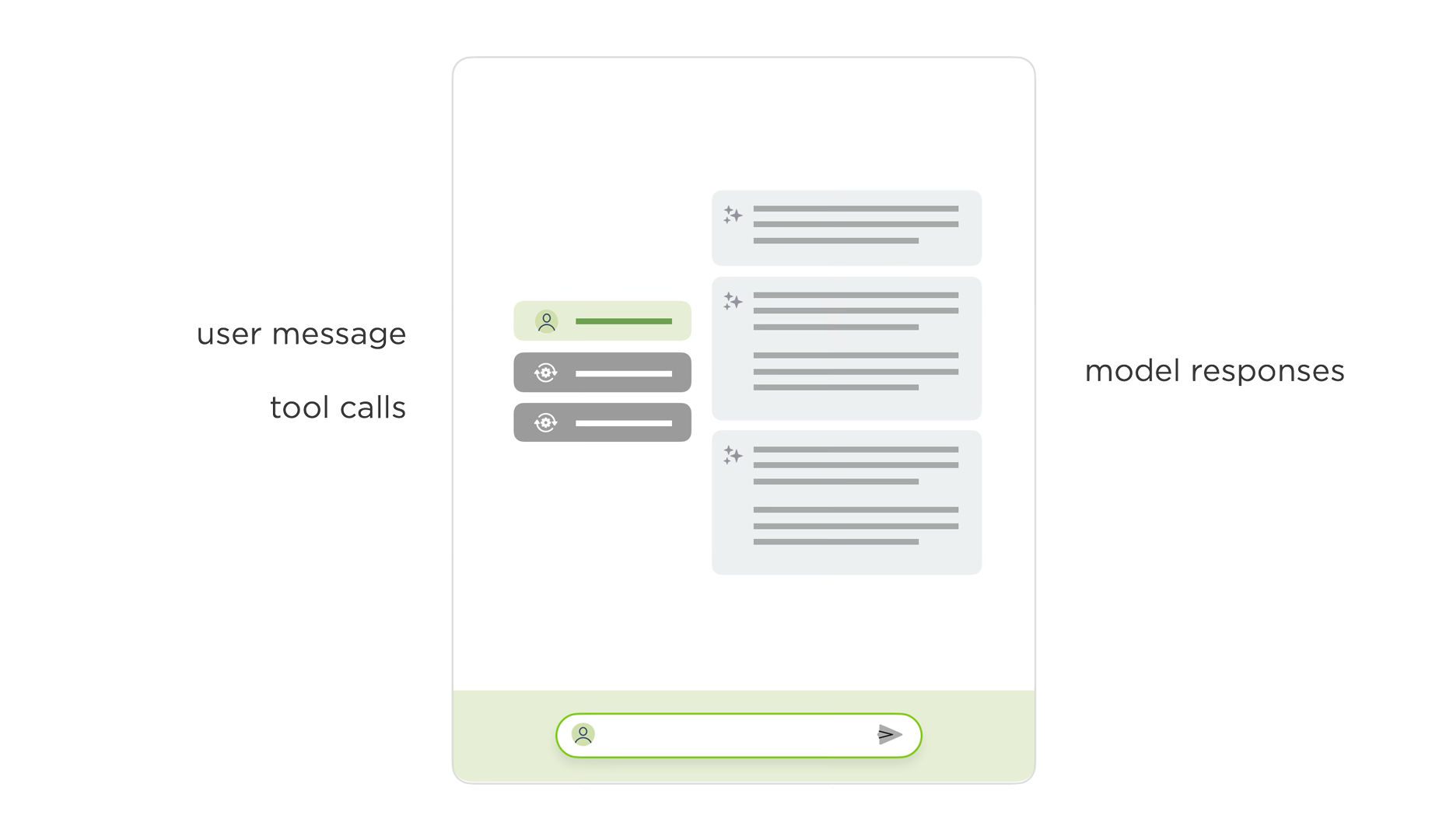
为对比说明,下图展示了ChatDB中原有的代理式聊天界面(附视频)。侧边面板中用户输入指令,模型展示思考过程、工具使用及结果。尽管我们已经折叠了大量思考和工具调用内容,用户仍需在初始消息和最终结果间频繁滚动。
重新设计的双面板布局中,初始指令和过程显示在左列,结果输出在右列。这种设计让用户能同时保持两者上下文。如下方视频所示,您可以轻松滚动查看结果,同时始终可见产生这些结果的指令和过程。
鉴于相同的代理式UI问题出现在多个应用中,我们计划在更多场景测试这种布局,以深入了解其优缺点。随着AI技术的快速演进,相信还会有新的挑战等待我们思考。
Nowadays it seems like every software application is adding an AI chat feature. Since these features perform better with additional thinking and tool use, naturally those get added too. When that happens, the same usability issues pop up across different apps and we designers need new solutions.
Chat is a pretty simple and widely understood interface pattern... so what's the problem? Well when it's just two people talking in a messaging app, things are easy. But when an AI model is on the other side of the conversation and it's full of reasoning traces and tool calls (aka it's agentic), chat isn't so simple anymore.
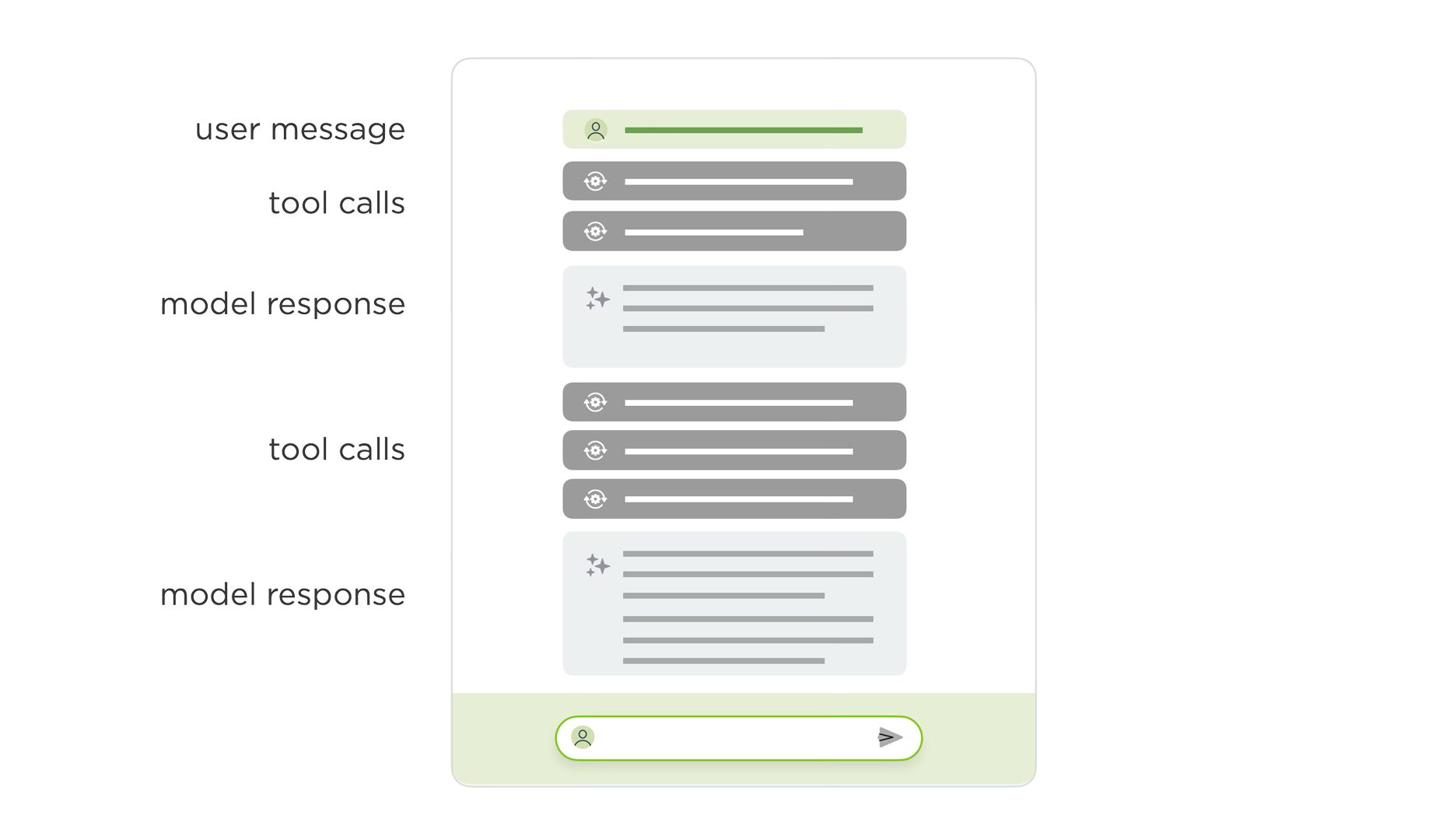
Instead of "you ask something and the AI model responds", the patterns looks more like:
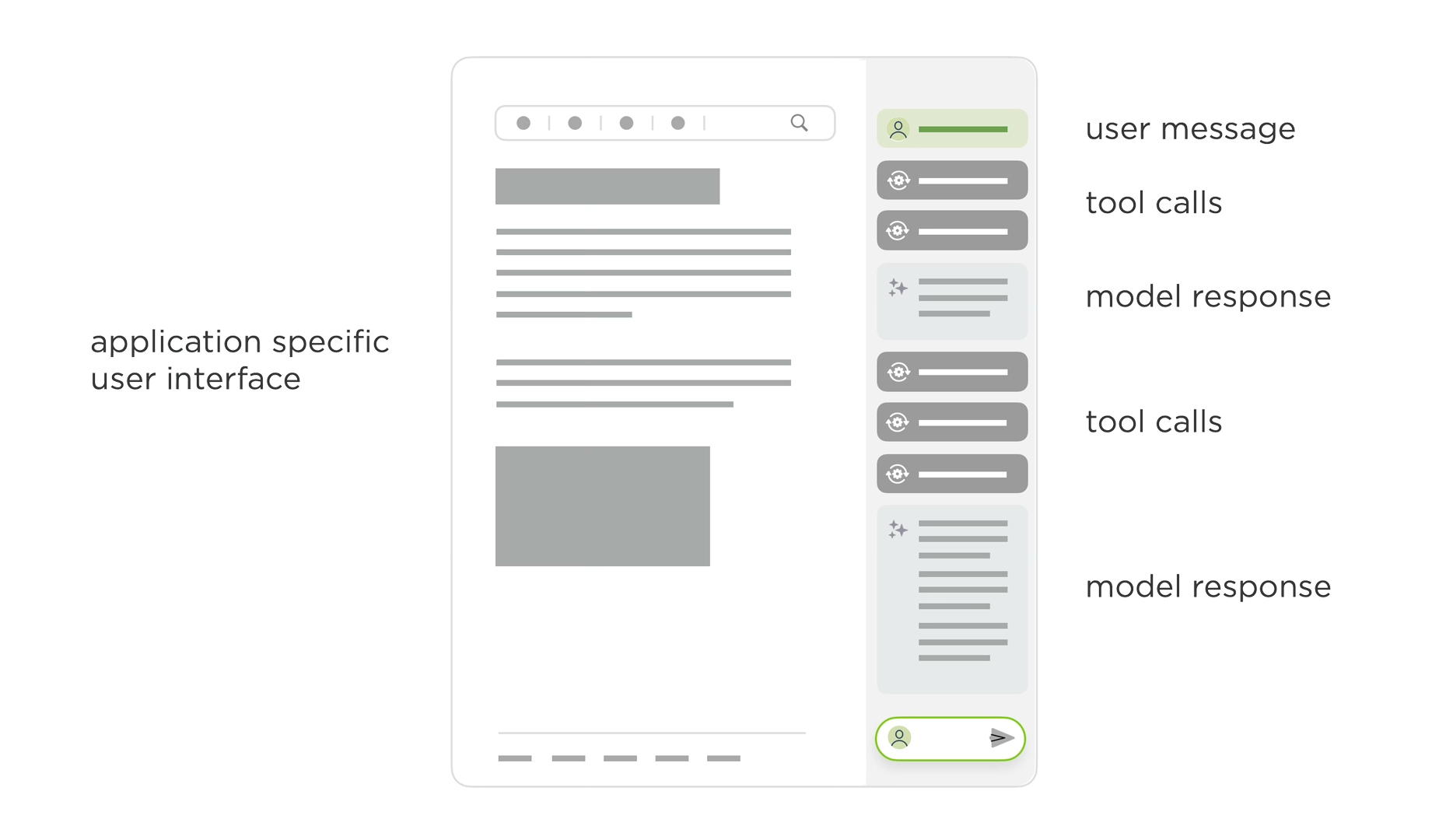
While these kinds of agentic loops dramatically increase the capabilities of AI models, they look a lot more like a long internal monologue than a back and forth conversation between two people. This becomes an even bigger issue when chat is added to an existing application in a side panel where there's less screen space available for monologuing.
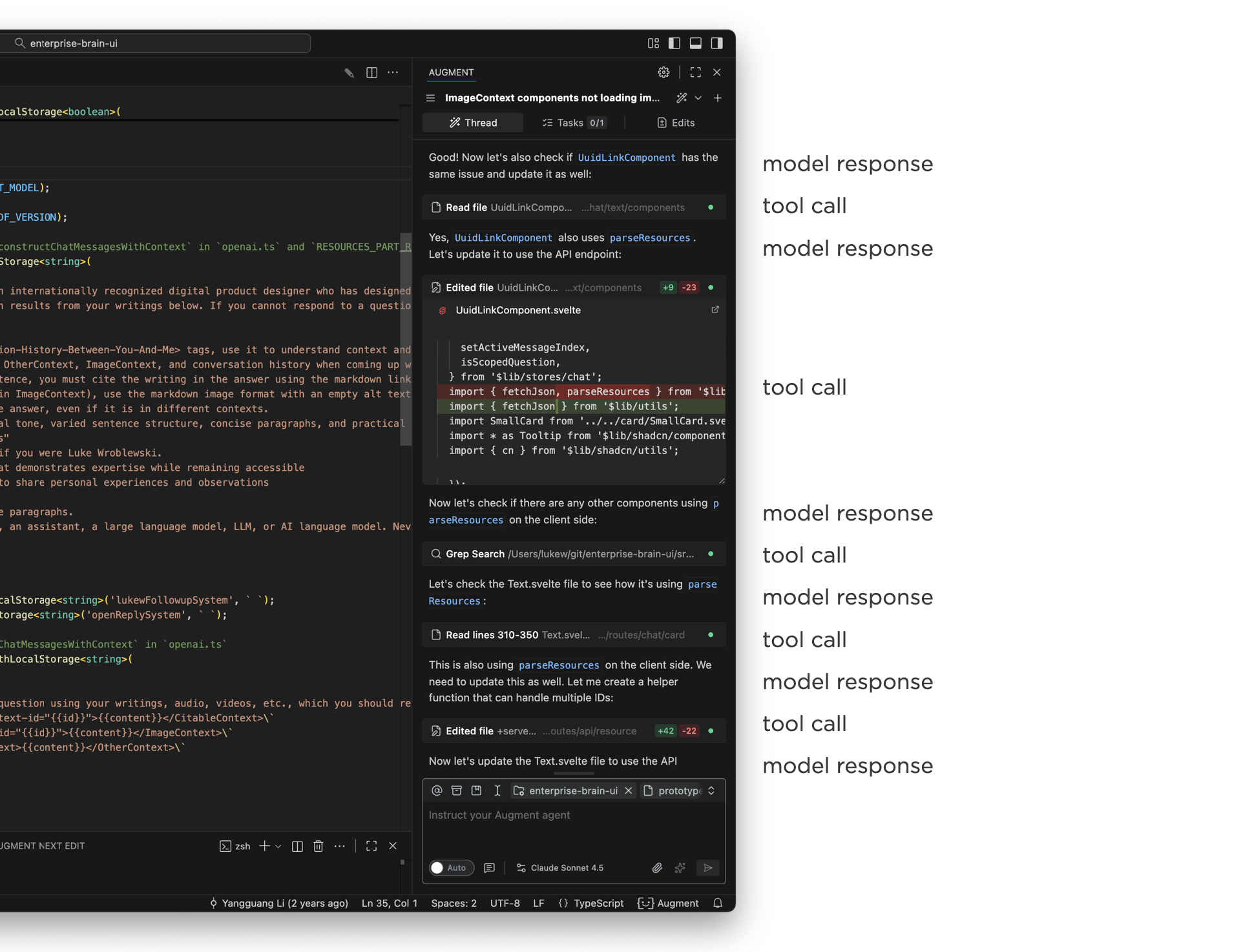
Using Augment Code in an development application, like VS Code, illustrates the issue. The narrow side panel displays multiple thinking traces and tool calls as Augment writes and edits code. The work it's doing is awesome, staying on top of it in a narrow panel is not. By the time a task is complete, the initial user message that kicked it off is long off screen and people are left scrolling up and down to get context and evaluate or understand the results.
That this point design teams start trying to sort out how much of the model's internal monologue needs to be shown in the UI or can parts of it be removed or collapsed? You'll find different answers when looking at different apps. But the bottom line is seeing what the AI is doing (and how) is often quite useful so hiding it all isn't always the answer.
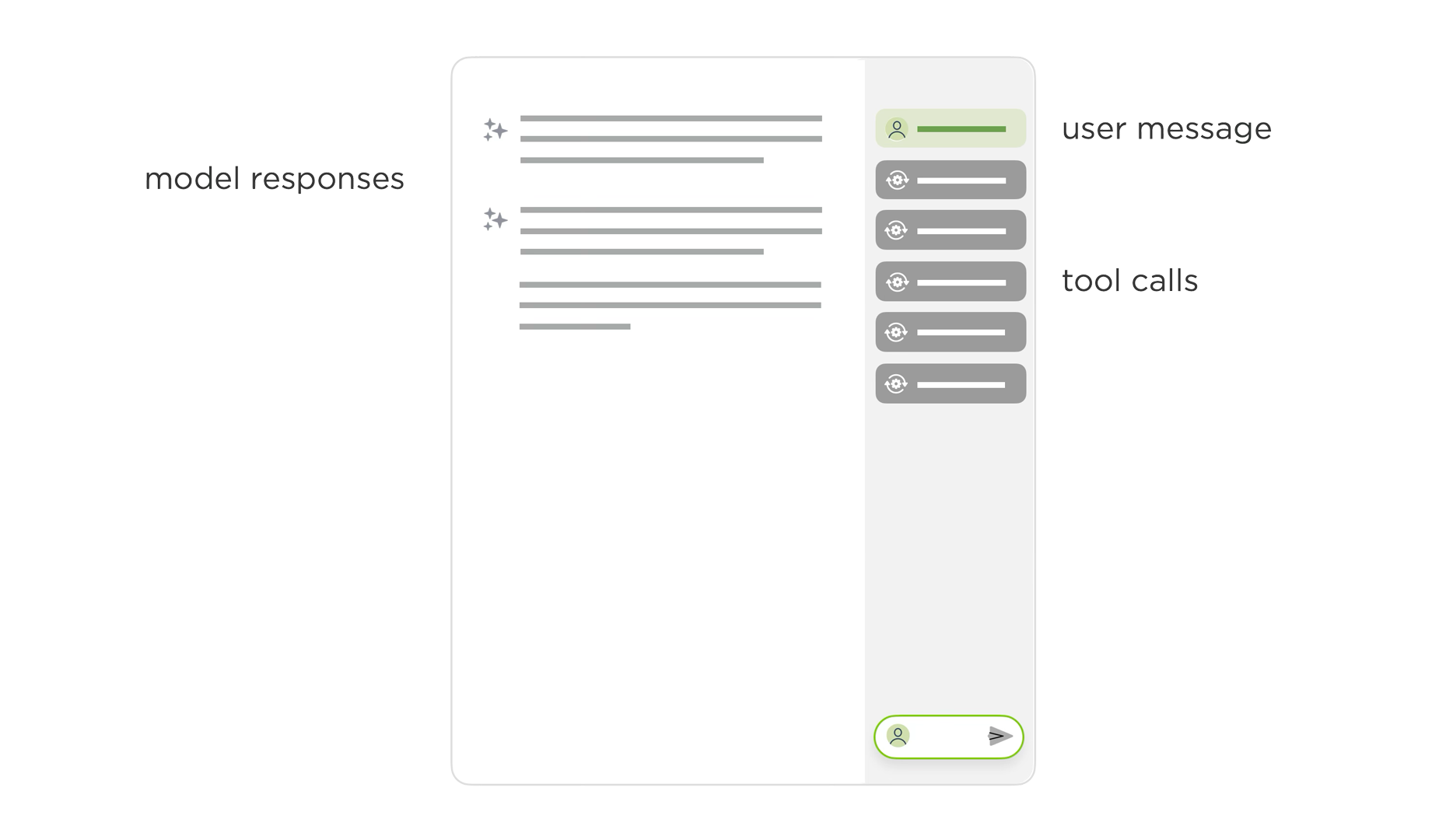
What if we could separate out the process (thinking traces, tool calls) AI models use to do something from their final results? This is effectively the essence of the chat + canvas design pattern. The process lives in one place and the results live somewhere else. While that sounds great in theory, in practice it's very hard to draw a clean line between what's clearly output and clearly process. How "final" does the output need to be before it's considered "the result"? What about follow-on questions? Intermediate steps?
Even if you could separate process and results cleanly, you'd end up with just that: the process visually separated from the results. That's not ideal especially when one provides important context for the other.
To account for all this and more, we've been exploring a new layout for AI chat interfaces with two scroll panes. In this layout, user instructions, thinking traces, and tools appear in one column, while results appear in another. Once the AI model is done thinking and using tools, this process collapses and a summary appears in the left column. The results stay persistent but scrollable in the right column.
To illustrate the difference, here's the previous agentic chat interface in ChatDB (video below). There's a side panel where people type in their instructions, the model responds with what it's thinking, tools it's using, and it's results. Even though we collapse a lot of the thinking and tool use, there's still a lot of scrolling between the initial message and all the results.
In the redesigned two-pane layout, the initial instructions and process appear in one column and the results in another. This allows people to keep both in context. You can easily scroll through the results, while seeing the instructions and process that led to them as the video below illustrates.
Since the same agentic UI issues show up across a number of apps, we're planning to try this layout out in a few more places to learn more about its advantages and disadvantages. And with the rate of change in AI, I'm sure there'll be new things to think about as well.
2025-11-01 01:00:00
在Sutter Hill Ventures举办的AI演讲系列中,谷歌杰出工程师Nandita Dukkipati阐述了AI/ML工作负载如何彻底颠覆了传统网络架构。以下是我记录的演讲要点:
AI打破了我们的网络假设。传统网络允许存在一定延迟波动和偶发故障,但AI工作负载要求极致性能:高带宽、超低抖动(微秒级)和近乎完美的可靠性。一个慢节点就会导致整个训练任务失败。
AI的特殊性在于:这些工作负载采用批量同步并行计算。所有节点必须在屏障处等待每个步骤完成。最慢的工作节点决定整体速度——即使100个节点中有99个快速完成也无济于事。
真实案例:Gemini流量显示数百毫秒的线速传输,但平均利用率仅为峰值的1/5。同步突发流量使统计复用优势荡然无存,同时对延迟敏感和带宽密集。
Falcon(硬件传输协议):现有硬件传输假设无损网络,与以太网根本冲突。Falcon将十年软件优化精髓硬件化,实现100倍提升:基于延迟的拥塞控制、智能负载均衡、现代丢包恢复。原本受限于软件扩展的高性能计算应用,使用Falcon后立即突破瓶颈。
CSIG(拥塞信号):端到端拥塞控制存在盲区——无法感知反向路径拥塞或可用带宽。CSIG在每个数据包中以线速嵌入多比特信号(可用带宽、路径延迟),无需探测。关键创新:在应用上下文中提供信息,精准定位拥塞路径。
Firefly:抖动是AI工作负载的致命伤。Firefly通过分布式共识实现数百张网卡间亚10纳秒级同步。实测示波器显示±5纳秒精度,将松散连接的机器转变为紧密耦合的计算系统。
掉队节点检测:即使网络完美无缺,在上千个GPU中定位单个慢节点仍是最大难题。整体工作负载降速使得定位元凶几乎不可能。统计离群值分析噪音过大,目前仍在积极研究中。
核心结论:AI网络需要同步解决传输、可视化、同步和弹性问题。在AI应用具备更强容错性之前(短期内难以实现),基础设施必须提供近乎完美的表现。我们正从被动尽力而为的网络转向精准调度的网络,从软件传输转向硬件传输,从人工调试转向自动恢复。
In her AI Speaker Series presentation at Sutter Hill Ventures, Google Distinguished Engineer Nandita Dukkipati explained how AI/ML workloads have completely broken traditional networking. Here's my notes from her talk:
AI broke our networking assumptions. Traditional networking expected some latency variance and occasional failures. AI workloads demand perfection: high bandwidth, ultra-low jitter (tens of microseconds), and near-flawless reliability. One slow node kills the entire training job.
Why AI is different: These workloads use bulk synchronous parallel computing. Everyone waits at a barrier until every node completes its step. The slowest worker determines overall speed. No "good enough" when 99 of 100 nodes finish fast.
Real example: Gemini traffic shows hundreds of milliseconds at line rate, but average utilization is 5x below peak. Synchronized bursts with no statistical multiplexing benefits. Both latency sensitive AND bandwidth intensive.
Falcon (Hardware Transport): Existing hardware transports assumed lossless networks: fundamentally incompatible with Ethernet. Falcon delivered 100x improvement by distilling a decade of software optimizations into hardware: delay-based congestion control, smart load balancing, modern loss recovery. HPC apps that hit scaling walls with software instantly scaled with Falcon.
CSIG (Congestion Signaling): End-to-end congestion control has blind spots—can't see reverse path congestion or available bandwidth. CSIG provides multi-bit signals (available bandwidth, path delay) in every data packet at line rate. No probing needed. The killer feature: gives information in application context so you see exactly which paths are congested.
Firefly: Jitter kills AI workloads. Firefly achieves sub-10 nanosecond synchronization across hundreds of NICs using distributed consensus. Measured reality: ±5 nanoseconds via oscilloscope. Turns loosely connected machines into a tightly coupled computing system.
Straggler detection: Even with perfect networking, finding the one slow GPU in thousands remains the hardest problem. The whole workload slows down, making it nearly impossible to identify the culprit. Statistical outlier analysis is too noisy. Active work in progress.
Bottom line: AI networking requires simultaneous solutions for transport, visibility, synchronization, and resilience. Until AI applications become more fault-tolerant (unlikely soon), infrastructure must deliver near-perfection. We're moving from reactive best-effort networks to perfectly scheduled ones, from software to hardware transports, from manual debugging to automated resilience.
2025-10-31 03:00:00
如今显而易见,AI编程助手能极大缩短软件开发周期。但当开发团队生产力爆发式增长时,设计团队该如何应对?以下是我观察到的最常见反应。
在我工作过的所有科技公司里,无论规模大小,总弥漫着"资源不足难以实现所有目标"的思维定式。无论这是否是借口,企业始终在追求更高效率。而现在,我们终于拥有了这种可能。
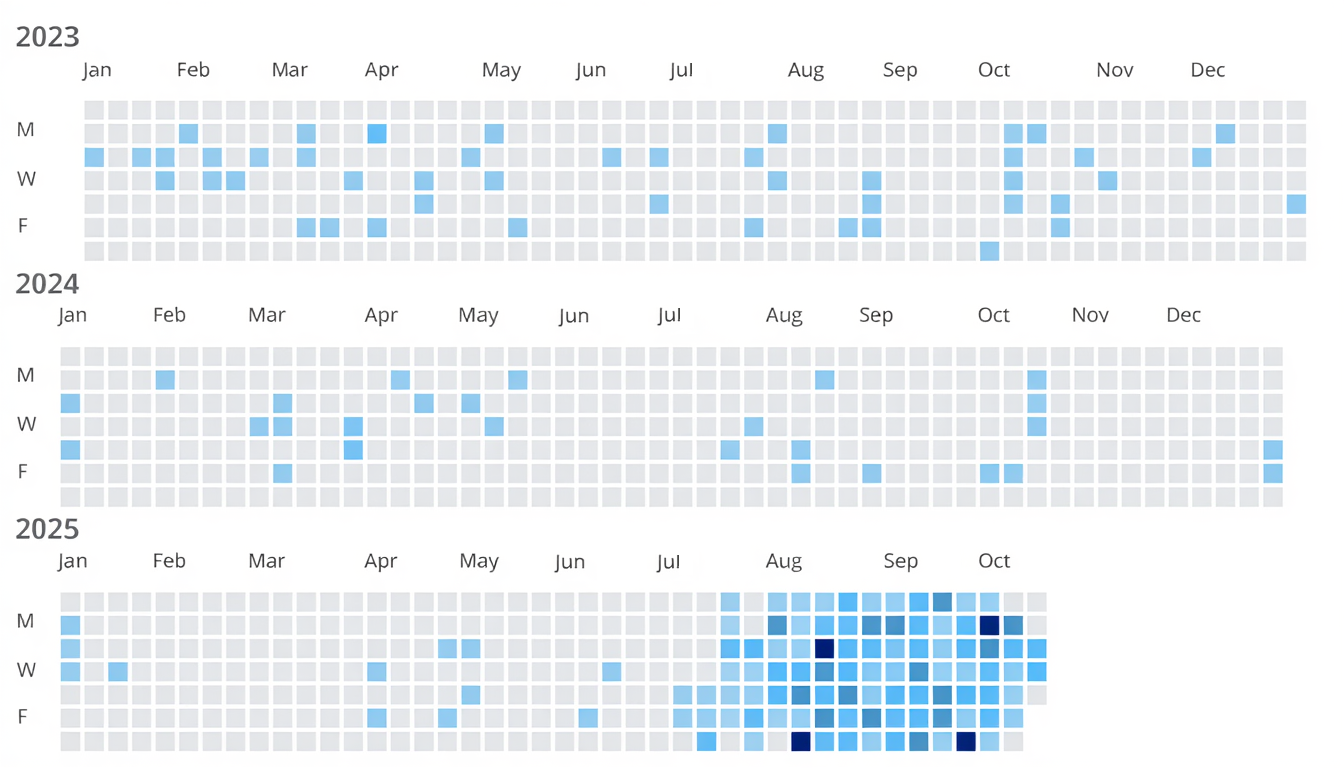
越来越多开发者发现,当代AI编程助手显著提升了他们的生产力。例如亚马逊的Joe Magerramov近期阐述其"团队10倍吞吐量提升并非理论,而是可量化的"。在质疑"氛围编程,垃圾代码"之前,他的文章详细展示了开发者如何在200英里时速下保持高质量,并重构流程以实现每日100次提交而非10次。
当开发团队交付速度提升10倍时,软件设计团队将面临什么?我观察到三种典型反应:
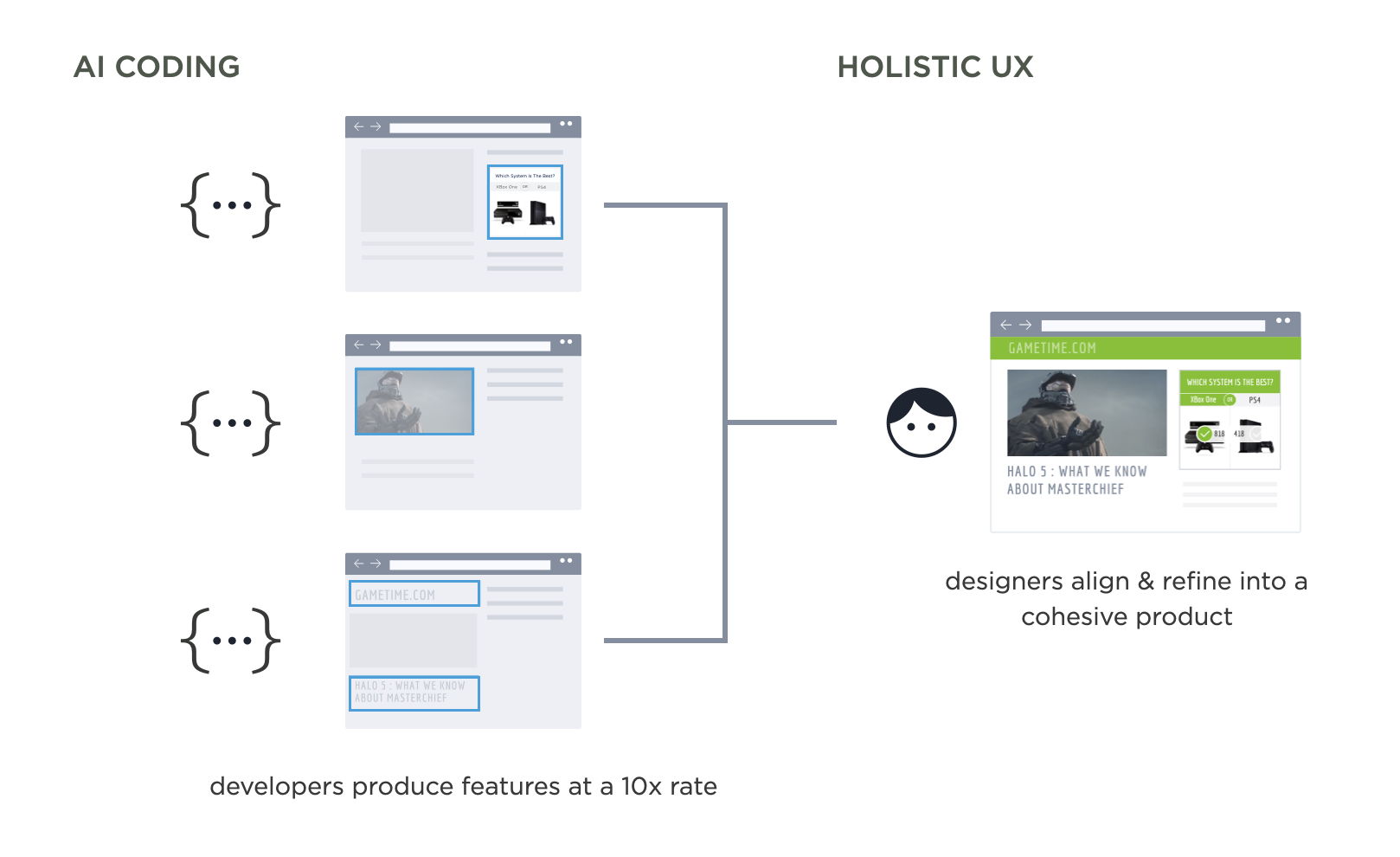
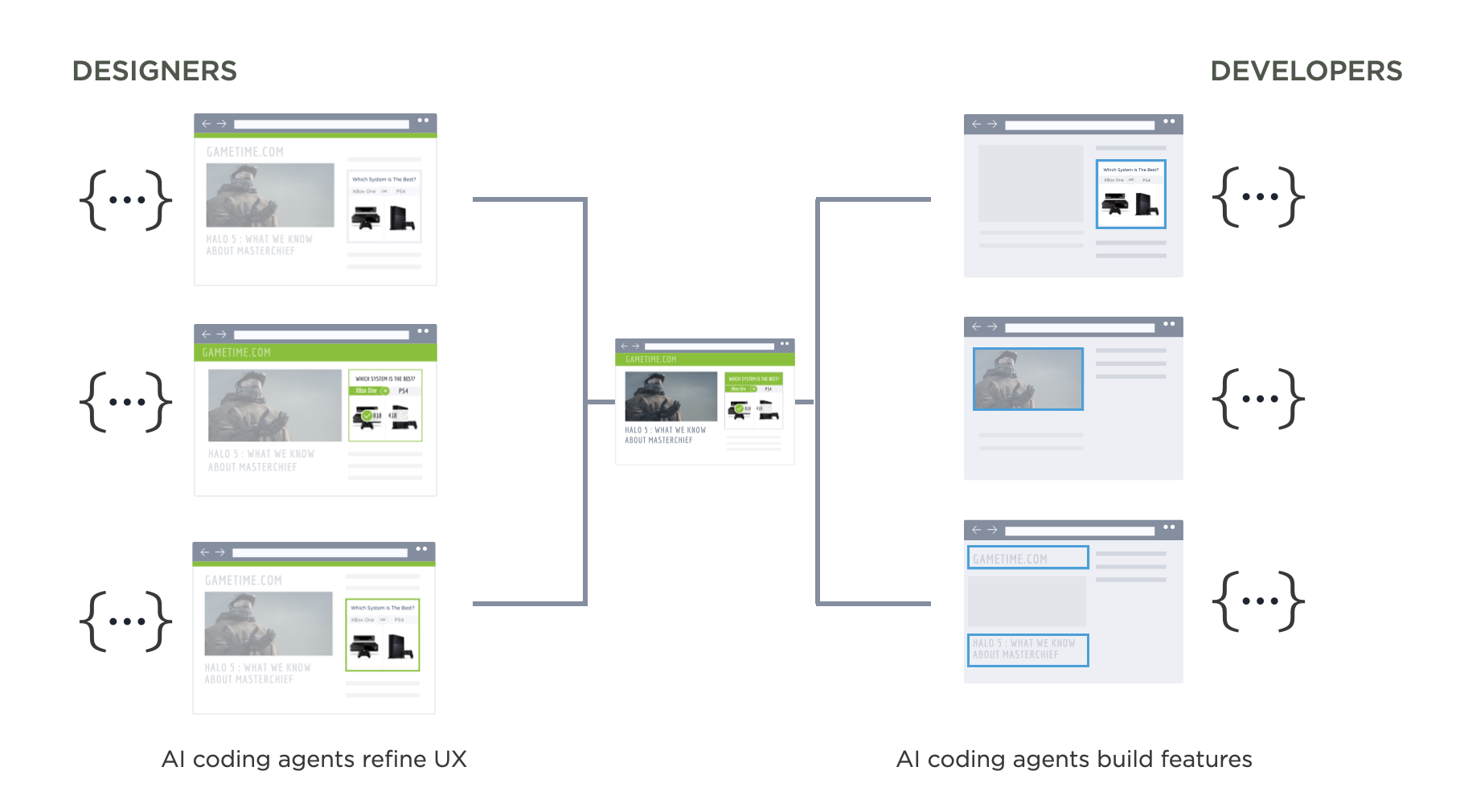
设计师不再将主要精力放在制作工程师后续需要实现的线框图上,而是越来越关注功能开发后的UX整合。即确保开发者快速编码的大量功能能融入连贯的产品体验。这种角色反转重塑了设计与开发的关系。
多年来设计团队始终"领先"于工程团队,不受技术债务和架构限制。设计师通过线框图和原型在开发前构思可能性,而开发者则需在实现时处理各种边界情况、状态和技术问题。
如今开发团队"反超"设计团队,新功能以惊人速度转化为代码。UX优化及与产品结构目标的深度融合成为后续必要的"收尾工作"。
越来越多设计师开始使用AI编程工具制作原型甚至交付功能。既然开发者能借AI提速,设计师为何不可?这使他们更贴近实际产品而非抽象线框图。Perplexity的设计师与工程师直接协作将提示词作为编程语言。Sigma的设计师则使用Augment Code等工具在生产环境修复UX问题。
第三种反应更具怀疑精神:AI提升开发速度不等于能创造优质产品。虽然占据道德高地令人愉悦,但现实是软件开发正在变革。开发者短期内不会回归1倍生产力。
"天下事物九成糟"——斯特金定律
值得重温斯特金定律的由来:当被问及为何90%科幻小说都很糟时,这位科幻作家答道:任何领域90%的作品都是糟粕。
AI生成的代码大多不够优秀?确实,但传统代码同样如此。无论使用何种工具,创造优秀产物始终艰难。对设计师和开发者而言,工具在变,本质工作未变。
At this point it's pretty obvious that AI coding agents can massively accelerate the time it takes to build software. But when software development teams experience huge productivity booms, how do design teams respond? Here's the most common reactions I've seen.
In all the technology companies I've worked at, big and small, there's always been a mindset of "we don't have enough resources to get everything we want done." Whether that's an excuse or not, companies consistently strive for more productivity. Well, now we have it.
More and more developers are finding that today's AI coding agents massively increase their productivity. As an example, Amazon's Joe Magerramov recently outlined how his "team's 10x throughput increase isn't theoretical, it's measurable." And before you think "vibe coding, crap" his post is a great walkthrough on how developers moving at 200 mph are cognizant of the need to keep quality high and rethink a lot of their process to effectively implement 100 commits a day vs. 10.
But what happens to software design teams when their development counterparts are shipping 10x faster? I've seen three recurring reactions:
Instead of spending most of their time creating mockups that engineers will later be asked to build, designers increasingly focus on UX alignment after things are built. That is, ensuring the increased volume of features developers are coding fit into a cohesive product experience. This flips the role of designers and developers.
For years, design teams operated "out ahead" of engineering, unburdened by technical debt and infrastructure limitations. Designers would spend time in mockups and prototypes envisioning what could be build before development started. Then developers would need to "clean up" by working out all the edge cases, states, technical issues, etc that came up when it came time to implement.
Now development teams are "out ahead" of design, with new features becoming code at a furious pace. UX refinement and thoughtful integration into the structure and purpose of a product is the "clean up" needed afterward.
An increasing number of designers are picking up AI coding tools themselves to prototype and even ship features. If developers can move this fast with AI, why can't designers? This lets them stay closer to the actual product rather than working in abstract mockups. At Perplexity, designers and engineers collaborate directly on prompting as a programming language. At Sigma, designers are fixing UX issues in production using tools like Augment Code.
The third response I hear is more skeptical: just because AI makes developers faster doesn't mean it makes good products. While it feels good to take the high ground, the reality is software development is changing. Developers won't be going back to 1x productivity any time soon.
"Ninety percent of everything is crap" - Sturgeon's law
It's also worth remembering Sturgeon's Law which originated when the science fiction writer was asked why 90% of science fiction writing is crap. He replied that 90% of everything is crap.
So is a lot of AI-generated code not great? Sure, but a lot of code is not great period. As always it's very hard to make something good, regardless of the tools one uses. For both designers and developers, the tools change but the fundamental job doesn't.
2025-10-23 08:00:00
某些用户体验问题伴随我们已久,以至于我们不再相信自己能做得更好。需要从用户那里收集数据?网页表单。用户不理解你的应用如何运作?新手引导。但新技术带来了新机遇,包括解决长期存在的用户体验挑战的方法。
如今AI在软件应用中主要表现为附加在用户界面侧边的聊天面板。虽然这通常有用,但并非利用AI改善应用体验的唯一方式。我们还可以利用AI模型的强项来解决存在多年的常见用户痛点。
我曾撰文探讨过其中一些方法,但认为总结几点来说明更高层次的见解会很有帮助。
大多数应用从空白状态开始,通过新手流程教导用户如何使用。展示界面、解释功能、演示示例,期待用户坚持到发现价值的那一刻。
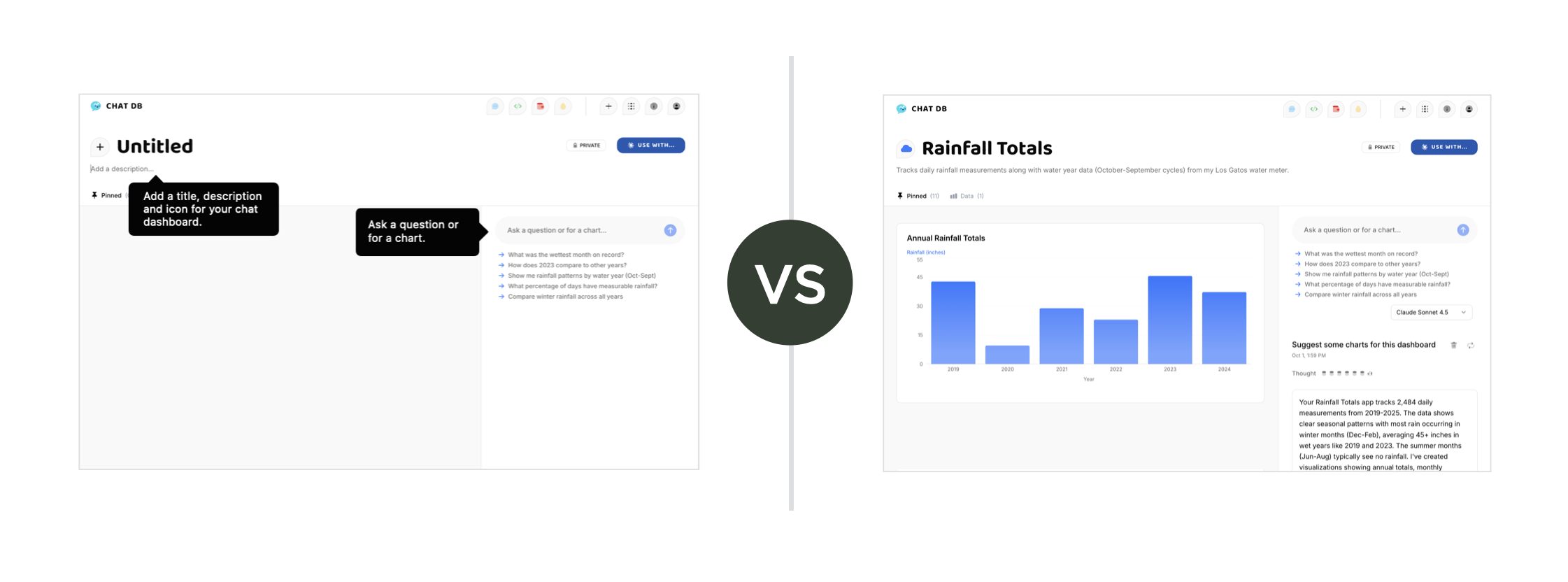
AI颠覆了这个模式。它可以从生成内容开始,而非空白页面。让用户第一天就有可编辑的内容,使他们能优化而非从零创造。区别在于即时参与感与延迟满足感。用户能立即使用产品,因为已有现成内容可供操作。他们通过观察可能性、修改和实践来学习。
更多内容见让AI负责新手引导...
传统搜索界面意味着关键词框、下拉菜单、分面筛选器。想找特定内容?先学习我们的分类法,理解归类体系,点击多重筛选选项。
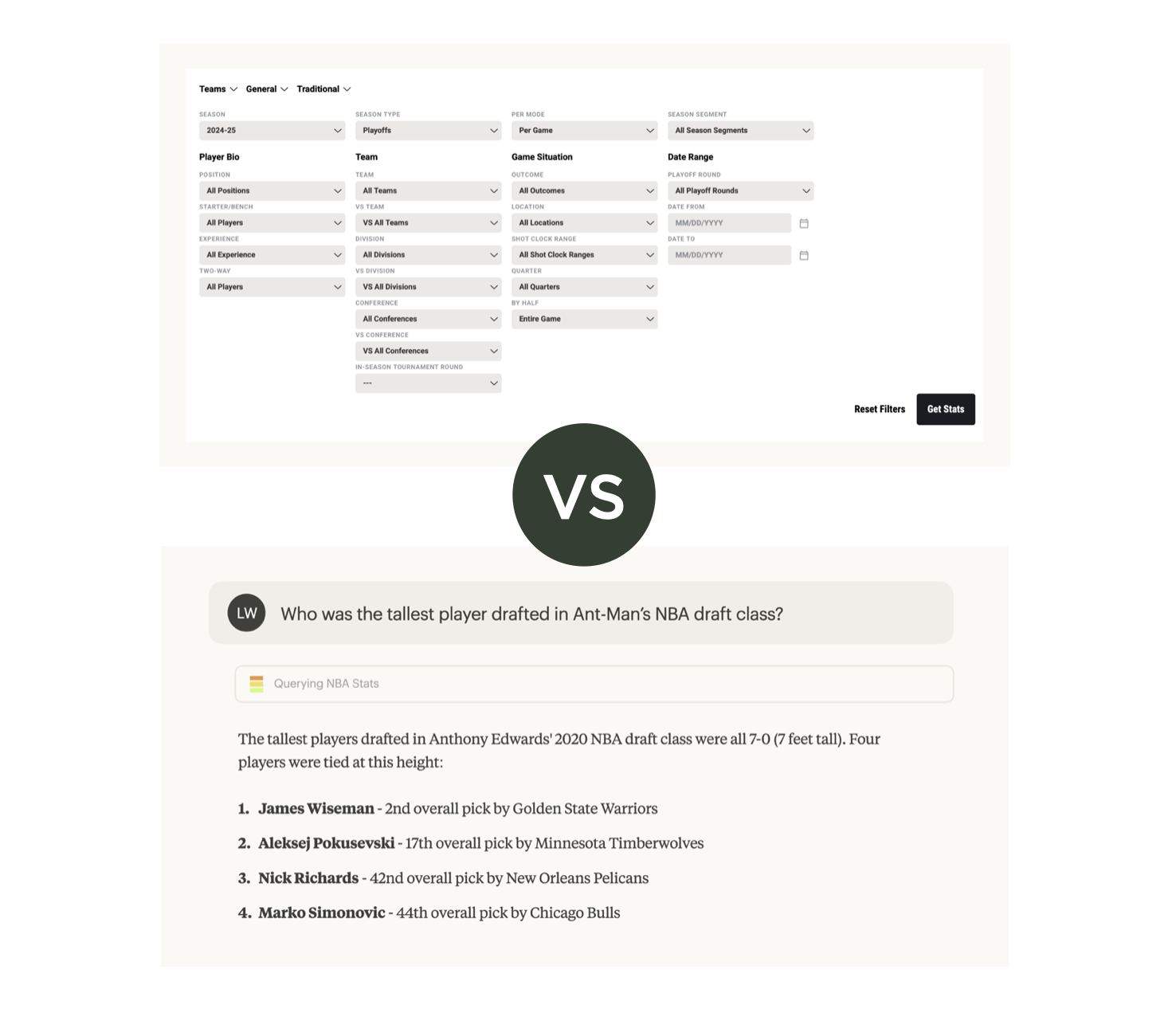
AI模型内嵌世界知识,理解上下文,能将自然语言问题转化为多步查询。"给我看90年代高评分动作片"不需要分别选择类型、年代和评分阈值的下拉菜单。AI会解析查询结构,组合筛选条件,返回结果。
用户的搜索方式千差万别,AI比僵硬的UI控件更能应对这种多样性。
更多内容见世界知识提升AI应用...
网页表单的存在是为了将信息结构化存入数据库。字段标签、输入类型、验证规则,表单强迫用户将信息塞入预设框架。
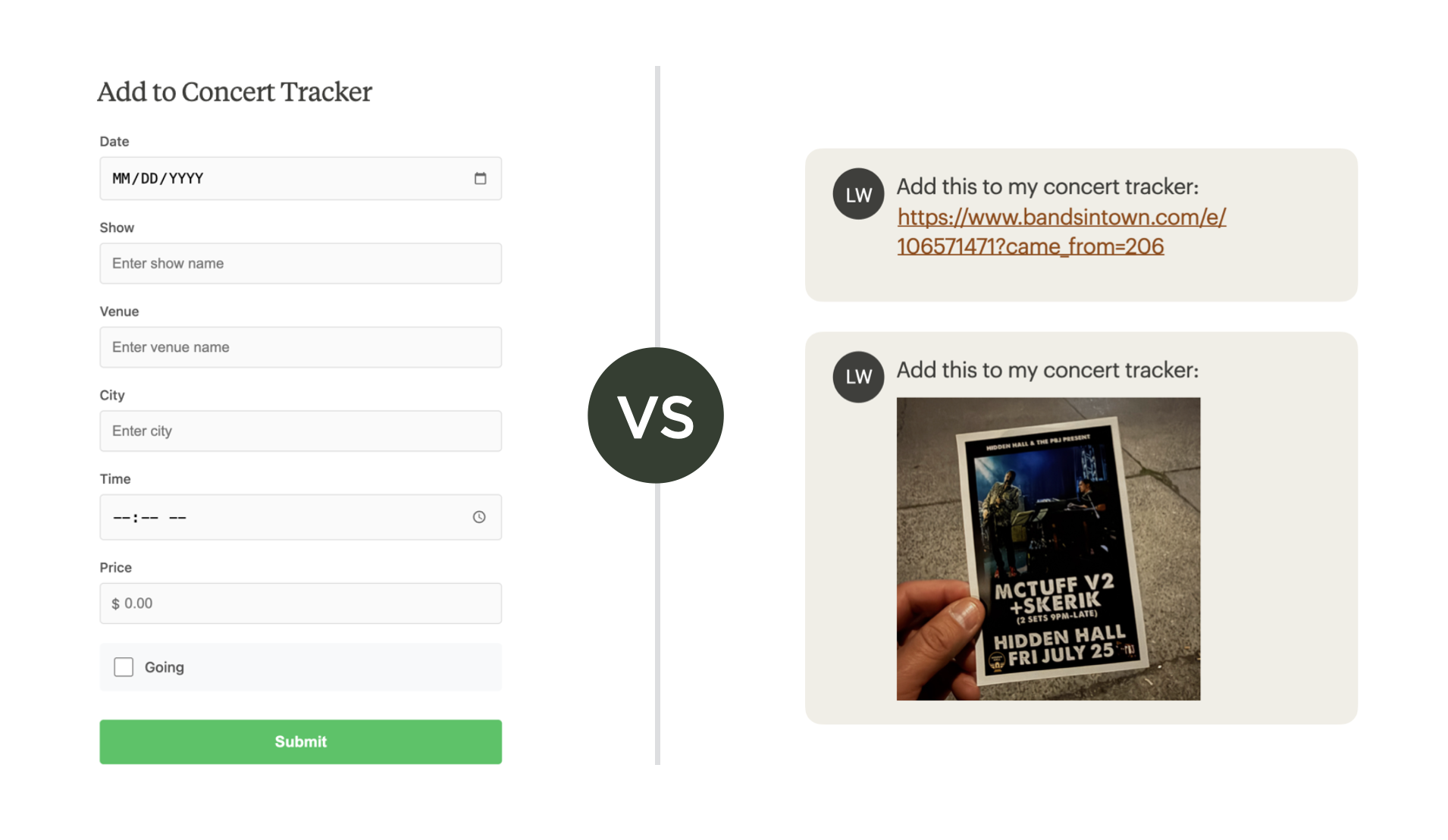
但AI擅长处理非结构化输入。用户只需上传图片、PDF文件或URL,AI就能提取结构化数据,自动填充数据库字段。机器代替人类完成格式化工作,将负担从用户转移至系统。人们自然表达,软件处理结构。
更多内容见AI应用中的非结构化输入替代网页表单...
这些案例有个共同点:AI能力让我们重新思考人机交互方式。不是给现有模式添加AI功能,而是基于AI的可能性重构模式本身。塑造当前UX惯例的限制条件正在改变,是时候重新审视我们的解决方案了。
Some UX issues have been with us so long that we stopped thinking we could do better. Need to collect data from people? Web forms. People don't understand how your app works? Onboarding. But new technologies create new opportunities including ways to tackle long-standing UX challenges.
Today AI mostly shows up in software applications as a chat panel bolted onto the side of a user interface. While often useful, it's not the only way to improve an application's user experience with AI. We can also use what AI models are good at to address common user pain points that have been around for years.
I've written about some of these approaches but thought it would be useful to summarize a few in order to illustrate the higher level point.
Most apps start with empty states and onboarding flows that teach people how to use them. Show the UI. Explain the features. Walk through examples. Hope people stick around long enough to see value.
AI flips this. Instead of starting with nothing, AI can generate something for people to edit. Give people working content from day one. Let them refine, not create from scratch. The difference is immediate engagement versus delayed gratification. People can start using your product right away because there's already something there to work with. They learn by seeing what's possible, by modifying, by doing.
More in Let the AI do the Onboarding...
Search interfaces traditionally meant keyword boxes, dropdown menus, faceted filters. Want to find something specific? Learn our taxonomy. Understand our categorization scheme. Click through multiple refinement options.
AI models have World knowledge baked in. They understand context. They can translate a natural question into a multi-step query without making people do the work. "Show me action movies from the 90s with high ratings" doesn't need separate dropdowns for genre, decade, and rating threshold. The AI figures out the query structure. It combines the filters. It returns results.
People search in many different ways. AI handles that variety better than rigid UI widgets ever could.
More in World Knowledge Improves AI Apps...
Web forms exist to structure information for databases. Field labels. Input types. Validation rules. Forms force people to fit their information into our predetermined boxes.
But AI works with unstructured input. People can just drop in an image, a PDF file, or a URL. The AI extracts the structured data. It populates the database fields. The machine does the formatting work instead of the human. This shifts the burden from users to systems. People communicate naturally. Software handles the structure.
More in Unstructured Input in AI Apps Instead of Web Forms...
These examples share a common thread: AI capabilities let us reconsider how people interact with software. Not by adding AI features to existing patterns, but by rethinking the patterns themselves based on what AI makes possible. The constraints that shaped our current UX conventions are changing so it's time to start revisiting our solutions.
2025-10-14 08:00:00
上周我列出了一系列用户体验和技术障碍清单,这些障碍使得在AI模型"内部"使用应用变得颇具挑战。随后OpenAI的ChatGPT应用商店公告承诺将消除大部分障碍。鉴于AI正在深刻改变应用的构建和使用方式,我认为有必要探讨这些挑战以及OpenAI提出的解决方案。
无论你称之为聊天应用、远程MCP服务器应用还是嵌入式应用,当你的AI应用运行在ChatGPT中时,ChatGPT的能力就成为了你应用的能力。ChatGPT能进行网络搜索,你的应用也能;ChatGPT可以连接Salesforce,你的应用同样可以。这些听起来都是构建嵌入式AI应用的绝佳理由,但是...需要权衡取舍。
此前,嵌入式应用必须通过连接远程MCP服务器添加到Claude.ai或ChatGPT(开发者模式下),而输入字段可能深藏在客户设置的数层点击之后。这个过程对大多数人而言就像一堵墙,完全阻碍了应用发现。
为解决这个问题,OpenAI宣布了正式的应用程序提交审核流程和质量标准。没错,就是一个应用商店。通过审核后,安装嵌入式应用将变成一键操作(需通过隐私同意流程),不再需要手动服务器配置。
如果你曾在Claude.ai或ChatGPT等聊天客户端添加过嵌入式应用,使用过程基本以文本交互为主。嵌入式应用无法渲染图像,更不用说用户界面控件了,用户只能阅读和打字。
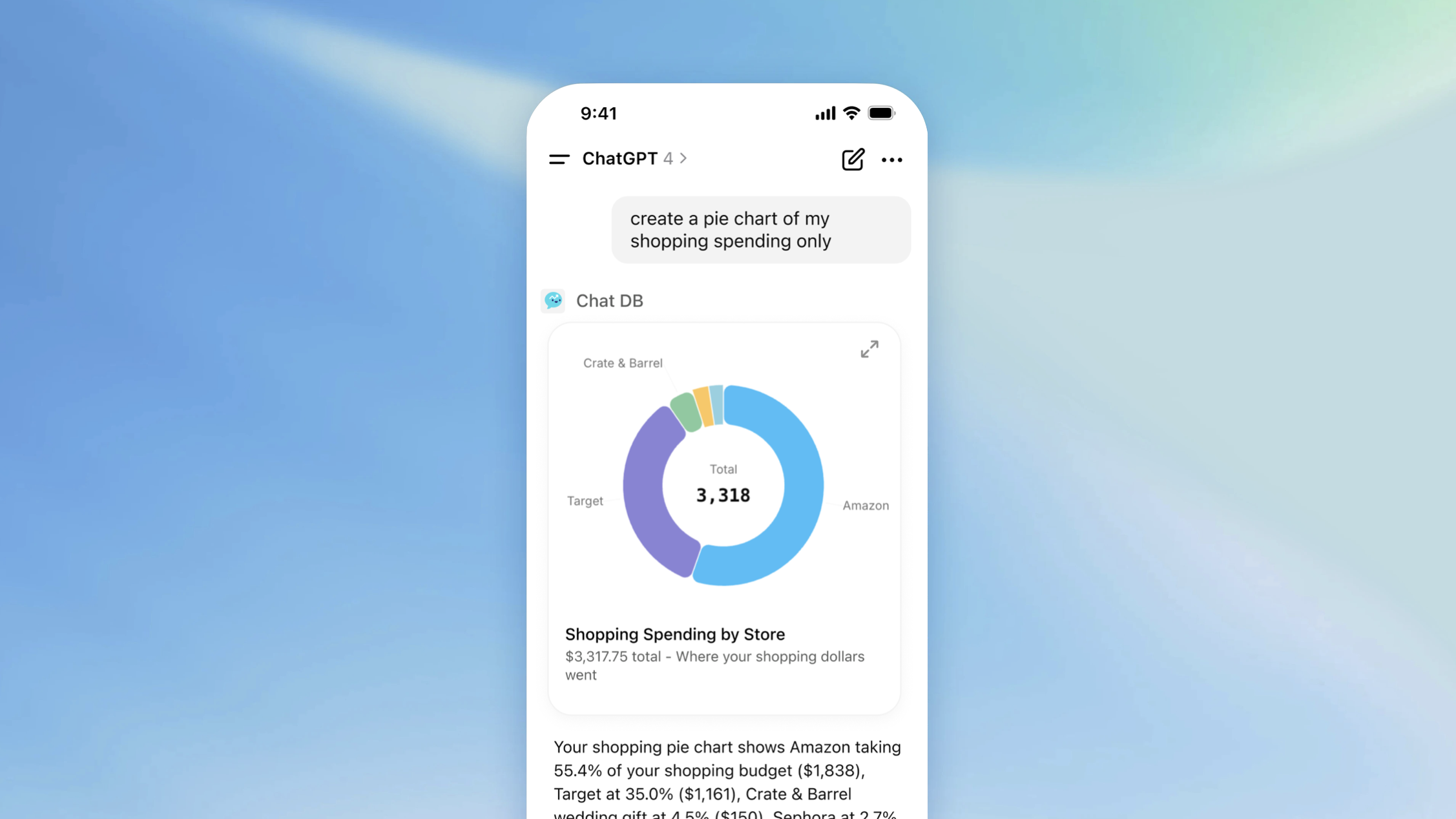
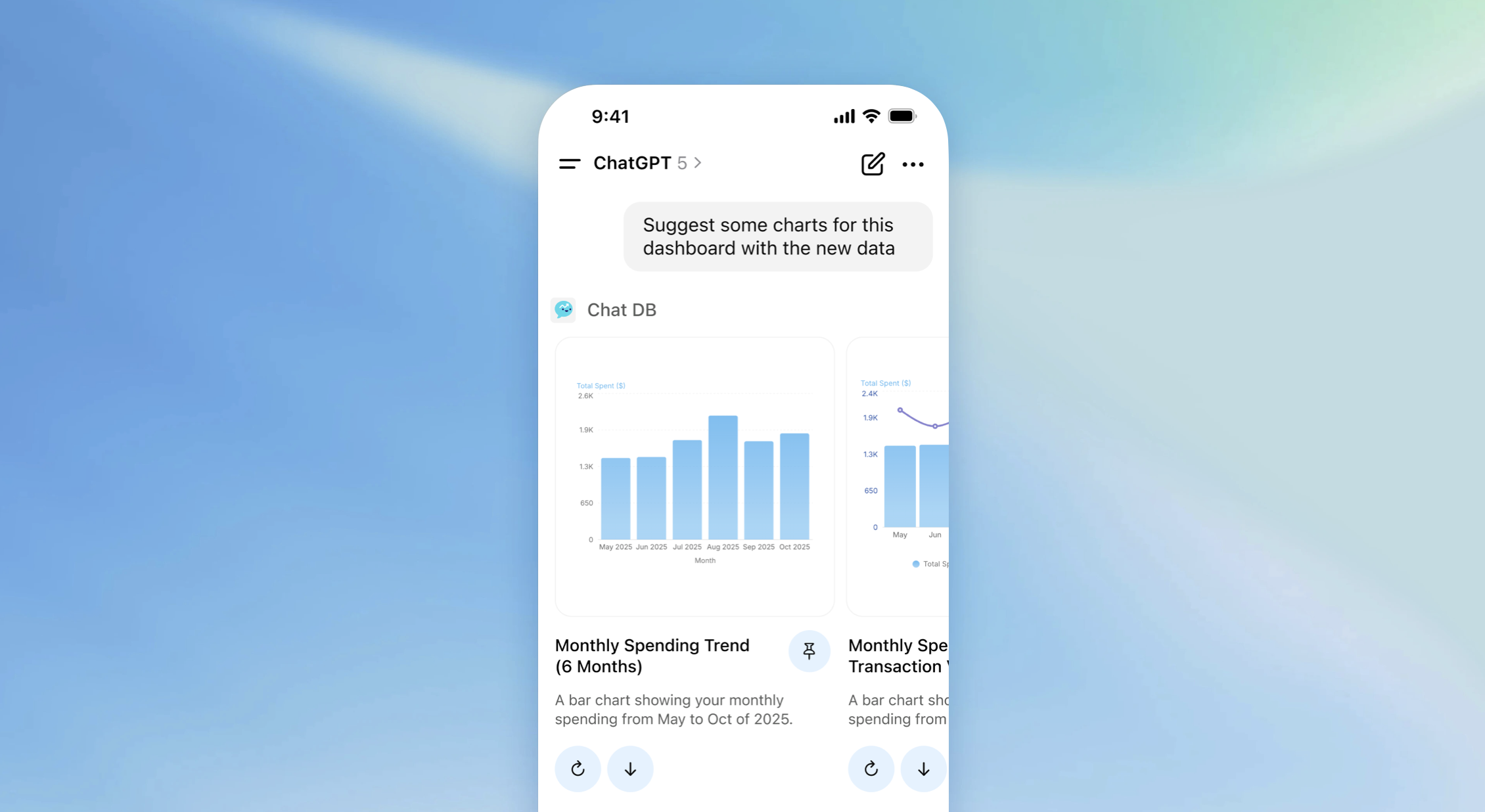
现在,ChatGPT应用能够渲染"运行在iframe内的React组件",这不仅支持内嵌图片、地图和视频,还能实现自定义用户界面控件。这些iframe还可以扩展至全屏模式,为应用提供更多专属UI空间,并支持画中画(PIP)模式进行持续会话。
这并不意味着嵌入式应用的发现性问题已完全解决。用户仍需在ChatGPT中通过名称搜索应用,通过"+"按钮访问,或依赖模型判断是否/何时使用特定应用。
运行嵌入式应用的服务器与AI客户端之间的交互也有改进空间。与桌面和移动操作系统不同,ChatGPT(目前)不支持自动后台刷新、服务器发起通知,甚至无法从前端向服务器传递文件(仅能传递上下文)。这些功能对现代应用至关重要,或许支持即将到来。
为任何平台构建应用都需要权衡分发能力与技术特性或限制。ChatGPT每周8亿用户量是个诱人的分发机会,而ChatGPT应用商店已经解决了嵌入式AI应用的许多用户体验和技术问题。
这足以让MCP远程服务器从开发者专属协议转变为真正的软件应用吗?这遵循所有平台迁移的相同模式:先有底层技术,再有使其易用的用户体验层。上周我们确实在这个方向上迈出了重大步伐。
Last week I had a running list of user experience and technical hurdles that made using applications "within" AI models challenging. Then OpenAI's ChatGPT Apps announcement promised to remove most of them. Given how much AI is changing how apps are built and used, I thought it would be worth talking through these challenges and OpenAI's proposed solutions.
Whether you call it a chat app, a remote MCP server app, or an embedded app, when your AI application runs in ChatGPT, the capabilities of ChatGPT become capabilities of your app. ChatGPT can search the web, so can your app. ChatGPT can connect to Salesforce, so can your app. These all sound like great reasons to build an embedded AI app but... there's tradeoffs.
Embedded apps previously had to be added to Claude.ai or ChatGPT (in developer mode) by connecting a remote MCP server, for which the input field could be several clicks deep into a client's settings. That process turned app discovery into a brick wall for most people.
To address this, OpenAI announced a formal app submission and review process with quality standards. Yes, an app store. Get approved and installing your embedded app becomes a one-click action (pending privacy consent flows). No more manual server configs.
If you were able to add an embedded app to a chat client like Claude.ai or ChatGPT, using it was a mostly text-based affair. Embedded apps could not render images much less so, user interface controls. So people were left reading and typing.
Now, ChatGPT apps are able to render "React components that run inside an iframe" which not only enables inline images, maps, and videos but custom user interface controls as well. These iframes can also run in an expanded full screen mode giving apps more surface area for app-specific UI and in a picture-in-picture (PIP) mode for ongoing sessions.
This doesn't mean that embedded app discoverability problems are solved. People still need to either ask for apps by name in ChatGPT, access them by through the "+" button, or rely on the model's ability to decide if/when to use specific apps.
The back and forth between the server running an embedded app and the AI client also has room for improvement. Unlike desktop and mobile operating systems, ChatGPT doesn't (yet) support automatic background refresh, server-initiated notifications, or even passing files (only context) from the front end to a server. These capabilities are pretty fundamental to modern apps, so perhaps support isn't far away.
The tradeoffs involved in building apps for any platform have always been about distribution and technical capabilities or limitations. 800M weekly ChatGPT users is a compelling distribution opportunity and with ChatGPT Apps, a lot of embedded AI app user experience and technical issues have been addressed.
Is this enough to move MCP remote servers from a developer-only protocol to applications that feel like proper software? It's the same pattern from every platform shift: underlying technology first, then the user experience layer that makes it accessible. And there was definitely big steps forward on that last week.
2025-10-10 05:00:00
任何设计过软件的人都可能遇到过"空白状态"问题。虽然应用程序能创造有用的内容,但让用户跨越初始创作障碍却非易事。如今借助AI技术,模型可以替人们跨越这道创作鸿沟。
设计电子表格应用时,你需要"新建表格"页面;设计演示工具时,你需要空白状态来承载新演示文稿。文档编辑器、设计工具、项目管理应用...它们都面临同样的难题:当用户面对空白画布时,如何帮助他们迈出第一步?
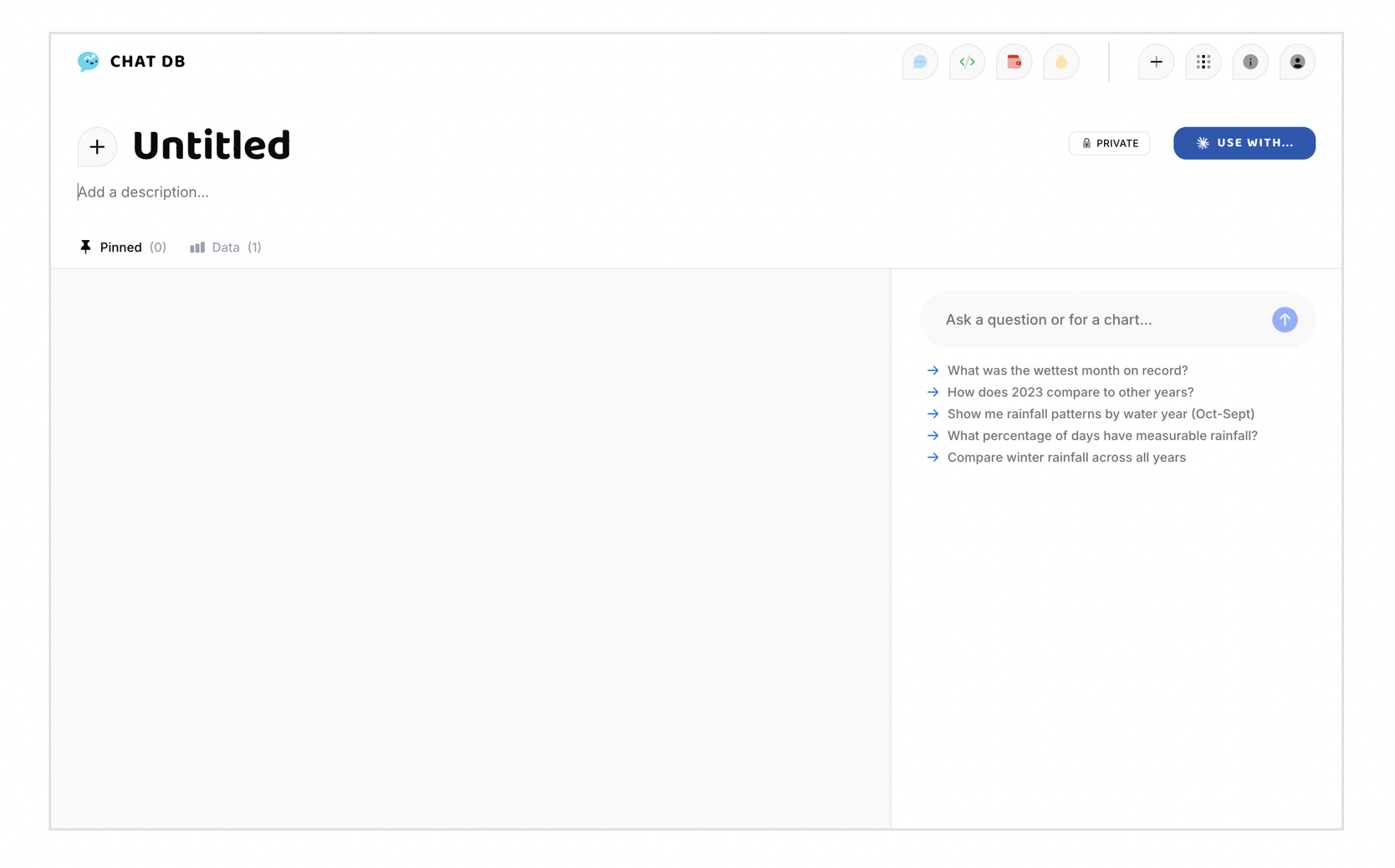
设计师们尝试过多种解决创作鸿沟的方法,形成了各类常见模式:
这些方法要求用户先学习后操作。但实际上,大多数人会直接尝试,仅在失败时才回头学习。事实证明,要求用户先阅读手册根本行不通。
而现代AI模型让我们能采取全新方式:AI可以通过实际创作过程向用户演示产品用法,用户只需调整结果即可。AI负责创作,人类负责优化。
新模式将"先学后做"转变为"观察后优化",让用户从AI生成的雏形开始打磨,而非从零起步。我们不再教用户如何创作,而是直接展示创作过程——换言之,AI承担了(引导)工作。
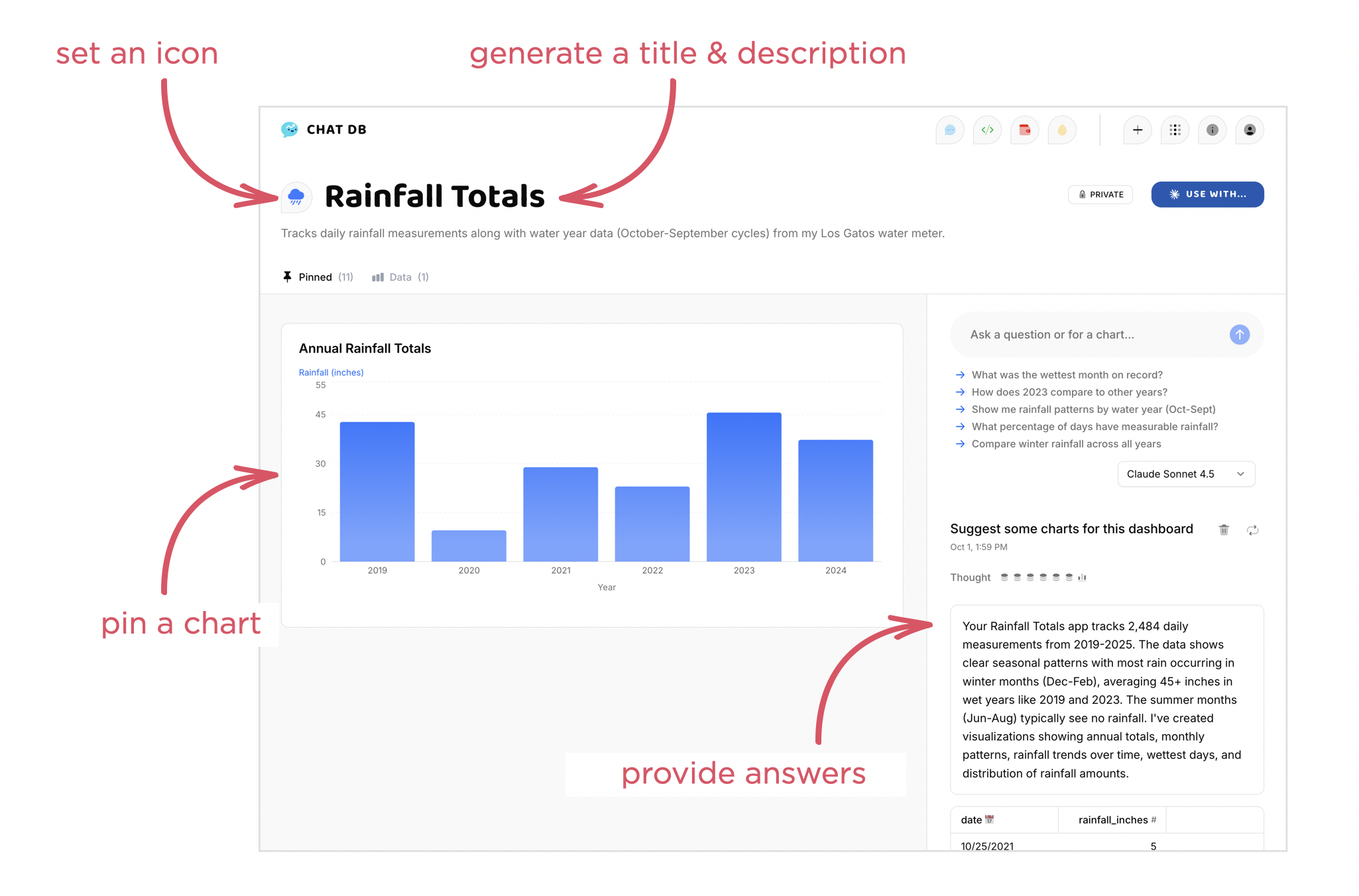
这在ChatDB中得到完美体现,它能帮助用户即时理解、可视化并分享数据。上传数据后,ChatDB会:
整个过程直观展示ChatDB的功能与用法,无需任何引导教程。
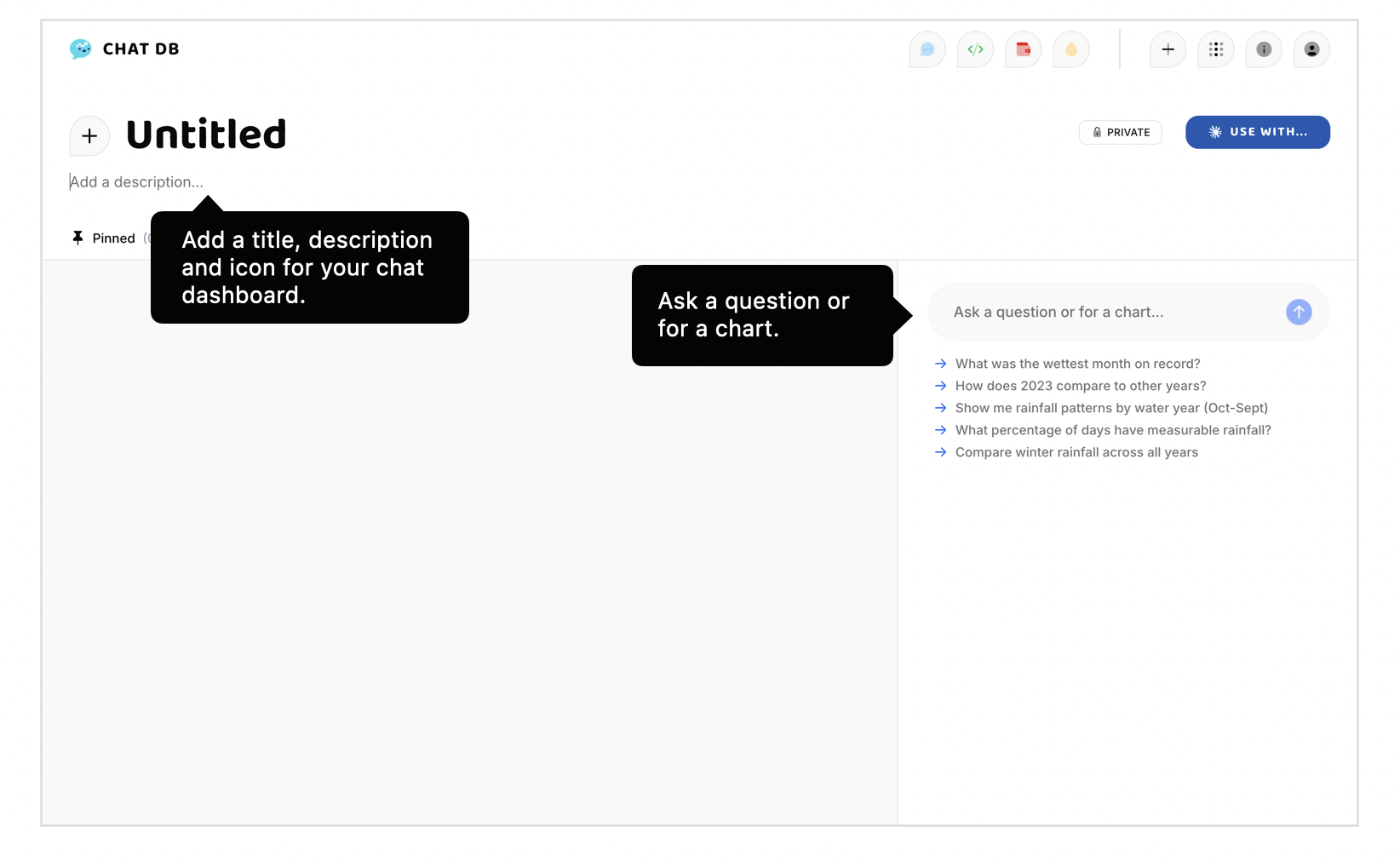
仪表盘创建后,编辑标题(点击输入)、更换图标颜色等操作都极其简单。AI提供起点,用户接力完善。亲自试试看。
这种方式将软件从"教导使用"转变为"示范可能",把传统空白状态问题从"如何帮助开始"转化为"如何帮助优化"。软件通过实际行动而非说明书,向用户展示可能性。
Anyone that's designed software has likely had to address the "empty state" problem. While an application can create useful stuff, getting users over the initial hurdle of creation is hard. With today's technology, however, AI models can cross the creation chasm so people don't have.
If you're designing a spreadsheet application, you'll need a "new spreadsheet" page. If you're designing a presentation tool, you'll need an empty state for new presentations. Document editors, design tools, project management apps... they all face the same hurdle: how do you help people get started when they're staring at a blank canvas?
Designers have tried to address the creation chasm many times resulting in a bunch of common patterns you'll encounter in any software app you use.
These approaches require people to learn first, then act. But in reality most of us just jump right into doing and only fall-back on learning if what we try doesn't work. Shockingly, asking people to read the manual first doesn't work.
But with the current capabilities of AI models, we can do something different. AI can model how to use a product by actually going through the process of creating something and letting people watch. From there, people can just tweak the result to get closer to what they want. AI does the creation, people do the curation.
Rather than learning then doing, people observe then refine. Instead of starting from nothing, they start from something an AI builds for them and making it their own. Instead of teaching people how to create, we show them creation in action. In other words, the AI does the (onboarding) work.
You can see this in action on ChatDB which allows people to instantly understand, visualize, and share data. When you upload a set of data to ChatDB it, will:
All this happens in front of your eyes making it clear how ChatDB works and what you can do with it, no onboarding required.
Once your dashboard is made, it's trivial to edit the title (just click and type), change the icon, colors, and more. AI gives you the starting point and you take it from there. Try it out yourself.
With this approach, we can shift from applications that tell people how to use them to applications that show people what they can do by doing it for them. The traditional empty state problem transforms from "how do we help people start?" to "how do we help people refine?" And software shows people what's possible through action rather than instruction.
