


2026-06-25 01:27:11
This content is password-protected. To view it, please enter the password below.
2026-05-24 01:58:01
Updated May 2026
As some of you may know, I carry everything I own in my backpack every day. Recently, that backpack was stolen. Replacing my passport took some time, but replacing my laptop did not, and within minutes I had a new Macbook up and running with the exact same files and browser tabs that were open on my previous one at the moment it was stolen.
This was the result of serious effort I put in nearly ten years ago to consolidate, organize, and back-up my digital life, and the contingency plans I put in place if anything was stolen. It took a long time before that effort was put to the test, but it looks like that time was absolutely well spent!
A lot of people were curious about how I made this happen. So in this post I will detail what my digital ecosystem looks like and the contingency plans for if my devices are stolen. Though I imagine very few people carry all of their worldly possessions in their backpack as I do, home break-ins, fires and regular theft are still a thing, so I hope this post can be useful.
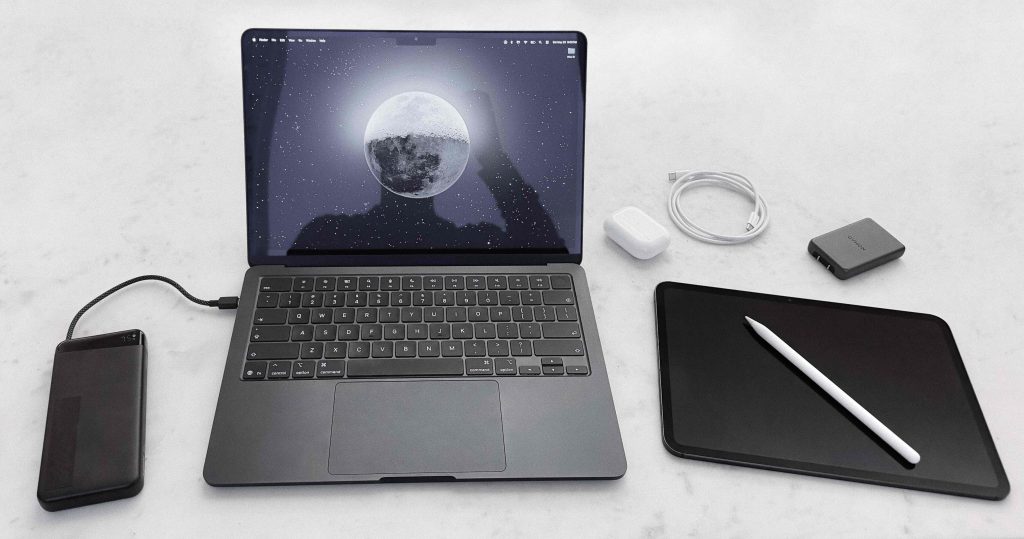
My personal hardware setup (2026)
I treat my technology and data the same way I do my physical possessions: intentionally and with extreme prejudice. Every device and app has to earn its place. This is one of those things that seems painfully obvious yet very few people do. I’d like to call this ‘digital minimalism.’
I feel like the term digital minimalism has been distorted by people who take their technology cynicism too far and isolate themselves from reality. Abstinence isn’t the same as discipline; you’ll miss out on tools that can improve your life. So I’d like to propose a better definition:
Use technology, but selectively and with restraint. Use social media to stay in touch with friends, but never scroll an algorithmic feed. Own a laptop, which can enable creative output, but never a TV, which cannot enable anything. Reap the benefits of technology, like learning new skills, staying connected, or creating something meaningful, while avoiding the tradeoffs.
The first two points are subjective; everyone’s technology needs are different so it’s pointless to discuss the best laptop or app. The third point is interesting, however, and is the focus of this post.
Not allowing my devices to hold me back means I can’t worry about losing them, which means I need all of my data backed up to the cloud. But at the same time, I want all my data on my devices, so I’m not dependent on wifi or a cell signal to access my files or photos while traveling.
This means keeping my digital life extremely organized, trimmed to small file sizes that can back up or download in seconds, and secure with several layers of redundancy using large, stable platforms that I trust to still be around in decades.
This framework is designed around security and recoverability. By using established platforms like Apple and Google, I can minimize complexity and cognitive overhead and have a framework that is both encrypted and easy to access at any time from any device.
But this introduces a challenge. For most people it’s extremely difficult to lock yourself out of your digital life, since these platforms have login processes that make it easy to authenticate yourself using a secondary device. But if you lose every device simultaneously, it gets complicated. Tech companies would rather you lose access to your account than be blamed for giving a stranger access, and these days memorizing a password is not enough. Plus, circular dependences!
That’s why in addition to making contingency plans for losing individual devices, I made sure to plan for the worst case scenario: losing everything at once. All while keeping my accounts safe with multi-factor authentication and without relying on physical authentication methods.
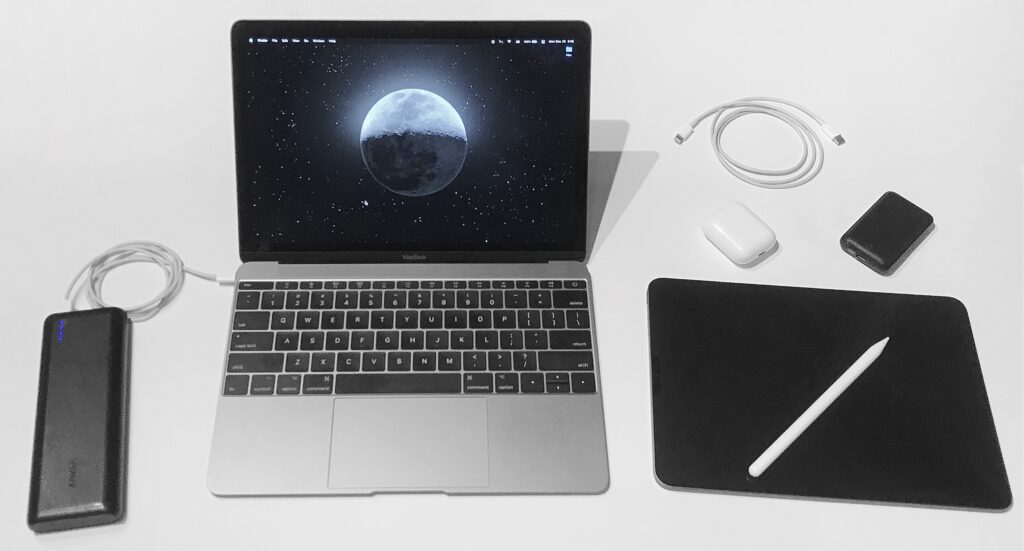
My personal hardware setup (2019)
The holy trinity of my digital life is my Apple, Google, and 1Password accounts. Consequently, these are the only three passwords I have memorized. These passwords don’t give account access, since everything has multi-factor authentication enabled, but having them memorized makes logging in quicker. All three are passphrases, four concatenated english words with an optional number thrown in, which are incredibly secure and impossible to forget.
On my Macbook, all of my data is located in one folder. This folder is on my desktop, titled ‘Files’, and contains everything I’ve ever done, including current projects, tax archives, and school essays from a decade ago. Since my desktop is synced to iCloud, this means everything syncs to iCloud.
This is not an intended use of iCloud drive, and it’s possible I’m the only person who does this, but it works brilliantly. Not only does it ensure every file is permanently backed up, but it also means everything is accessible in the Files app on my other devices. Moving files back and forth this way is often even faster than AirDrop.
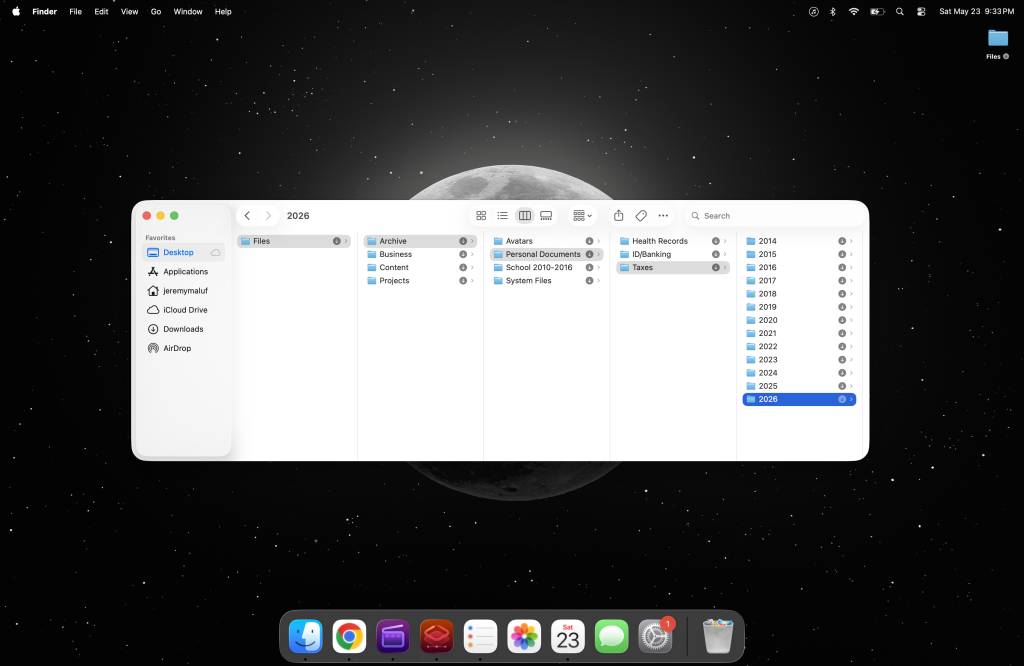
The clean desktop is performative; usually it’s full of current projects
This is only possible because I keep my data structured and minimal. My entire iCloud drive, with over two decades of data, is only 30GB, and my entire photo library is only 100GB. This makes handling my data much quicker and easier than if I were dealing with terabytes.
To illustrate how spartan this data regimen is, if I record a two-hour video with my phone right now, that’s 100GB. So to take photos and 4K HDR videos every day and only have 100GB since my first iPhone in 2008* is something I am proud of. I do this by always trimming videos to the necessary portion and deleting duplicates or unnecessary shots within minutes. This habit has the side effect of making my camera roll organized and easy to parse and share.
Since iCloud is a secure, encrypted filesystem, I can store private data like digital IDs, bloodwork, and copies of my secret keys and backup codes. In my Macbook settings, FileVault, Stolen Device Protection, Find My, and Recovery Contacts are all enabled. I do not use Advanced Data Protection, as I believe it to be overkill, but I am open to changing my mind. My threat model is theft and targeted hacking, not government subpoenas.
*I broke this phone in 2011, which resulted in me losing all my photos up to that point and laid the groundwork for the effort I put in a few years later to make sure it never happens again.
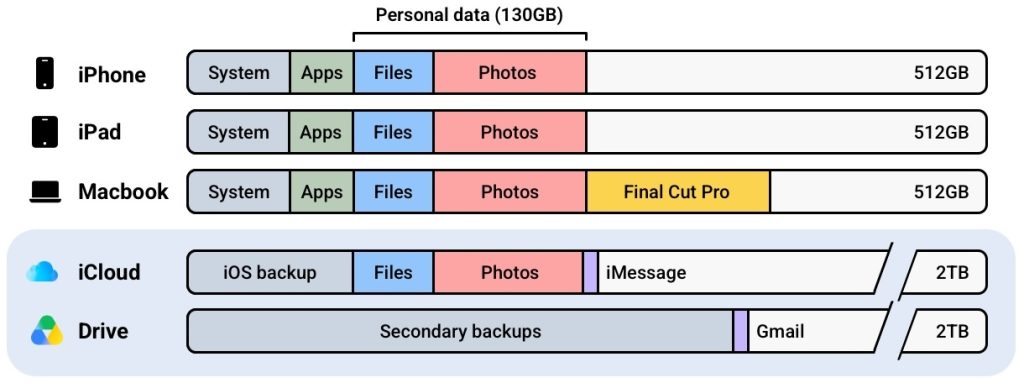
I use four Google products. I may replace Google Drive if I ever find an alternative that I trust to still be around in a decade, but with the current state of cloud storage companies this looks to be unlikely. Regardless, the other three products are perfect and I don’t foresee them changing.
1Password gives me access to my remaining 600 accounts, from social media to banking. All of these accounts have alternate entry points so losing 1Password is not critical, but I still try to make sure it never happens. Since the 1Password secret key is not enough to gain account access, even combined with an email, I was able to store it liberally in half a dozen places.
For the past few years I’ve also had a thumb drive, kept in my pocket at all times, that functions as a tertiary backup for large files that don’t need to be encrypted, and allows for quicker file access when needed. It has proven to be much more reliable than the SSD drives I’ve used over the past decade, but I sometimes doubt the usefulness of a physical drive so I may eventually get rid of it.
The total cost of all my technology is about $2,500, or $3,500 when I carry an iPad. $1000 each for a Macbook, iPhone and iPad, and $500 for everything else. This is the worst case; I’ll pay much less during a planned upgrade since I can buy during a sale or trade-in my old device.
My monthly subscriptions are very reasonable for the amount of data and redundancy this framework provides. Relevant services I pay for:
Ignoring cell service, which is a universal expense, these subscriptions total just $45 per month and get me 4TB of secure, redundant cloud storage, a password manager, and insurance coverage for all of my devices: damage coverage for my Macbook and damage/theft/loss coverage for my iPad and iPhone. My Apple Watch and Airpods are also insured, but upfront at purchase in order to arbitrage the pricing differences.
Assuming my stuff gets stolen once every ten years, which anecdotally seems to be the case, the amortized cost of replacing everything comes down to just a few bucks per month. Not bad!
Once I’m certain my devices are gone and there’s no chance of recovering them, the first step is to remotely lock and erase them in Find My. All Apple devices are encrypted by default so there’s no risk of a data breach, but this step fully bricks them and can display a message if they’re found. After that, my next step depends on what was taken. Here’s the runbook.
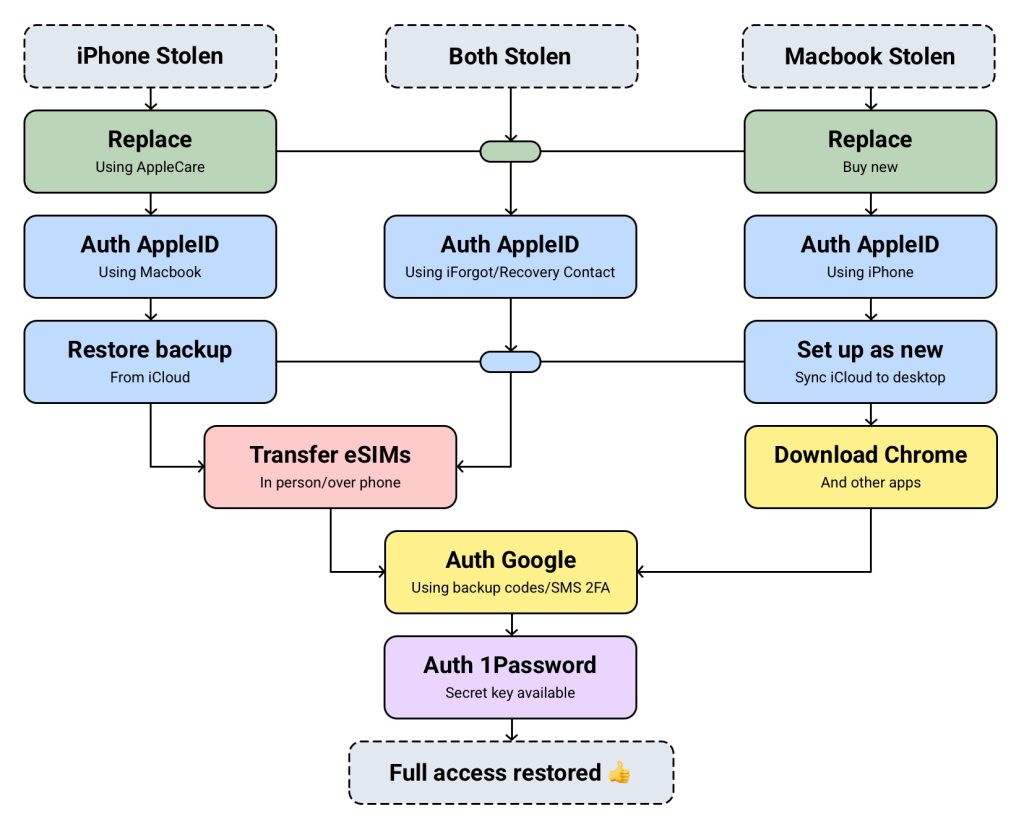
I occasionally carry an iPad or backup iPhone, which adds another layer of security by slightly increasing the odds that I retain a trusted device after a theft. But only slightly; if my Macbook is stolen my iPad will probably be as well (as demonstrated by a 2022 theft attempt in Texas, in which I chased the thief down for 30 minutes to get both devices back). The recovery process for these devices is the same as my Macbook.
Finally, I should mention that I have two weak points with my setup: on my Macbook I’ll lose any Final Cut Pro projects actively being edited (Apple coded Final Cut Pro to be incompatible with iCloud-synced folders), and on my iPad I’ll lose any Procreate artwork that I didn’t manually backup. I believe these are solvable issues, so if you have ideas please reach out!
After the thief managed to find my Airtags and deactivate the Macbook’s tracking signal, I marked it as ‘lost’ in Find My. I then bought a new Macbook and sat down to set it up.
First, I logged into my iCloud account. The moment I did this, all of my iCloud files automatically synced to my desktop folder. I then downloaded Chrome and logged into my Google account, and a second later all of my bookmarks and extensions synced as well. From there, it was just one click to restore all the tabs that had been open on my previous laptop. All within 5 minutes.
I downloaded Final Cut Pro and Pixelmator Pro, my two daily apps, and logged into 1Password to unlock everything. Any other apps I had on my previous laptop, from Claude Code to Kerbal Space Program, were secondary and rarely used, and I’ll download them if I need them.
Finally, I tweaked a few settings to make the MacOS ecosystem usable, like reducing the display size, turning off the AI features, and installing NoTunes to fix some of Apple’s UX flaws. I made sure my iCloud desktop and local desktop were synced again, and in settings I swapped the laptop within my AppleCare plan. And that was it! It was like my laptop had never been stolen.
Total time, maybe 15 minutes.
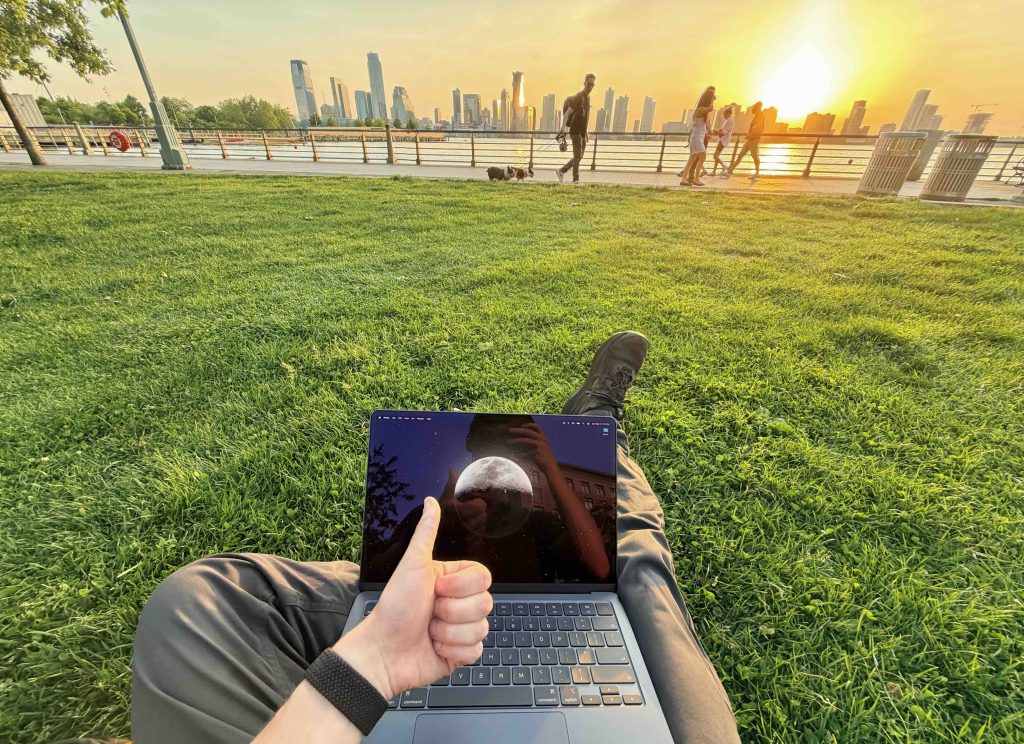
Like it was never stolen
For anyone wondering how my bag was stolen, it involved many drinks and was entirely my fault. This is the reason I have contingencies for theft recovery instead of only optimizing for theft prevention: my credo is to live an interesting life, and an interesting life cannot be safe and controlled all of the time. I wouldn’t change anything about that evening. I’d do it all over again.
These contingency plans allow me to truly feel free and not have to worry about my possessions when I’m out on an adventure, whether it be in a bar in the Upper East Side or a favela in Rio. My only concern should be for the material value, and if the adventure outweighs it, then I take the risk.
If this mindset appeals to you, I highly recommend taking a similar approach to your technology to decrease cognitive load and stop letting your stuff hold you back.
As an addendum, I often get asked about this website, so I figured I’ll include that info here. It’s nothing fancy. The website is built on WordPress using a custom theme I stripped down, the domain is bought and hosted on Namecheap, and analytics is on Plausible. The goal is for this to be as simple and self-sufficient as possible; I can ignore it for half a decade and it will stay up.
Namecheap is known to struggle with traffic spikes, but I’ve hosted this website with them since 2017 and never had a problem, even with 1,000+ concurrents. That said, considering they were sold to private equity in 2025, if this ever becomes an issue I am prepared to move quickly!
To keep the site secure, Namecheap has TOTP 2FA enabled, WordPress has very few plugins installed, and I always assume any email about my domains is a phishing attempt.
In total I pay $23.11/mo for this website, which is mostly for analytics. If I ever switch back to Google Analytics (free) my website expenses would be $7.28/mo! Either way it’s very affordable, and I do think people appreciate this site not having tracking cookies.
In addition to the above website expenses I also pay $49/yr for Carrd Pro Plus. I also perpetually have off-and-on expenses for miscellaneous other domains and projects.
Thank you for reading!
I send the occasional email to this list, including notes on projects and interests, travel adventure write-ups, and notifications for when I post updates to this site.
Please enable JavaScript for this form to work.
100% human-written | instagram | twitter | youtube | [email protected]
2025-02-05 00:37:04
Updated February 2025
Traveling by plane doesn’t inherently require anything other than what’s in your pockets right now. Everything else can be purchased when needed (e.g. umbrella, clothes) or will be provided where you’re staying (e.g. toiletries, towel). Yet for some reason everybody treats weekend trips by plane like they require an order of magnitude more stuff than crashing at a friend’s place.
I realized this a few years ago and started traveling “pockets-only” for some of my shorter trips within the US, just bringing my phone, wallet, toothbrush and phone charger. Eventually I added my passport into the mix and tried it on longer international trips…and they all went effortlessly. It is legitimately the best way to travel. If you’ve ever read or watched Jack Reacher, it’s exactly like that.
I get asked a lot about the logistics, so this page will be a short guide.
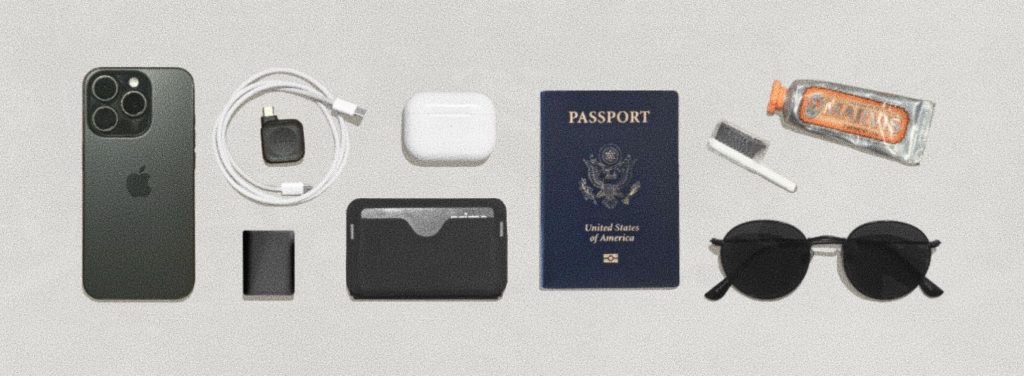
Just to note: this travel style works best for people who are in good health and have experience with minimalist travel. There are also trips for which this won’t work, such as trips to places with minimal infrastructure, or trips that require a laptop or multiple outfits for work or events. And finally, none of this works if your daily routine requires specialty items like medication or makeup. If you don’t fit these criteria feel free to read on, but I don’t recommend trying this.
Every item is technically optional. It is possible to travel without a phone, most hotels provide toothbrushes and personal care items, and you can survive without a credit card and ID. But the more you don’t bring, the more failure points you introduce. Efficient travel is all about reducing failure points, so if your ATM withdrawal gets flagged by the bank, you don’t become stranded.
It’s worth noting that ‘pockets-only’ is somewhat biased towards men’s fashion, and women have the option of wearing a dress without pockets and carrying a small purse.
Accessories like a watch, sunglasses, or jewelry can be brought, but generally the more items you bring, the more mental overhead to keep track of everything. For situations where you may require an umbrella, simply monitor the forecast and buy one at a nearby store if needed.
To address the elephant in the room: it’s easy to travel like this if you sacrifice personal hygiene. I do not endorse this. If someone can tell you’re traveling from your appearance or odor, you’re doing it wrong. If you take anything away from this post, please let it be that. I’m not a fan of how far vagabond-style travel has drifted from classy travel. There’s no reason you can’t do both.
At a high level, clothing can be divided into base layers and outerwear. Outerwear, such as coats, sweaters, shoes, jeans, gloves, buffs and hats, will stay clean indefinitely as long as you take care of them. If you often do activities that get your clothes dirty, don’t do them.
Base layers – your shirt, underwear, and socks – do require strategy, however, and will need to be replaced or cleaned daily. If you’re traveling to a warm climate you might only have base layers. There are three ways to handle them.
Typically, weather will make a lot of your clothing decisions for you. In general though, traveling pockets-only to colder parts of the world is far easier than to warmer climates.
Airports won’t give you trouble for traveling pockets-only, and passing through security checkpoints takes 10 seconds. Ultimately, trips end up feeling a lot more relaxed.
When booking your hotel or Airbnb, be sure to check the amenities list. Generally the more you pay the more amenities you get, but even the cheapest will include a towel and soap. I would not recommend hostels or shared Airbnbs unless you are certain they provide what you need.
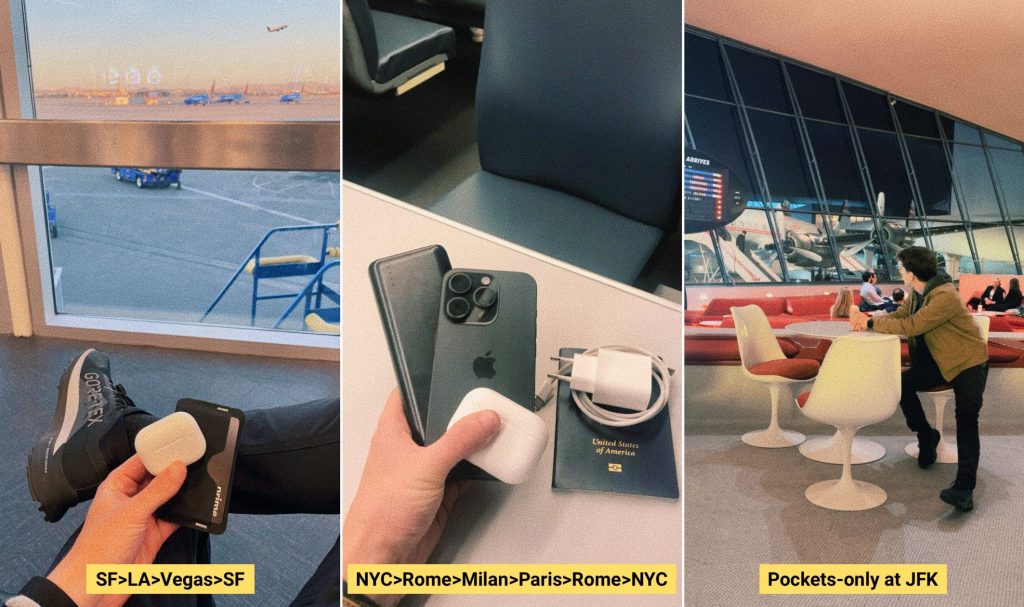
I have not encountered any setbacks traveling like this, but the internet has presented many! Ignoring scenarios that don’t warrant attention, common hypotheticals have been along the lines of tripping in a puddle or spilling a beer on yourself. Crazy that I have to say it, but believe it or not, these are all the results of choices you make and not universal certainties!
Another note: I’d like this post to be as generalized as possible, however there’s one thing that makes traveling like this fit into my life seamlessly and it would feel dishonest to leave it out. I pay $5-10k per year for access to gyms and offices that essentially give me “home bases” everywhere.
For example, WeWork coworking spaces are in every major city worldwide, and if my cheap hotel is far from a city center, they can function as a rest stop during the day. Gym chains like Equinox or Lifetime have locations in every major US city, each a spot where I can relax in a sauna or reset in a shower. This helps maintain the refined, clean, streamlined feel of my trips.
You can achieve this for 5% of the price. Ten years ago, before flying pockets-only, I used to pay $10/mo for Planet Fitness and take $5 overnight bus rides to LA, back and forth, only bringing a pocket travel towel. Traveling pockets-only comes in many forms.
I’m not the first to travel pockets-only, but as no information exists online I hope this post can help those considering it. And there’s never been a better time in human history: tickets, cash, and everything that used to take up pocket space have all been replaced by apps!
Also, by pure coincidence, this is the most environmentally-friendly way to travel. No baggage results in far fewer airline emissions, and the inability to purchase souvenirs helps as well. There’s even a wider movement in this direction, with some cities banning suitcases and some airlines banning excess luggage to reduce carbon footprints and ‘undesirable tourism’.
All this said, I have no preconceptions that pockets-only will become a popular travel trend, at least anytime in the near future. But if you can imagine some future utopia in which you hop on a supersonic jet to a space station hotel, do you see yourself carrying a backpack?
Thank you for reading!
I send the occasional email to this list, including notes on projects and interests, travel adventure write-ups, and notifications for when I posts updates to this site.
Please enable JavaScript for this form to work.
100% human-written | instagram | twitter | youtube | [email protected]
2021-08-25 05:36:51
Updated February 2026
I’ve always thought it would be a fun ‘side quest’ in life to walk every street, trail, and park on the planet. So for the past decade I’ve made it my mission to do that. I want to see everything. Some people say it’s impossible to walk 100 million miles in a human lifetime, but why not try? Worst case, I’ll have a lifetime of adventures exploring every corner of the world.
Since starting this mission in 2015, I’ve GPS-tracked 50,000 miles of walking in over 200 cities and dozens of countries, averaging 10-20 miles per day, which keeps me so healthy I’m functionally immortal (I’ll write another post on this). This project will permanently be a work-in-progress.
Rather than opening a tracking app every time I go for a walk, I have my phone configured to track me 24/7 in the background. This means I capture everything, every second of every day. It’s very likely that I’m the only person in the world to track this amount of data at this level.
I often get asked how to do this. No all-in-one app exists for this, so it’s extremely difficult. If you’re committed, below is the system I use, however if you’d like to stay sane I highly recommend just using a fitness tracker like Strava synced to a tool like Citystrides or Wandrer.
New York is my favorite city in the world, and because of that it has the most mileage out of the hundreds of cities I’m currently tracking. Since 2015 I’ve walked about 25,000 miles (40,000 km) here, equivalent to a full lap of the planet.
As of December 3rd, 2025, I’ve walked every single street in Manhattan, including the parks, trails, and often both sides of the street. If you count these additional self-imposed rules, I’m the second person ever to do this, and the first person ever to GPS-track it. If you only count streets, I’m around the 50th person to accomplish this (due to it being a popular challenge among runners).
Finishing the rest of the city is going to take some time, however, as Manhattan is the smallest of the five boroughs and still took me a full decade. Though Brooklyn does have some decent progress! If you’d like to stay updated on these long-term side quests, sign up to my newsletter!
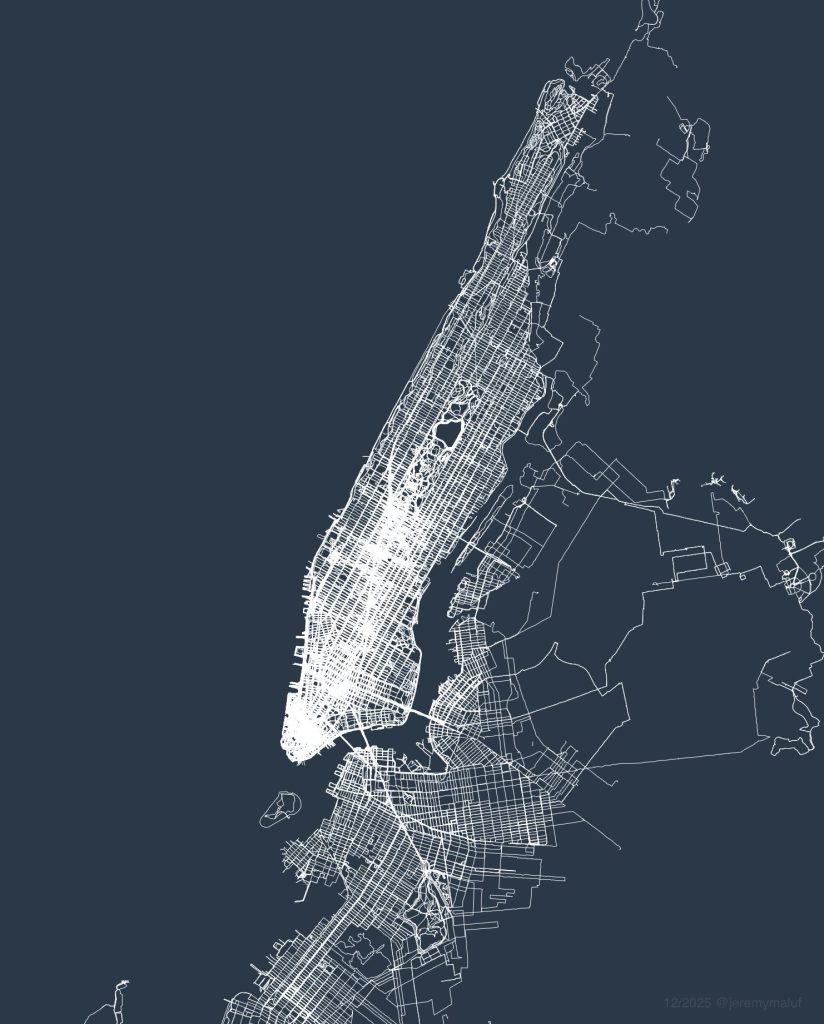
I’m often asked how different this map would look if I tracked my walking but didn’t “seek out” new streets. Humans naturally prefer taking familiar routes, so the answer is very different. It’s hard to see when looking at the map, but walking every street is difficult because the human brain is coded to subconsciously ignore unfamiliar streets. In the thousands of conversations I’ve had about walking during the course of this project, one common discovery is the vast number of people who have never even walked the next street over behind their home. Without checking a map to seek out new streets, even after a decade of living in the city you wouldn’t walk 90% of these streets.
Since most of the data is just me going about my normal life in nyc, like running errands and walking with friends, rather than dedicated walks, it provides a really unique perspective from a geospatial angle about where someone who lives in NYC spends their time. As far as I know, a project like this has never been done before.
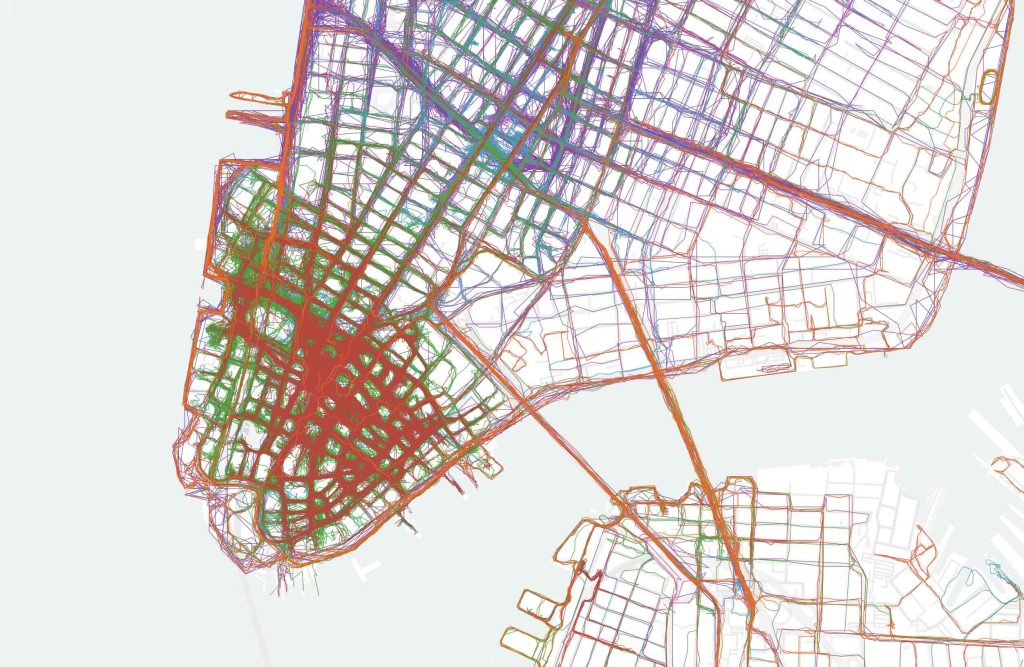
GPS inaccuracies highlight the streets I walk most often, and neighborhoods like the Financial District and Midtown become a dense cluster of lines due to the tall buildings. When I color-code the map you can also see which year I walked the street, for example you can see that I had an apartment in SoHo in 2017-2018 (purple) and that I spent a lot of time in FiDi 2024-2025 (green and red). Fun fact: this is an example of a four-dimensional map.
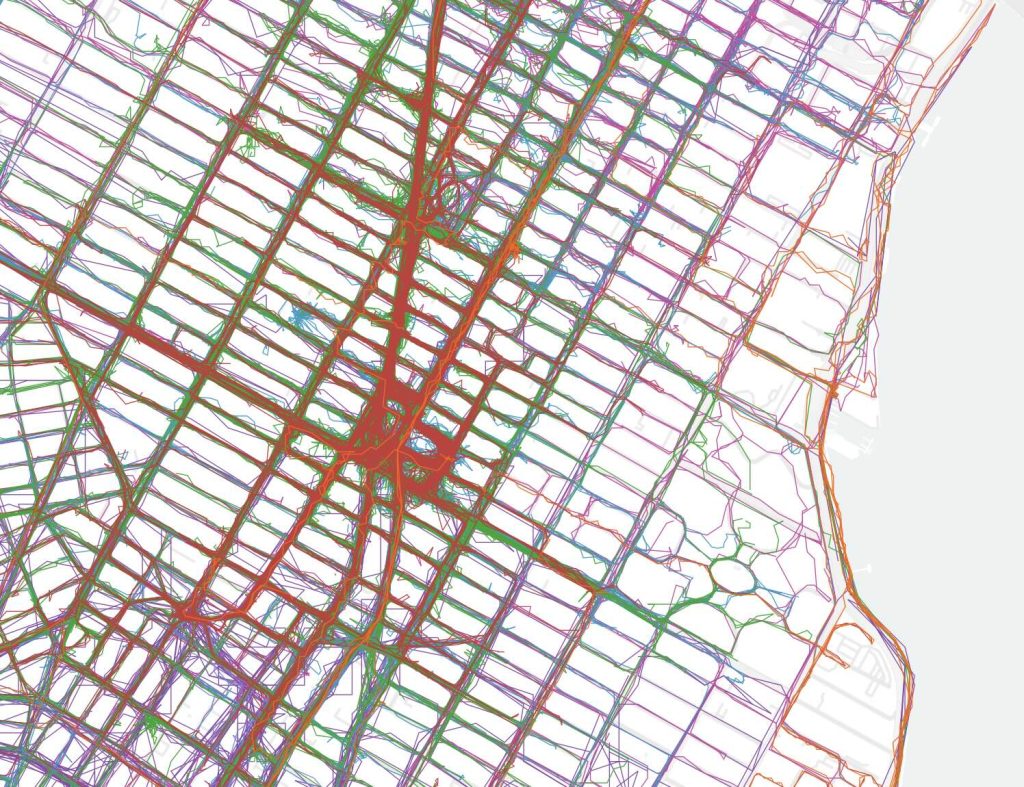
At the same time, GPS can be so accurate that it will track my movement within large buildings, such as in IKEA or museums. For example, whenever I visit the Met the data shows that I tend to enter via the members entrance, loop through the Temple of Dendur and make a beeline for the sculpture gallery.
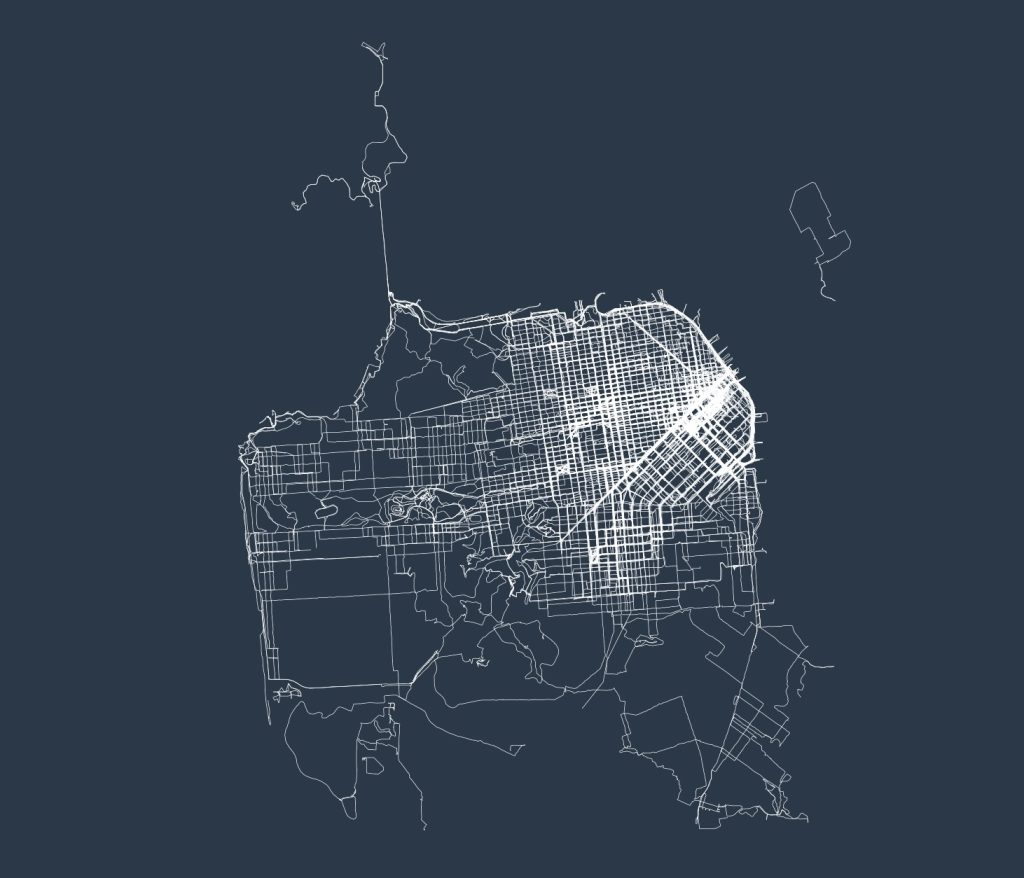
San Francisco is the only major world city that’s close to completion, due to it being a very small city. In total I’ve walked 7,000 miles here, around 75% complete, and I’m about a month from finishing it.
I haven’t found the best way to visualize my Northern California data, since San Francisco is too small of a city to look interesting, but the Bay Area as a whole is too large to see individual streets. I have walked around 15,000 miles in the Bay Area as a whole, mostly around Mountain View and Palo Alto. For now I will omit the full map, as displaying suburbia necessitates censoring addresses.
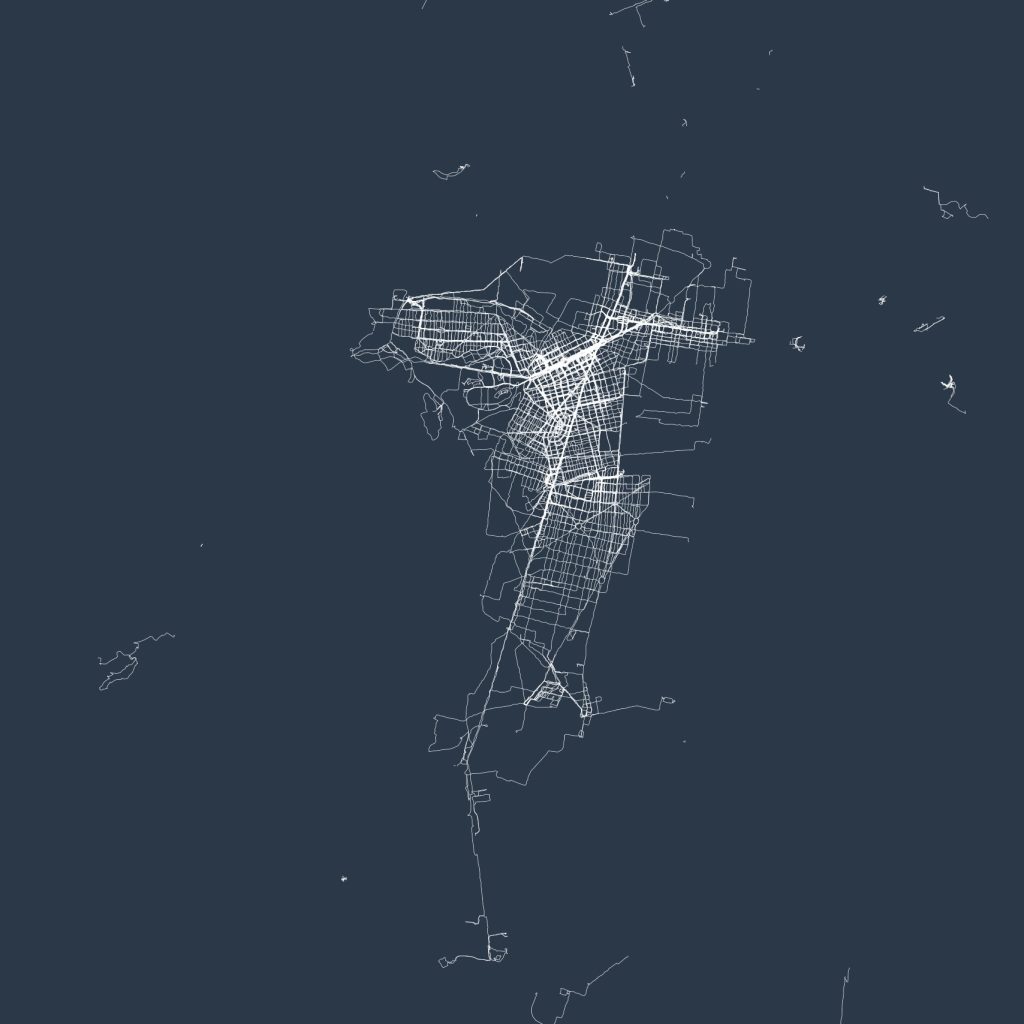
The 2,500 miles I’ve walked in Mexico City barely even puts me at 5% completion, as it’s the largest city in North America. I’ve walked the majority of the developed portion of the city, including all landmarks, with the majority of what’s left being sprawling residential neighborhoods that used to be separate towns and pueblos before being swallowed up by the city. Slowly over time my map will expand outward to cover them.
Please enable JavaScript for this form to work.
100% human-written | instagram | twitter | youtube | [email protected]
2019-05-07 09:15:06
Updated June 2026
In 2015 I got rid of everything I owned that didn’t fit in a laptop backpack, and I’ve been living at this level of minimalism since. The idea is to only own what I need, which allows me to focus more, spend less, travel spontaneously and simplify my life.
I update this post yearly, with past versions available on the Internet Archive: 2024, 2022, 2021, 2020, 2019, 2018, 2017. If you’re interested in hearing more about this lifestyle, after 10 years and millions of views on this page, I also started sharing my life on Instagram and YouTube.
June 2026 update: Replaced my full setup after my bag was stolen during a late night out! For the first time in years, everything on this page is brand new (aside from the things I had in my pockets).
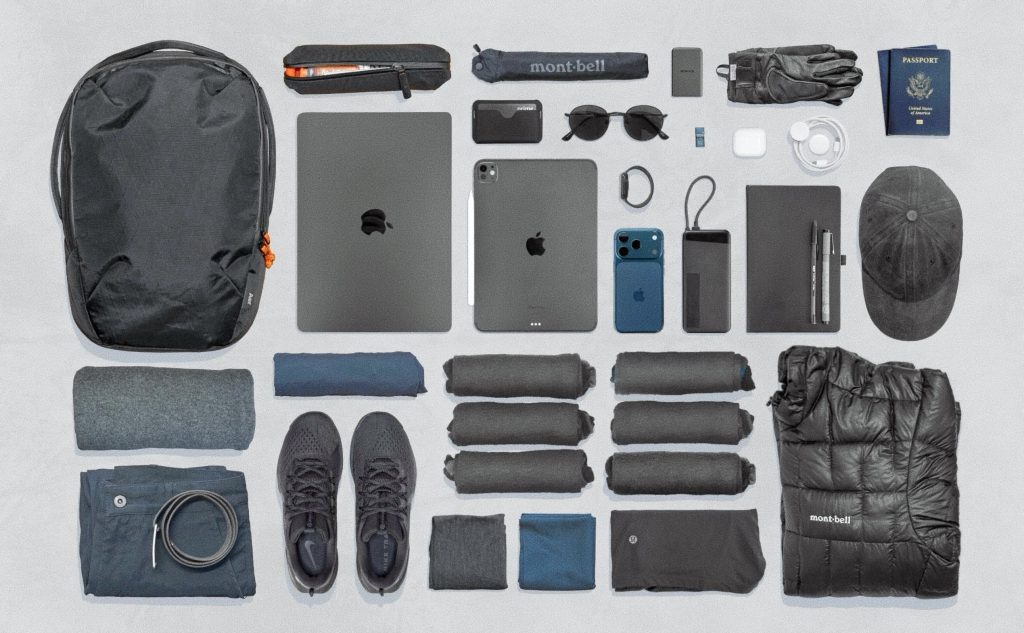
This post was never meant to be a guide, but whenever it’s shared without exposition a lot of the responses online tend to be the same dozen questions and misunderstandings. So here’s a few words to address those.
Onebag travel is unquestionably the best way to travel. Traveling without luggage removes just about every pain point associated with flying, such as checking bags, overhead compartments, bag fees, waiting in line, and needing to drop off luggage before an adventure. Just stroll into the airport an hour before your flight, and walk off your plane directly to your destination. I’m not here to sell you on this. r/onebag is a community built around this and a good place to learn more.
As to how I got here, I’ve never really owned much at any point in my life, so once I started traveling frequently this seemed like the natural evolution of my lifestyle. Because I’ve been doing it for so long, it’s really not something I think about often.
Of course, I have taken the time to optimize each thing to be the best possible: I’d much rather pack a 4oz jacket over a 1lb jacket. However, it’s worth mentioning I don’t take part in the consumerist side of the travel/hiking communities, which focuses more on expensive brand names than practicality. Buy only what you need; a $100 setup is nearly as good as a $10,000 setup. Sometimes spending more will get better quality or versatility, but it’s never worth obsessing over. Remember, the perfect travel gear doesn’t exist (relevant XKCD).
In terms of the nomad lifestyle, while I prefer fast-paced travel, it’s not great for productivity, finances, and friends, so I now stay in cities for longer periods. This allows me to maintain social relationships and explore cities deeper. It also allows me to do “zero-bag” trips in which I travel with just the contents of my pockets. Long term, I will always travel with as little as possible.
With exposition done, here’s the list of everything I own.
Some links on this page are affiliate links.
Depending on where you’re coming from, I either own an excessive number of tech devices or incredibly few. Either way, everything here has been used almost daily for over a decade: other than upgrading devices this setup has remained stable since I bought an Apple Watch in 2015 and switched from earbuds to Airpods in 2016. The iPhone and iPad have been constants since 2008 and 2010. Given its longevity, it’s safe to say this is my ideal setup.
I keep my digital life organized and backed up to the cloud, and have contingency plans for losing my devices that allow me to replace them and their data in minutes. This allows me to truly feel free and not worry about my possessions. If a hypothetical adventure introduces the risk of losing my stuff, I only need to consider the material value of replacing it and nothing more. I published a post about my personal data framework that goes into detail on this.
All of my devices except my Apple Watch charge via USB-C, which means I only need to own one wall charger, one powerbank, and two cables. By chaining all of these things together I can fast-charge the powerbank, my watch and one other device simultaneously.
I wear roughly the same outfit every day. Because I own so few items, I wear through them faster than someone with a full closet would; a tee or mid-layer lasts about 1,000 hours of use, meaning that I replace them every few months. As a result I actually have the ability to experiment with a variety of outfits and styles; just on a timescale of months rather than days.
After over a decade of wearing hoodies as my mid-layer, now that I’m entering my 30’s I decided to switch to something more appropriate. At the moment this is a cashmere sweater, but this may change as I experiment further. For my outer layer, I got rid of my canvas jacket, but I’ll likely look for another next winter. My insulated layer will forever be a down jacket because down is magic.
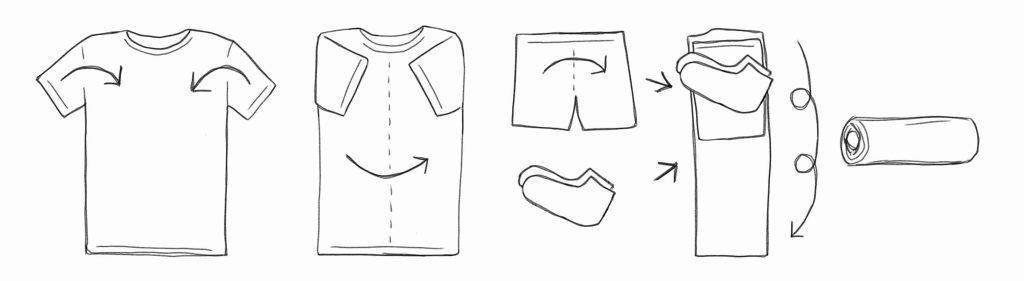
There are several items here that I rarely use, some intentionally (such as my first aid kit), and some because of where I’ve been spending my time (I don’t need a travel towel if I’m in a city). That said, this part of my kit has been stable for so long I don’t think it’s likely to change anytime.
⚠️ Refresh still in progress.
The stuff I toss in my backpack for hiking trips, such as parts of the Pacific Crest Trail or volcanoes around the US and Central America. Was without this gear for the past several years, but starting in 2026 I’m going to make it a permanent part of my kit again.
Typically my outdoor gear weighs about 4lbs(1.8kg). I could bring the weight down, but over the past few years I’ve been prioritizing bag size and comfort over weight. During my 2018 thruhiking phase I found the ultralight mindset appealing, but since then my priorities have shifted to focus more on the overall experience, so weight is no longer the focus.
The most difficult part about traveling with backpacking gear is keeping it airport-friendly. Knives, fuel, tent stakes, and tent/trekking poles aren’t allowed in carry-on, and while carbon fiber stakes and poles can usually sneak through, it’s not reliable.
Thank you for reading!
I send the occasional email to this list, including notes on projects and interests, travel adventure write-ups, and notifications for when I post updates to this site.
Please enable JavaScript for this form to work.
100% human-written | instagram | twitter | youtube | [email protected]

