


2026-11-03 23:56:06
Today, the team at Shiny Frog are celebrating the ten-year anniversary of the release of their Markdown editor Bear. From the Bear blog:
Back in 2013, three friends who loved Apple and design couldn’t find a notes app they liked, so they built their own. That side project became Bear. It arrived on the App Store in November 2016, and within a year it had been named Mac App of the Year and won an Apple Design Award. This November, the little Bear turns 10. Today it helps millions of people around the world capture their ideas and organize their lives every day, and we’ve felt so much love and support from all of you along the way.
Ten years is a long time for a software product to be around. At the same time, I can’t shake the feeling that Bear has existed a lot longer than that. It’s one of my all-time favorite apps and such an essential part of my workflow that it feels like I’ve been using it forever.
Everything I write happens in Bear, and it’s become my go-to for note-taking, too. Every time I use it, I can feel the love and care that goes into making it, which is why I imagine I’ll still be using it and saying something similar about it in ten more years.
Congratulations to the team for ten years of incredible work. Here’s to many, many more!
2026-10-31 00:50:41
This piece by Rev. Dr. Robert W. Lee really spoke to me. It’s short, but it’s full of wise, helpful truths for times of mourning. I highly recommend reading the whole thing.
I don’t know what lies ahead in my life or the course it will take. I know there will be moments of great joy and moments of deep grief. Yet through it all I am assured that it’s all grace.
2026-09-30 01:12:38
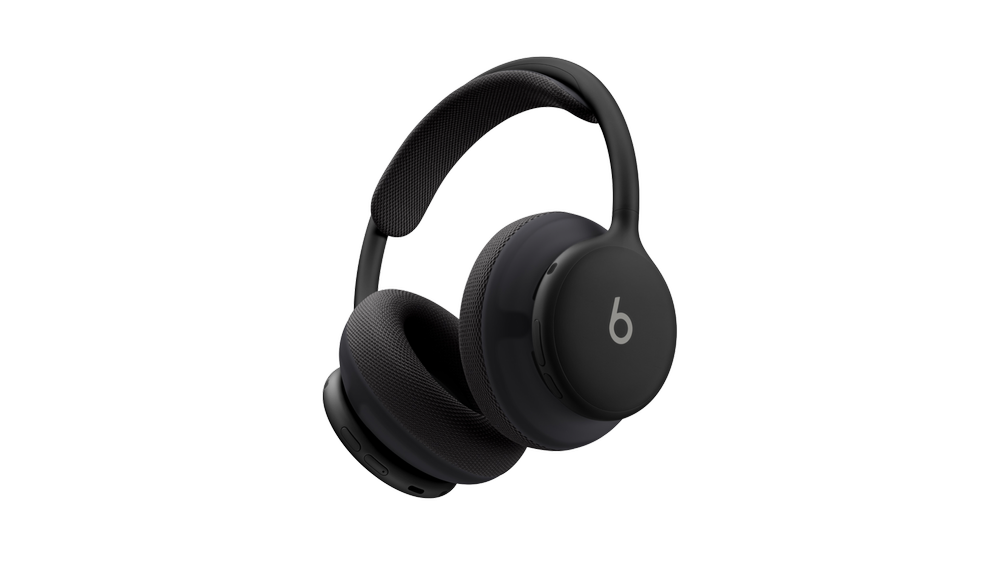
Last week, after months of teasing, Beats announced their new flagship headphones: Beats 360. They feature the company’s best over-ear sound and active noise cancellation ever, as well as interchangeable ear cups and headbands so you can change the color and material of your headphones in just a few seconds. They’re also the company’s first ever water- and sweat-resistant headphones, making them ideal for those who want to wear over-ears while working out.
I was intrigued by the look of the Beats 360 from the moment I first saw them being used by athletes at the World Cup. While breaking out of the traditional Beats design mold, they still carry the company’s iconic aesthetic while incorporating some higher-end touches borrowed from Apple’s AirPods Max. (Beats is an Apple subsidiary and collaborates with the company on audio products.) The various color combinations make space for tons of expression while still offering subtler options for people like me who prefer not to stand out.
The design won me over before the 360s were ever announced, but the technical details really closed the deal for me. While these headphones don’t include Apple’s H2 audio chip, the Beats team did manage to incorporate a lot of the H2’s niceties into Beats 360 – not only for Apple users, but for Android users as well. Regardless of your ecosystem of choice, the headphones feature one-touch pairing with all of your devices via the cloud, automatic switching when you move from one device to the other, and location tracking. This marks the first time a proprietary chip from Beats has included AirPods-style device switching, which is exciting to see.
Between the design, the ecosystem integration, and positive early reviews about the headphones’ sound quality and comfort, I knew I had to try them. Because they’ve been so long in the works, I was able to pick them up locally on release day (unheard of where I live) at Target. I’ve been testing them since last Thursday, pretty much wearing them non-stop as my daily drivers for both regular use and exercise. I wanted to find out if Beats 360 could be the one pair of headphones for every aspect of my life.
There is so much to love about these things. Their design is downright stunning in person. The build quality is the best I’ve ever seen in a Beats product, even better than my beloved Beats Solo Pro from a few years back. The ripstop case with its magnetic seal is a great way to carry them around. Whether I was wearing them on my head or around my neck, the Beats 360 felt like a great accessory to wear. I don’t know what it is about headphones, but wearing them just makes me feel like me; it’s the look I want every day.
Sound quality and active noise cancellation are similarly excellent. Coming from AirPods Pro and Beats Solo 4, the 360s offer a lot more in terms of volume and punch without sacrificing clarity, and the ANC made my noisy workplace feel perfectly peaceful.
My only complaint about the sound is a persistent hiss coming from the speakers anytime the headphones are turned on. Whether I was using noise cancellation, transparency mode, or neither, the white noise was constantly there. When I was listening to music, I didn’t notice it, but it was definitely irritating when I was wearing the headphones simply for ANC. Based on impressions I’ve read from other Beats 360 users on social media, the hiss seems to be a widespread but not universal problem.
When it comes to software, Beats 360 don’t offer as smooth of an experience as I was expecting. They did pair instantly with my phone and other devices (though I did have to re-pair them after a day-one firmware update), but the auto-switching feature is finicky at best. If was listening to a podcast on my phone and started playing a video on my iPad, the headphones would switch over, but they wouldn’t reliably switch back to my iPhone if I started playing the podcast again once the video was over.
Even worse, the headphones would often switch away from a device that was playing audio to one that wasn’t playing anything at all. The 360s also don’t offer a quick option to move back to a device if they switch erroneously, the way AirPods do. I may be spoiled by how good the AirPods’ H2 chip is at handling automatic device switching, but I found the Beats 360 version to be unreliable and thus not all that useful.
The biggest question of all in my testing was comfort. I’ve tried several different noise-cancelling over-ear headphone models from Apple in the past, and each of them gave me splitting headaches due to the clamping force needed to create a good seal. Could Beats 360 break that trend with their unique materials and weight distribution? Kind of.
Beats 360 are certainly the most comfortable noise-cancelling headphones I’ve ever worn. With the Performance Knit (cloth) cushions, the headphones did not give me instant headaches, but the pressure did eventually get to me during longer sessions. I found the UltraPlush (faux leather) cushions less comfortable and more pain-inducing.
I am an outlier when it comes to headphone comfort because I’m particularly sensitive to them for whatever reason. Beats 360 might have crossed the line into comfortable territory for me if I’d given them more time to break in. They were really close.
But as I was considering all of these factors together and whether they added up to the right headphones for me, something happened that instantly shifted my thinking on it all: I put on my AirPods Pro 3.
It had been nearly a week since I used the AirPod because I really wanted to give the Beats 360 a fair try. As soon as I put them in my ears, I remembered all the things I love about them. Their sound quality and noise cancellation, while not quite as good as the 360s, are incredible for their compact size. They’re easy to carry around, they’re so comfortable that I forget I’m wearing them, and they include the very best wireless audio technology Apple has to offer without any tradeoffs.
All my testing revealed that I already had the right product for me. The AirPods Pro are perfect in every way – except for the fact that they aren’t over-ear headphones. Giving up that form factor is hard for me, but I have to go with the product that works the way I need it to, not the one I’d like in an ideal world.
At the end of the day, for my use case, the spectacular design, sound quality, and noise cancellation of the Beats 360 couldn’t outweigh the hissing, auto-switching bugs, and potential comfort issues, especially not when I already have the incredible AirPods Pro 3 at hand. I still think they’re great headphones for wearing to the gym or for those who want more expressivity in their headphones, and I recommend trying them if you’re interested because they do have some great qualities. They just aren’t for me.
I’m glad I experimented with the Beats 360 for a few reasons:
My heart will always long for the perfect over-ear headphones, but my ears belong to AirPods Pro. That’s just the way it is. For everyone else, Beats 360 are a great addition to the Beats/extended Apple audio lineup. If you’re in the market for some stylish over-ears, give them a try. And if you’re happy with the setup you’ve got, well, that’s great, too.
2026-09-29 00:52:53
I’ve never been much of a note-taker. Rather than spending meetings and discussions with my head down in a computer recording everything that’s said, I tend to let the information wash over me, trusting my memory to retain what’s important. Aside from specific event and task details, which do get written down in their prospective apps, I keep most things just up in my head.
I’ve also never much for project management. If I have something I need to do, I’ll put it on my task list with a due date, but only at a high level. Breaking items down into sub-tasks just doesn’t jive with how my brain works. I see the task is coming up, I think on it for a while, and then, when the time comes, I do it. This is true for tasks that take five minutes and ones that are long and complex, requiring several days or weeks to complete.
For whatever reason, I have a tendency to keep my processing internal. I absorb information, I let my brain do its thing with it, and then I output whatever needs to be done: work, writing, decisions. The entirety of the middle part happens in my head.
Lately, though, I’ve been trying to externalize more. It started when I switched to Bear for writing and note-taking, forcing myself to let it become a bit of a messy space without any expectations. If I’m thinking about a problem or planning an event, I create a note for it and just jot things down: ideas, issues, questions, things that need to be done. Tiny sub-tasks that would never make their way into Reminders suddenly appear and disappear in my notes as needed. Links, reference images, quotes, half-baked thoughts – they’re all there.
Though the habit is still in its formation stage, I think it’s working. There hasn’t been a huge shift in what I’m able to accomplish, but I do find that there are fewer lingering stray thoughts taking up space in the back of my head. By getting them out, I free up room to process only the most pressing matter at hand until I’m ready to move on to the next thing, pull up my notes for it, and get to work.
As someone who likes structure and tidiness, allowing a bit of messiness into my setup was a challenge at first, but I’m reaping the benefits now. Note-taking works. Who new?
My tendency to internalize is true not just of my relationships with data and devices, but with people as well. If I’m working through an idea or a feeling, my go-to approach is to keep it to myself for as long as possible. It’s not that I’m purposefully withholding anything; I just tend toward silent pondering, I guess.
But I’m trying to be more open with this sort of processing, too. As I’ve been reminded many times by friends and loved ones, I don’t have to carry things alone. People are happy and willing to listen, support, and offer guidance when needed. Like note-taking, expressing emotions can be messy; at the same time, it can be really helpful.
You may have noticed this site becoming more of a “feeling space” lately. That’s been a part of this new approach for me, and I’m grateful to anyone who takes the time to read my ruminations, including you.
Shifting my processing – whether it be for tasks, emotions, ideas, or anything else – outside of myself has been a refreshing change. There will always be a lot happening inside my head, but balancing that internal activity with some external expression is just what I needed.
2026-09-15 01:48:21
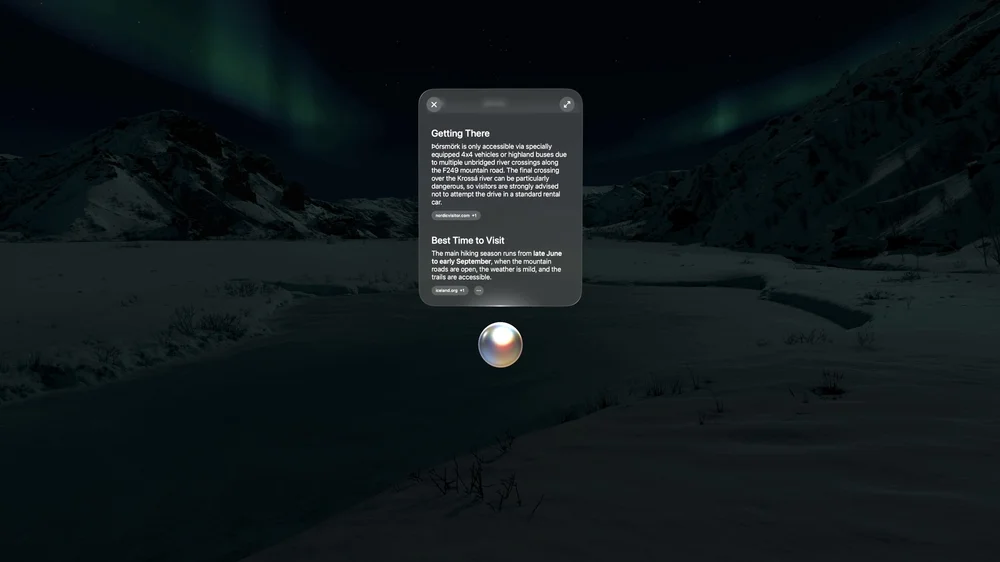
Today’s the day visionOS 27 rolls out officially worldwide – alongside, of course, its corresponding updates oniOS, iPadOS, watchOS, macOS, and tvOS. It’s a big day! Having lived with visionOS 27 all summer, I thought I’d share a handful of my favorite features in case you’re updating today or just curious about what’s new in spatial computing.
This is the major change across all of Apple’s platforms this year, and it’s good see visionOS getting not only the full Siri AI treatment, but a version of Siri AI custom-built for a spatial interface. Siri appears in your space as a white orb when invoked via voice or a new hand gesture where you pinch and hold the Home button. Of course, there’s also the Siri app, where conversations with the assistant from all of your devices are collected and synced.
Once Siri appears, you can pin it to a surface and leave it there to chat with anytime by simply looking at it. It’s kind of cool having a helpful orb in the room with me, always ready to jump in when needed. Being able to ask Siri about window contents and real-world surroundings with Visual Intelligence is nice, too, and it comes with a fantastic animation of Siri scanning your environment.
I’ve found the new version of Siri to be much more capable than its predecessor. It’s great for asking world knowledge questions as well as for digging up information buried in your own messages, emails, notes, events, and files. Now that visionOS 27 is out publicly, I look forward to seeing how developers integrate with the new and improved Siri. If I could ask Siri about old journal entries and day plans the way I can about messages, that would be amazing.
Siri is still meant to be an assistant, not a friend or a constant chat mate, and I think that’s as it should be. It’s just as present and helpful as it needs to be without getting in the way of the vast majority of things I want to do without any AI input. Apple did a good job.
I haven’t been a fan of the way visionOS handles notifications since its inception, but things have gotten a lot better this year thanks to glanceable, interactive notifications. Before, a notification would display nothing but the app’s icon, forcing you to open Notification Center or the full app to see any actual information. Now, you can peer into a notification to see what it says just by glancing at it.
I keep my notifications to a minimum – mostly just text messages, emails, and critical house alerts. Thanks to these new expanding notifications, I can now check who a message is from and decide whether it’s worth responding to before I leave the context of what I’m working on. And if a message just needs a quick reply, I can do that directly from the notification as well. Less time dealing with notifications is a big win in my book.
The immersive environments on Vision Pro are incredible, and Apple does a great job of selecting the perfect places to capture them. This year, it’s a spot in Thórsmörk, Iceland, featuring a slow-moving river, snow-topped mountains, and the Northern Lights at night. It’s mesmerizing and a fantastic place to focus or relax.
visionOS still doesn’t support third-party environments, but the addition of panoramas to the mix is a nice step in the right direction. The ability to immersive yourself in massive panoramas has long been one of the Vision Pro’s go-to selling points, and visionOS 27 makes that experience even better. Panoramas can now be converted to 3D spatial scenes, adding depth and perspective similar to what we saw with regular photos last year. And you can set your own panorama or one you download online as your environment. Panoramas don’t include movement, and they don’t cover your full field of view the way immersive environments do, but it’s still great to have the option to use your own favorite images as a backdrop for windows as you’re working.
Web developers can integrate 3D environments into their sites, offering visitors on the Vision Pro the ability to immerse themselves in unique spaces as they browse. Web environments can include special zones and screens for viewing embedded videos as well. It’s going to be a while before we see spatial web elements like environments be adopted on any sort of scale, but they’re fun to experience and could prove to be useful down the line when spatial browsing expands to more devices.
A few of Apple’s apps are now able to add curvature to windows. The TV app’s multiview feature, which can be used to watch multiple MLS, F1, and Friday Night Baseball feeds at once, now curves to make it easier to take in everything happening around you. Freeform windows curve at a certain width as well so you can see all of the content in a workspace. And Safari includes a new multi-tab view that curves around you so you can browse and navigate multiple pages at once without switching between tabs. I find this approach a lot easier than opening multiple Safari windows manually.
I hope that this limited rollout is a preview of what’s to come for visionOS windows in general. Sometimes, I want a window to be really big, and I’d like any app – from Apple or a third party – to have the ability to adapt as it grows for the sake of comfort.
Besides Siri AI, the big push in Apple’s OS updates this year is system improvements. Across the board, bugs are being squashed, and things are just getting smoother. visionOS hasn’t been left out of that, with notable improvements including a redesigned Control Center for better access to settings (including, for the first time, AirPlay settings right in Control Center!), full-quality screen captures and recordings, and much faster connection to Wi-Fi upon booting up. Restarting my Vision Pro used to feel like a chore because it took forever for the device to connect to the internet and start syncing data. Now, I literally can’t unlock the thing fast enough to see it connect to the network.
It’s a good year for visionOS. The platform was fully included in the big Siri AI push, it got some nice feature additions and day-to-day improvements, and developers now have access to new tools like Reality Composer Pro 3 to make building experiences for Vision Pro easier. The OS feels more settled and mature in some ways, but at the same time, it’s also experiencing changes in pretty fundamental areas, like notifications and Control Center. Spatial computing is still an exciting space to be a part of – or just to keep up with, if you’re still waiting for the right time to jump in.
Whichever group you fall into, thanks for reading, and enjoy all the great OS updates out today!
2026-09-15 01:05:57
Today, Apple is releasing major new versions of all of its operating systems, so if you use a supported iPhone, iPad, Mac, Apple Watch, or other Apple device, you’ve got an update waiting for you in the Settings app. I know that many people aren’t as enthusiastic about installing new software on their devices as I am, but I do think there’s one big reason everyone should push the Update button today. And no, it’s not an AI feature.
The reason you should update your Apple devices today is performance.
Having tested iOS 27 and its counterparts over the summer, I can say with confidence that my devices have never run better than they do now. From last year’s iPhone Air to my five-year-old iPad Pro, I’ve noticed improvements in speed and reliability across the board, and I’m thrilled about it.
When Apple announced this year’s software updates in June, it was clear that the big focus besides AI was going to be platform improvements. Engineers combed through the company’s operating systems looking for bugs, slowdowns, and pain points they could address to make using Apple devices more seamless, and they found a ton of them. Here are a few examples from my real-world use:
These are just a handful of examples of ways the software on all of my devices has been improved. (I didn’t test macOS Golden Gate or tvOS 27, but I look forward to seeing the performance gains there as well.)
Apple’s operating systems have always been best-in-class, but any software builds up cruft and paper cut issues over time, and I’m thankful the OS teams have taken the time to work through so many of them this year. It makes the day-to-day experience of using Apple devices better in small ways that really do add up.
So I encourage you to give today’s OS updates a chance. I think you’ll be happily surprised by how well your devices – even older ones – run on the latest software.